
For small restaurants, daily operations move fast. One customer places an order, another asks for the bill, the kitchen needs to know what to prepare, and the owner needs to check whether cash, UPI, and card payments match the day’s sales.
When billing, inventory, and payments are managed separately, confusion starts.
The bill may be created at the counter, stock may be updated later, and payments may be checked at closing time. By then, it becomes difficult to know what was sold, which items used more stock, and whether all payments were recorded correctly.
This guide explains how small restaurants can manage billing, inventory, and payments together so daily operations stay easier to track.
Summary
Small restaurants should connect every order with three things: the bill created, the stock or ingredients used, and the payment received. This helps owners avoid missed payments, stock mismatch, unclear daily sales, and manual closing-time confusion. The goal is not to manage three separate records, but to create one clear flow from order to bill to payment to stock update.
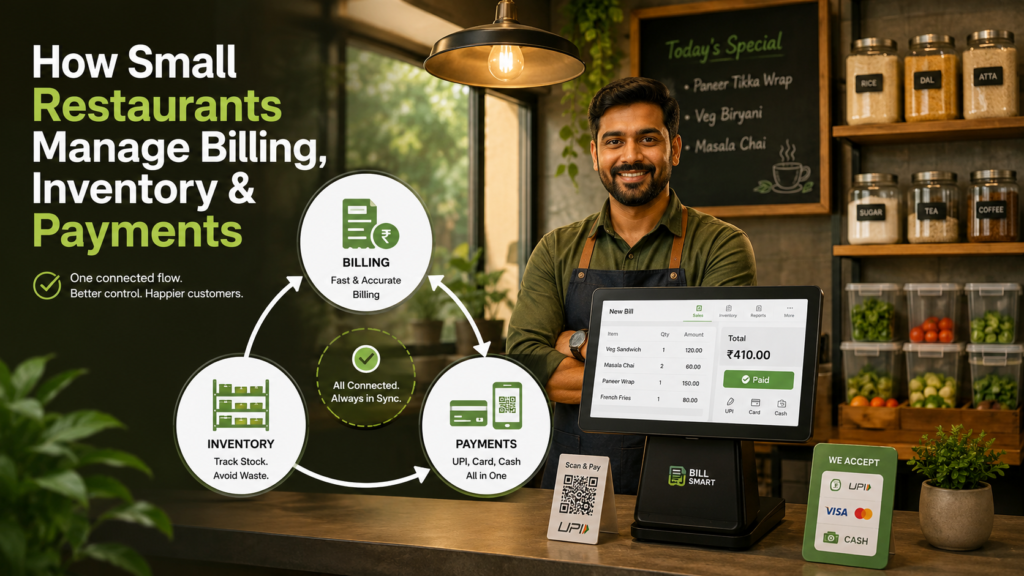
Table of Contents
- Why Separate Records Create Confusion
- Start With One Order Flow
- Connect Menu Items With Stock Usage
- Record Payments Against Each Bill
- Separate Order Types for Cleaner Tracking
- Review Billing, Stock, and Payments at Day-End
- Simple Daily Workflow for Small Restaurants
- Final Thoughts
Why Separate Records Create Confusion
Many small restaurants manage operations in different places.
Bills are created in one system or bill book. Stock is checked manually in the kitchen. Payments are verified through cash counter, UPI apps, card machine, or delivery platform settlements.
This creates gaps.
For example:
- Sales may look high, but payments may not match.
- A dish may sell well, but ingredient usage may not be tracked.
- UPI payments may be received, but not linked to the correct bill.
- Stock may reduce in the kitchen, but not reflect in business records.
- End-of-day closing may take longer because everything has to be matched manually.
The problem is not only manual work. The bigger issue is that the owner does not get one clear picture of the restaurant’s daily performance.
That is why billing, inventory, and payments should not be treated as separate tasks. They should be connected as part of the same order flow.
Start With One Order Flow
The easiest way to manage everything together is to follow one simple flow:
Order created → Bill generated → Payment recorded → Stock updated → Daily report reviewedThis flow helps every sale leave a clear trail.
When an order is created, the bill should capture the food items, quantity, amount, discount if any, and payment status. Once the bill is completed, the payment should be recorded against the same order. At the same time, the sold items should help update stock or ingredient usage.
This makes daily review much easier.
Instead of asking separate questions like:
- How much did we sell?
- How much payment came in?
- What stock was used?
- Which bills are unpaid?
You can check everything from one connected record.
Using restaurant billing software can help small food businesses keep orders, bills, payments, and business records connected instead of managing them in separate notebooks or files.
Connect Menu Items With Stock Usage
Restaurant stock is different from retail stock.
A retail shop sells the item as it is. A restaurant uses ingredients to prepare dishes. That is why small restaurants should not only track finished menu items, but also understand which ingredients are used more often.
For example:
| Menu Item | Stock Impact |
|---|---|
| Paneer tikka | Paneer, spices, oil, packaging if takeaway |
| Cold coffee | Milk, coffee powder, sugar, cup |
| Veg burger | Bun, patty, sauce, vegetables, packaging |
| Pizza | Base, cheese, toppings, box |
You do not need a very complicated setup from day one. Start by tracking the most important or high-cost items first.
For small restaurants, this can include:
- Paneer
- Cheese
- Milk
- Oil
- Rice
- Flour
- Meat
- Packaging items
- Beverages
- Ready-to-sell items
The purpose is simple: when billing shows which dishes sold more, inventory should help you understand what needs to be purchased again.
This prevents two common problems:
Overbuying items that are not selling fast
If ingredient and stock control is a major challenge, using restaurant inventory management software can help track item usage, stock movement, and purchase needs more clearly.
Record Payments Against Each Bill
Small restaurants often receive payments through different modes.
A customer may pay by cash. Another may pay through UPI. A group may split the bill. A delivery order may be settled later. A regular customer may pay at the end of the week.
If payments are not linked to bills, closing the day becomes difficult.
Every bill should clearly show:
- Total bill amount
- Payment mode
- Amount received
- Pending amount, if any
- Refund or cancellation, if applicable
- Staff member who handled the bill, if needed
This helps avoid confusion like:
- UPI received but bill not marked paid
- Cash collected but not matched with bill total
- Credit sale forgotten
- Platform order recorded only after settlement
- Refund not adjusted in daily sales
A clean payment record helps the owner know whether the restaurant actually collected the money shown in sales.
Sales and collections should be reviewed together, not separately.
Separate Order Types for Cleaner Tracking
Small restaurants may handle different types of orders in the same day.
These may include:
- Dine-in
- Takeaway
- Direct delivery
- Food delivery platform orders
- Bulk or party orders
- Café counter orders
If all orders are recorded the same way, it becomes hard to understand what is working.
For example, takeaway orders may need packaging stock. Dine-in orders may involve table service. Platform orders may have commission and settlement differences. Bulk orders may have advance payments.
So each order should be tagged or separated clearly.
This helps you answer practical questions:
- Are dine-in orders increasing?
- How much takeaway packaging is being used?
- Which payment mode is most common?
- Are delivery orders profitable after charges?
- Which order type creates more pending payments?
This is not about creating complicated reports. It is about keeping daily restaurant records clear from the beginning.
Review Billing, Stock, and Payments at Day-End
The best time to catch mistakes is the same day.
At closing time, restaurant owners or managers should review billing, inventory, and payments together.
Check:
| Day-End Check | What to Review |
|---|---|
| Total sales | How much was billed today? |
| Payment collection | How much came through cash, UPI, card, or other modes? |
| Pending amount | Are any bills unpaid or partially paid? |
| Top-selling items | Which dishes sold the most? |
| Stock usage | Which ingredients or items reduced the most? |
| Low-stock items | What needs to be purchased tomorrow? |
| Cancelled/refunded bills | Were adjustments recorded properly? |
| Order type split | Dine-in, takeaway, delivery, or platform order share |
This habit reduces month-end confusion.
Instead of waiting for the accountant to find mismatches later, daily checks help you correct mistakes early.
For small restaurants, even a 10-minute daily review can improve control over sales, payments, and kitchen stock.
Simple Daily Workflow for Small Restaurants
Here is a simple workflow that small restaurants can follow:
| Time | Action |
|---|---|
| Before opening | Check low-stock items and update available menu items |
| During billing | Create bills for every order and record payment mode |
| During service | Mark dine-in, takeaway, or delivery orders clearly |
| After each sale | Ensure sold items are reflected in stock or ingredient usage |
| During rush hours | Avoid manual side notes unless they are updated later |
| Before closing | Match total bills with cash, UPI, card, and pending payments |
| End of day | Review top-selling items, low stock, and payment summary |
| Next morning | Purchase required items based on sales and stock movement |
This keeps the restaurant organised without making the process too heavy.
The goal is to make every order easy to trace:
What was ordered → What was billed → What was paid → What stock was affected
Final Thoughts
Small restaurants do not need separate systems for every task.
If billing is in one place, inventory is in another, and payments are tracked somewhere else, daily operations become harder to manage. A connected workflow helps restaurant owners understand sales, stock, and collections more clearly.
Start with a simple habit: connect every order to its bill, payment, and stock impact.
This helps reduce missed payments, stock mismatch, end-of-day confusion, and unnecessary manual work.
For restaurants that need a more complete counter and order workflow, restaurant POS software can help manage orders, billing, payments, and daily reports from one place.
