
Hotel Bill Format in Word, Excel & PDF
Use a standard hotel bill format to record room charges, guest details, taxes, food, room service, and other stay-related expenses in one bill.
- Ready formats for creating hotel, lodge, and guest house bills
- Helps maintain proof of stay, payment, and GST/tax details
- Suitable for hotels, lodges, guest houses, resorts, and homestays
Download Free Hotel Bill Formats
Choose from ready-to-use templates for room stays, dining bills, and extra services in Excel, Word, or PDF.


What is Hotel Bill Format?
A hotel bill format is a structured billing template used by hotels, lodges and guest houses to record a guest’s stay, room charges, additional services, applicable taxes and the final amount payable.
This format also includes tax details (like GST), total payable amount, and payment information, making it easy for both the business and the customer to maintain clear records. A proper hotel bill format ensures accuracy, transparency, and professionalism in billing while also helping businesses with accounting and compliance.
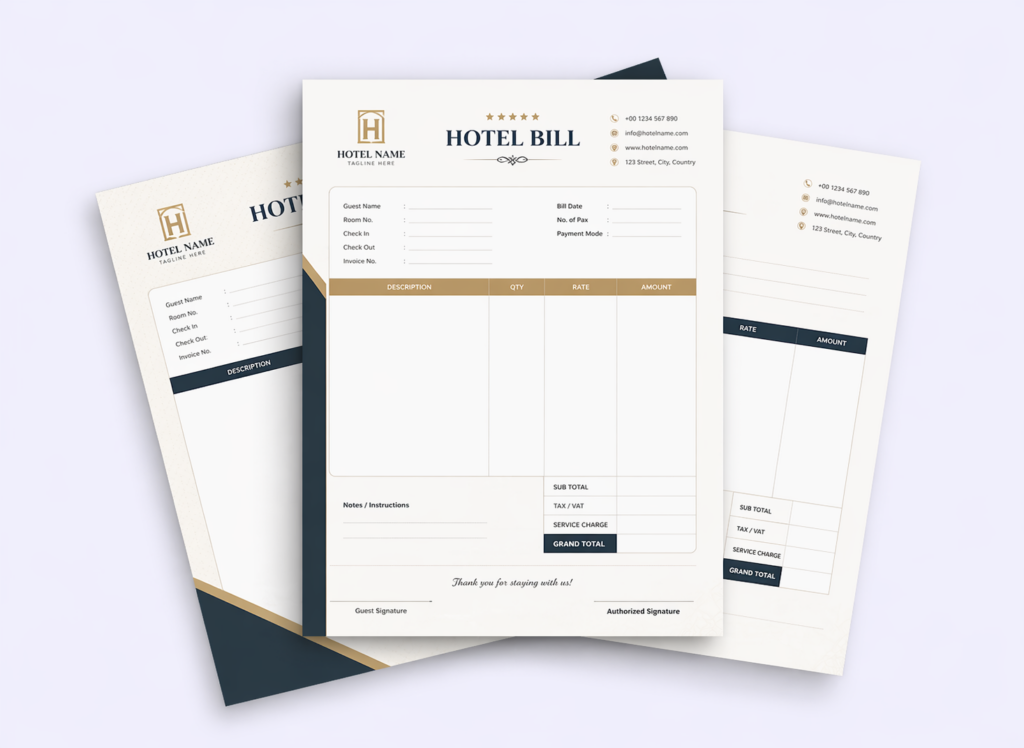
What is Included in This Hotel Bill Format?
- Hotel name, address, contact details, and GSTIN
- Guest name, mobile number, and address
- Invoice/bill number and billing date
- Check-in and check-out date
- Room number and duration of stay
- Room rent and tariff details
- Food, room service, laundry, and other charges
- CGST, SGST, or IGST tax breakdown
- Total bill amount
- Payment mode (cash, card, UPI, etc.)
- Authorised signature or stamp
Hotels that manage an in-house restaurant or dining area may need separate bills for food orders. While a hotel bill includes room charges and guest services, a food bill format records ordered dishes, quantities, prices, and the final payable amount. It can be used for restaurant dining, takeaway, and food-only transactions.
Hotel Bill Sample
A hotel bill sample shows how guest information, stay details, room charges, additional services, taxes and payment information appear together in a completed hotel bill.
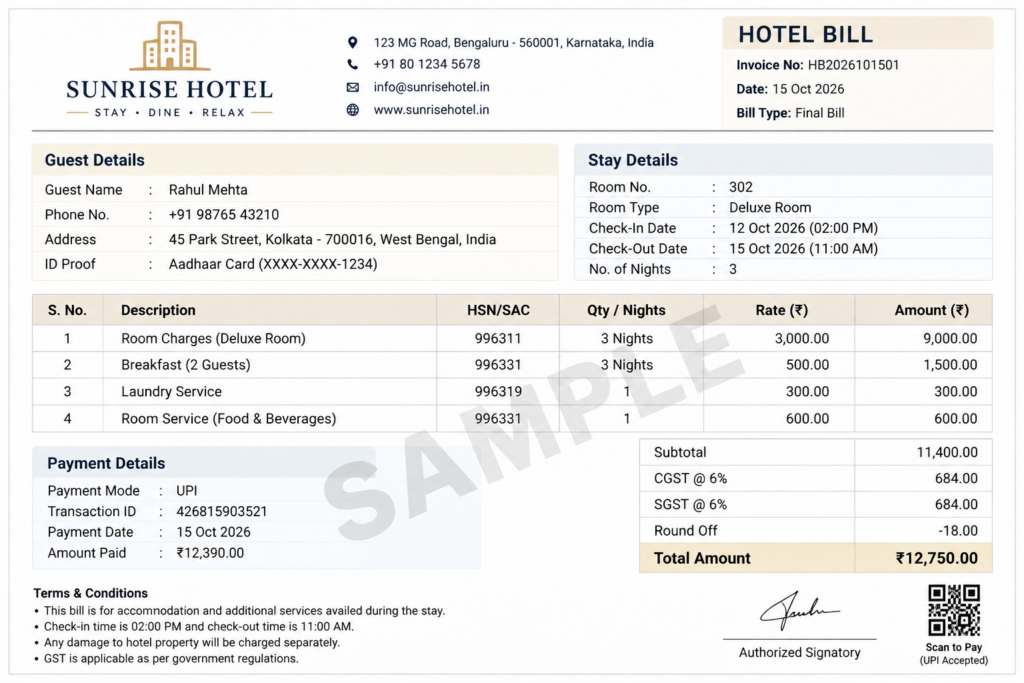
You can use this sample as a reference and download the blank hotel bill formats above in Word, Excel or PDF to create your own bill.
Can This Format Be Used as a Lodge Bill Format?
Yes. The same hotel bill format can be used as a lodge bill format by adding the lodge name, guest details, room number, stay dates, room charges, applicable taxes, payment details and other services provided during the stay.
Download the lodge bill format in Word, Excel or PDF using the templates above.
Features of myBillBook Hotel Bill Format

Generate Hotel Bills
Create polished, accurate hotel bills with guest details, itemized services, and taxes that build trust, improve transparency, and streamline daily operations while ensuring consistent, professional documentation across every guest checkout.

Customize Invoices
Design invoices to reflect your hotel’s brand, services, and amenities. Adjust room rates, add custom fields, and match layouts to luxury or budget standards for a consistent, premium guest experience every single day without compromise.

Easy to Download & Print
Quickly download bills in formats and print instantly. Share professional invoices via email, WhatsApp, or in person to speed checkout while maintaining accurate records, clear totals, and smooth accounting processes.

Maintain Guest Billing Records
Keep guest, stay, service, tax and payment information organised for easier billing reference and record keeping.

Multiple Billing Formats
Create and maintain hotel bills digitally and share or print them depending on how your hotel manages guest checkout.

GST-Compliant Billing
Ensure hotel bills meet Indian GST requirements with automatic tax calculations, breakup, and SAC codes, helping prevent penalties, maintain compliance, and deliver transparent records.
Hotel Bill Format vs Hotel Invoice Format
| Hotel Bill Format | Hotel Invoice Format |
|---|---|
| Commonly used at checkout | Can be used before or after payment |
| Records final stay charges | Can also record amounts due |
| Shows completed services | May support pending payment |
| Useful as final guest billing record | Useful for formal invoicing records |
In everyday hotel billing, the terms hotel bill and hotel invoice are often used interchangeably, but their use can vary depending on the hotel’s billing process.
Hotel Bill Format in Word – Editable Free Download
Microsoft Word is a versatile tool for creating detailed hotel bill formats in Word with a professional look. It’s user-friendly and ideal for smaller hotels or businesses that do not require automated calculations.
Hotel bill format in Word is best for hotels requiring a simple, visually appealing format that can be easily saved as a PDF or printed. Templates can also be reused by changing guest details.
Hotel Invoice format in Word offers –
- Customisable Design: Add branding elements such as logos, colours, and headers.
- Flexibility: Bills can be edited for specific guest details.
- Formatting Options: Include tables, bullet points, and alignment for a neat presentation.
- Printable: Ideal for printing or sharing as PDFs.
Steps to Create a Hotel Bill Format in Word:
- Open Word: Start with a blank document.
- Add Header: Include the hotel logo, name, address, and contact details.
- Guest Details: Create a table for fields like guest name, contact, check-in/out dates.
- Billing Table: Add a table with columns for date, description, quantity, rate, GST, and total.
- Total Section: Include subtotal, GSTIN, discounts, and grand total.
- Payment Details: Mention payment mode and transaction status.
- Footer: Add terms, conditions, and a note for authenticity.
- Format: Use consistent fonts, borders for tables, and clear headings.
- Save/Export: Save as Word or PDF for final sharing.
If you want to avoid editing a template manually, you can use our free invoice generator to create a hotel invoice online.
Hotel Bill Format in Excel – Free Download
Excel is an excellent tool for creating dynamic, automated hotel bill format in Excel, especially for businesses with multiple transactions or detailed pricing structures.
Hotel bill format in Excel is perfect for hotels that deal with recurring customers or require detailed and accurate financial data. It’s especially useful for calculating GST for Indian hotels and tracking revenue efficiently.
Hotel Bill Format in Excel Bill provides:
- Automated Calculations: Use formulas to calculate room charges, GST, discounts, and totals.
- Structured Layout: Organize data into rows and columns for easy readability.
- Reusability: Save templates and update with new guest details.
- Data Management: Easily track bills, maintain records, and analyse revenue.
Steps to Create a Hotel Bill Format in Excel:
- Open Excel: Start with a blank workbook.
- Set Header:
- Merge top cells to add the hotel name, logo, and contact details.
- Use bold fonts for clarity.
- Guest Details Section:
- Create rows for guest name, contact number, check-in/out dates, and invoice number.
- Align text neatly for readability.
- Billing Table:
- Add columns: Date, Description, Quantity, Rate, GST (%), GST Amount, and Total.
- Use formulas:
- GST Amount: =Rate*Quantity*GST%.
- Total: =Rate*Quantity + GST Amount.
- Total Section:
- Add rows for Subtotal, GST, Discounts, and Grand Total.
- Use SUM formulas to auto-calculate totals.
- Payment Details:
- Add rows for payment mode, transaction ID, and status (Paid/Pending).
- Format Table:
- Apply borders, align text, and use formatting styles for a professional look.
- Save/Export:
- Save it as Excel (.xlsx) for editing or export it as PDF for sharing.
Hotel Bill Format in PDF
A hotel bill format in PDF is best for sharing or printing a completed hotel bill because the layout remains consistent across devices and is less likely to be accidentally edited.
Use the editable Word or Excel version when preparing the bill, and export the completed version as PDF when you need a final copy for the guest or your records.
A hotel bill format in PDF for free download offers –
- Non-editable: Ensures data integrity and security.
- Professional Look: Maintains a neat and clean presentation.
- Universally Accessible: Opens easily on all devices and software.
Steps to Create Hotel Bill in PDF
- Design the bill in Word or Excel.
- Save or export it as a PDF.
- Use tools like Adobe Acrobat, Canva, or free online converters to create a polished PDF.
You can also create an invoice online using myBillBook’s free invoice generator and download it as a PDF.
Frequently Asked Questions
What is the difference between a hotel bill format and a hotel invoice format?
A hotel bill format is for final billing, while a hotel invoice format may also be used for advance payments or pending dues.
What GST rate applies to hotel accommodation in India?
The GST rate on hotel accommodation depends on the value of accommodation supplied per unit per day. As GST rates can change, hotels should verify the applicable rate from current CBIC/GST notifications before issuing tax invoices.
Can I add a QR code for UPI payments on my hotel bill?
Yes, adding a UPI QR code makes payments easier and faster for guests, improving checkout convenience and reducing payment delays
How do I create a hotel bill format with automatic tax calculation?
You can use Excel hotel bill templates with pre-set GST formulas or billing software like myBillBook for auto-calculated totals.
Can a hotel bill format include restaurant or room service charges?
Yes, you can add separate line items for restaurant meals, room service, laundry, and other amenities in the same hotel bill format.
What details must be included in a GST-compliant hotel bill?
A GST-compliant hotel bill must have GSTIN, SAC codes, tax breakup (CGST/SGST or IGST), guest details, invoice date, and an itemized list of charges.
Is this hotel bill format useful for lodges and guest houses?
Yes, this format can also be used as a lodge bill format or guest house bill format by editing the room details, guest details, charges, and tax fields.