
Retail billing software pricing can look simple at first. One tool may say ₹199/month, another may say ₹399/month, and another may offer a discounted yearly plan. But before choosing any billing software for retail shop use, it’s important to check what features are actually included in the price.
But the lowest price is not always the best deal.
For a retail shop owner, the real question is not just “How much does the software cost?” The better question is:
What am I getting for this price, and will it reduce my daily work?
A good retail billing software should justify its cost by saving time, reducing manual effort, keeping records organised, and helping you manage your shop better. This guide will help you evaluate pricing properly before buying billing software for your retail shop.
Summary
Before buying retail billing software, compare the total value, not just the monthly price. Check what is included in the plan, whether pricing is monthly or yearly, how many users and devices are allowed, whether support and setup are included, and whether the plan can support your shop as it grows. The right pricing is the one that matches your billing volume, staff usage, business size, and daily shop needs.
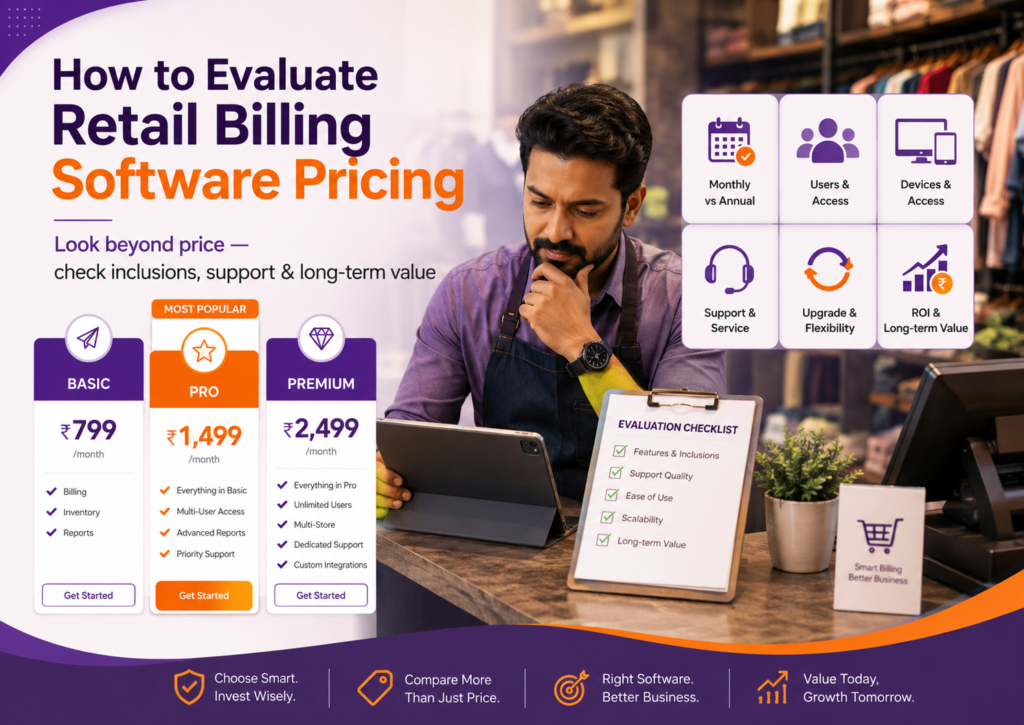
Table of Contents
- Look Beyond the Monthly Price
- Compare What Is Included in the Plan
- Check Monthly vs Annual Pricing
- Calculate Cost Against Daily Shop Usage
- Check User, Device, and Business Limits
- Understand Free Plan vs Paid Plan Difference
- Check Support, Setup, and Training Value
- Evaluate Upgrade Flexibility
- Use This Pricing Evaluation Checklist
- Final Thoughts
Look Beyond the Monthly Price
Many retail shop owners compare billing software only by looking at the monthly price.
That can be misleading.
A plan that looks cheaper may have fewer users, limited reports, restricted access, or less support. Another plan may look slightly costlier but may include more useful tools for daily shop operations.
Instead of comparing only price, compare value.
Ask yourself:
- Will this software save billing time?
- Will it reduce manual record work?
- Will it help avoid calculation errors?
- Will it reduce dependency on notebooks or Excel?
- Will it make daily sales and payment tracking easier?
- Will my staff be able to use it comfortably?
If the software helps you save even 15–20 minutes every day, the yearly value can be much higher than the subscription cost.
The right way to evaluate pricing is to compare the cost with the work it reduces.
Compare What Is Included in the Plan
Two billing software plans may have the same price but very different inclusions.
Before buying, check what the plan actually gives you.
Look at:
- Number of users included
- Number of businesses allowed
- Mobile and desktop access
- Invoice creation limits
- Report access
- Customer and supplier records
- Data backup
- Support availability
- Training or onboarding help
- Advanced billing or business features
Do not assume that every feature shown in the demo is available in the plan you are buying.
Ask for a clear plan comparison before making payment. This will help you avoid confusion later and choose the plan that fits your actual shop usage.
Check Monthly vs Annual Pricing
Many billing software providers show pricing in monthly terms, but the billing may actually be annual.
For example, a plan may be shown as ₹250/month, but you may need to pay for the full year together.
This is not wrong, but it should be clear before purchase.
Check:
- Is the price monthly or yearly?
- Is the monthly price billed annually?
- Is GST included or extra?
- Is the discount only for the first year?
- What is the renewal amount?
- Can the plan be upgraded later?
Annual plans can be useful because they are often more affordable than monthly payments. But you should know the full payable amount before buying.
A transparent price is better than a low-looking price that becomes confusing at checkout.
Calculate Cost Against Daily Shop Usage
One simple way to evaluate billing software pricing is to divide the cost by your daily usage.
For example, if your software costs ₹3,000 per year, that is roughly ₹250 per month, or less than ₹10 per day.
Now compare that with the time and effort it can save in your shop.
If it helps you:
- Create bills faster
- Avoid manual calculation work
- Find old bills quickly
- Track payments better
- Reduce end-of-day confusion
- Share cleaner records with your accountant
then the daily cost may be reasonable.
This approach helps you stop seeing software only as an expense. Instead, you start seeing it as a daily business tool.
The question is not:
Can I get cheaper software?
The question is:
Is this price worth the time and control I get every day?
Check User, Device, and Business Limits
Retail shops often start with one person using the software. But over time, you may want more people to access it.
For example:
- Owner
- Cashier
- Store manager
- Accountant
- Family member handling business
- Staff member managing stock
Before buying, check whether the plan supports your current and future usage.
Ask:
- How many users are included?
- Can it be used on mobile and desktop?
- Can multiple staff members access it?
- Is there an extra charge for more users?
- Can one plan support more than one business or branch?
- Can your accountant access reports if needed?
This matters because a plan that works today may become limiting as your shop grows.
Choose a plan that gives enough flexibility without forcing frequent upgrades.
Understand Free Plan vs Paid Plan Difference
Some retail shop owners start with free billing software to test digital billing.
That can be a good starting point, especially for small shops with limited billing needs. But before depending fully on a free plan, understand what is included and what is limited.
Check whether the free plan has limits on:
- Number of invoices
- Number of users
- Reports
- Advanced features
- Support
- Data access
- Desktop usage
- Business growth needs
A free plan is useful if you want to test the software or create a limited number of invoices. But if your shop has regular billing, staff usage, GST needs, payment tracking, or larger inventory, a paid plan may be more practical.
The decision should depend on your shop size and daily usage, not just the word “free”.
You can explore free billing software if you want to start with basic invoicing before moving to a paid plan.
Check Support, Setup, and Training Value
Support is also part of pricing.
A slightly higher-priced plan may be worth it if it includes proper onboarding, training, and quick support. This is especially important for retail shops moving from manual billing or basic tools.
Before buying, check:
- Is setup help included?
- Will the team help with invoice format?
- Is staff training available?
- Is phone or chat support included?
- Are help videos or guides available?
- Is support available when your shop is open?
Good support can reduce the time it takes for your staff to become comfortable with the software.
If the software is cheap but support is weak, your team may struggle after purchase. That can cost more time than the money saved.
Evaluate Upgrade Flexibility
Your retail shop may not need advanced options on day one. But your needs can grow.
You may add more products, more staff, more billing devices, or another shop location later. Your billing software plan should allow you to upgrade without making the process difficult.
Before buying, ask:
- Can I move to a higher plan later?
- Will my data remain safe during upgrade?
- Can I add users or devices later?
- Can I unlock more capabilities without changing software?
- Is the upgrade price clearly explained?
This helps you choose software that can grow with your business.
You do not need to buy the highest plan immediately. But you should know whether the software gives you a clear upgrade path when your shop needs more.
Use This Pricing Evaluation Checklist
Before paying for retail billing software, use this checklist:
| Pricing Check | What to Confirm |
|---|---|
| Monthly or annual price | Is the amount billed monthly or annually? |
| GST on pricing | Is GST included or extra? |
| Users included | How many staff members can use it? |
| Device access | Does it work on mobile, desktop, or both? |
| Invoice limits | Are there limits on bills or transactions? |
| Support | Is phone/chat support included? |
| Setup help | Is onboarding or training included? |
| Reports | Are important business reports included? |
| Free vs paid difference | What changes when you move to paid plan? |
| Renewal cost | Will the price change next year? |
| Upgrade path | Can you upgrade easily as your shop grows? |
| Overall value | Does it save enough time and effort to justify the price? |
Before finalising a plan, you can also read about the common billing software buying mistakes retail shop owners should avoid.
Final Thoughts
Retail billing software pricing should be evaluated based on value, not just cost.
A good plan should match your shop size, billing volume, number of users, device needs, support expectations, and growth plans. The cheapest option may not always be the most useful, and the most expensive option may not always be necessary.
Before buying, compare what is included, how the pricing works, what support you get, and whether the plan can support your daily shop operations.
