
Free GST Invoice Formats - Word, Excel, PDF
Download free GST bill formats and GST invoice formats in Word, Excel, and PDF to create tax invoices with GSTIN, invoice number, HSN/SAC details, taxable value, CGST, SGST, IGST, payment details, and total invoice value.
- Pre-designed GST bill and invoice formats for accurate tax billing
- Available in Word, Excel, and PDF for easy editing, printing, and sharing
- Includes GST fields such as GSTIN, HSN/SAC, tax breakup, place of supply, and invoice total
Powered by myBillBook - India's #1 Billing Software

What is a GST Bill Format or GST Invoice Format?
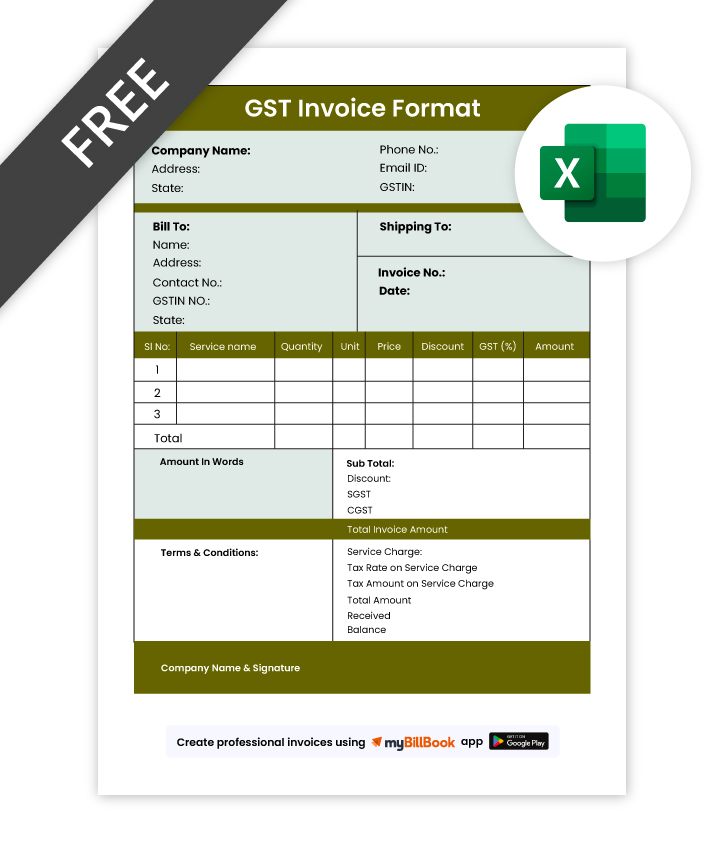
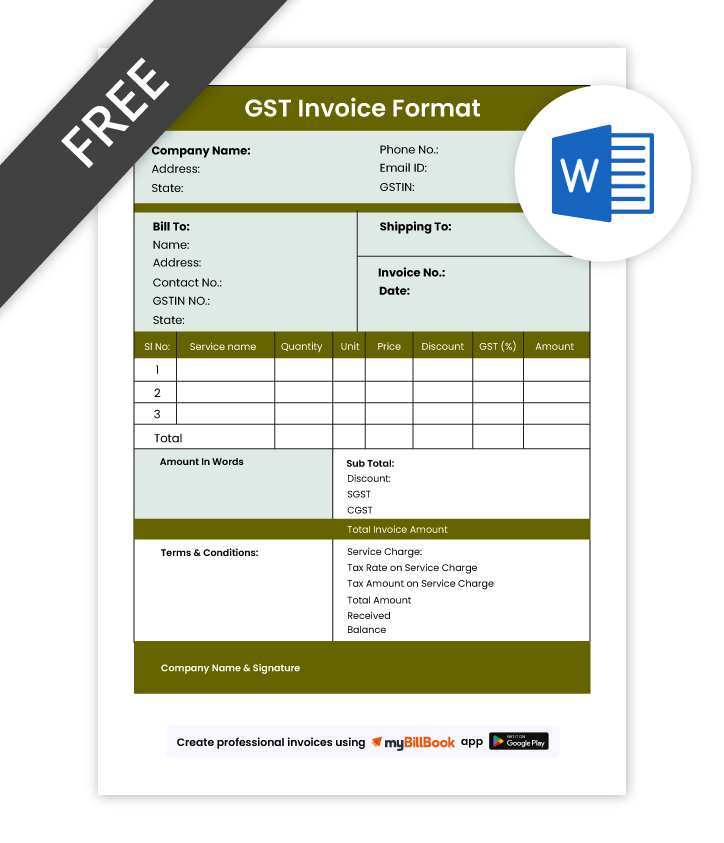
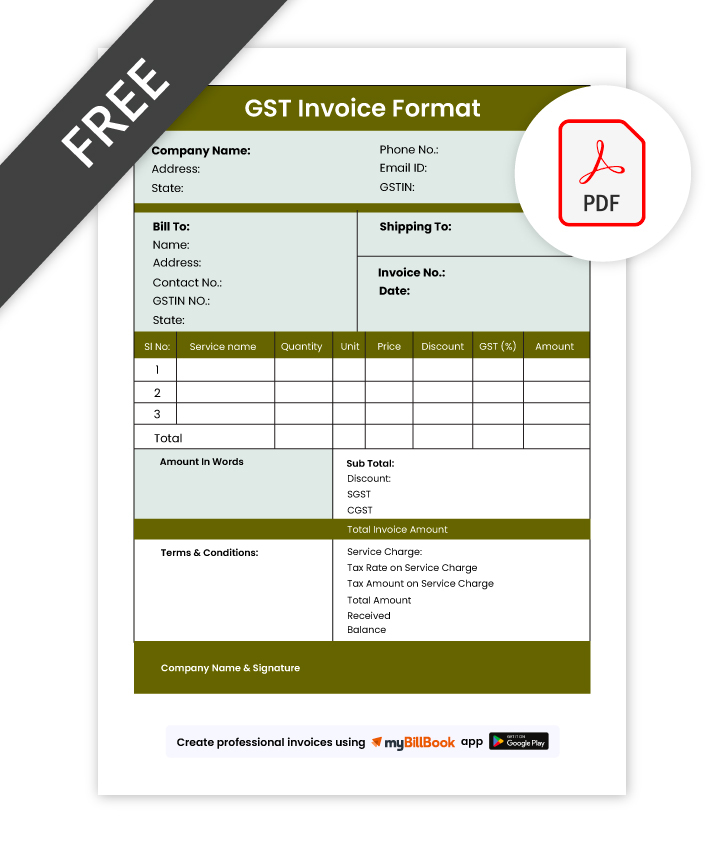
A GST bill format, also called a GST invoice format, is a structured template used by GST-registered businesses to record taxable sales of goods or services. It includes supplier GSTIN, buyer details, invoice number, invoice date, item description, HSN/SAC code where applicable, taxable value, GST rate, CGST, SGST or IGST breakup, and total invoice amount.
Businesses use GST bill formats to create tax invoices, maintain billing records, report sales, and help eligible buyers claim input tax credit. A clear GST invoice format also reduces calculation errors and keeps invoices ready for GST filing and audits.
Download Free GST Invoice Formats – Excel, Word, PDF
How to create an GST Bills using our Free Invoice Templates
Want a Quick GST Professional Invoice?
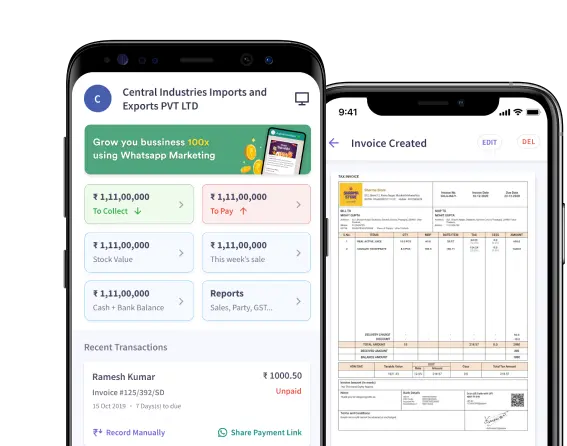
Use myBillBook Invoice Generator to create invoices instantly. The billing app also provides –
Start Using myBillBook for Free
What's the Difference Between Regular Invoice Format and GST Invoice Format?
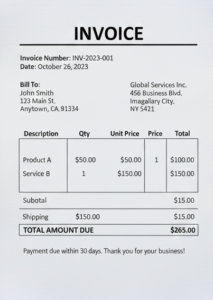
A regular invoice format captures basic billing details such as item name, quantity, rate, and total amount. It is used by businesses not registered under GST and does not include tax breakdowns, GSTIN, HSN/SAC codes, or any mandatory compliance-related information.
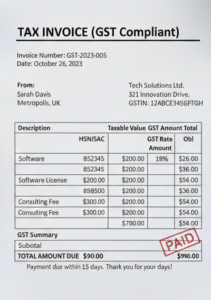
A GST invoice format includes GSTIN, invoice number, HSN/SAC codes, taxable value, GST rates, and tax breakup. It ensures compliance, supports input tax credit, and helps GST-registered businesses maintain accurate reporting for every filing period.
What Are the Mandatory Fields Required in a GST Invoice Format?
1. Supplier Details
Include the seller’s registered business name, address, and GSTIN. These details verify who issued the invoice and confirm the documentis validity for GST compliance.
2. Invoice Number and Date
Every GST invoice must have a unique, sequential invoice number along with the date of issue. This helps maintain proper billing records throughout the financial year.
3. Buyer Information
For registered buyers, mention their name, address, and GSTIN. For unregistered buyers, basic identity details and place of supply are sufficient.
4. Description of Goods or Services
List each product or service with its name, unit, quantity, and value. HSN/SAC codes must also be included to classify items accurately under GST.
5. Taxable Value
Show the value of goods or services before tax. Mention any discounts clearly so the taxable amount is calculated correctly.
6. GST Tax Breakdown
Specify the applicable GST rate and the exact tax amounts. This includes CGST and SGST for within-state sales, or IGST for interstate sales.
7. Total Invoice Amount
Display the final amount payable after all taxes are added. This amount should match the item-wise tax breakup.
8. Place of Supply
Mention the state where the goods or services are supplied. This determines whether CGST/SGST or IGST applies.
9. Reverse Charge Indicator
State whether the tax liability shifts to the buyer under reverse charge. If not applicable, it should be marked clearly.
10. Signature or Digital Authentication
The invoice must be signed or digitally authenticated by the seller or an authorised person to be valid.
What Are the Advantages of Using a Professional GST Invoice Format?
Using a well-designed GST invoice format does more than make your bills look neat—it improves accuracy, speeds up compliance, and reduces the risk of costly mistakes. Here are the key benefits:
1. Reduces Errors in Tax Calculation
A structured GST invoice format ensures the correct GST rates, HSN/SAC codes, and tax amounts are applied automatically, helping you avoid manual errors.
2. Ensures Smooth GST Return Filing
An accurate tax breakup makes monthly and quarterly GST filings easier. Since all required fields are in place, your invoices stay audit-ready with minimal rework.
3. Helps Customers Claim Input Tax Credit
A professional invoice clearly shows taxable value and GST components, making it easy for your customers to claim eligible ITC—improving their trust in your business.
4. Boosts Business Credibility
Clean, consistent invoices reflect professionalism. They help you maintain a strong brand image, especially when dealing with wholesalers, distributors, or corporate clients.
5. Saves Time With Ready-to-Use Structure
A standardised format removes the need to design invoices from scratch. You can create compliant invoices faster and focus more on running your business.
6. Minimises Compliance Risks
A well-prepared GST invoice automatically covers mandatory fields such as place of supply, invoice number, GSTIN, and reverse charge details—reducing the risk of penalties.
7. Works Seamlessly Across Digital Channels
Professional formats are designed to be easily shared via WhatsApp, email, or print without losing clarity or layout quality.
Know More About GST Invoice Formats in Word, Excel, and PDF
GST Invoice Format in Word
A GST invoice format in Word is perfect for businesses that prefer a clean, customizable layout. You can easily edit fields such as customer details, HSN/SAC codes, and tax breakup without formulas or complex tools. It’s ideal for creating branded invoices with your own logo, colours, and formatting, making it an excellent choice for service providers, consultants, and small shops that want professional-looking GST invoices with minimal effort.
GST Invoice Format in Excel
Excel GST invoice formats are best for businesses that want automated calculations. With built-in formulas for taxable value, CGST, SGST, IGST, and discounts, Excel helps eliminate manual errors and speeds up billing. It’s beneficial for traders, wholesalers, and retailers who handle multiple line items and need accurate tax calculations every time. The editable grid structure also makes it easy to maintain consistency across all invoices.
GST Invoice Format in PDF
A GST invoice format in PDF is ideal for secure, shareable, professional invoices. PDFs preserve layout and formatting across all devices, ensuring your GST details—like tax amounts, HSN/SAC codes, and totals—remain tamper-proof and easy to verify. This format is widely used to send invoices to customers via email or WhatsApp. It is perfect for businesses that want polished, non-editable GST invoices ready for printing or submission for audit.
Why myBillBook Is the Best Software to Generate GST Invoices?
GST-Compliant Billing Made Easy
myBillBook automates every GST requirement—right from tax rates to HSN/SAC codes—so you never have to worry about incorrect calculations or missing fields.
Multiple GST Invoice Formats Ready to Use
Choose from professionally designed templates in Excel, Word, PDF, and app-based formats, all built to include GSTIN, tax breakup, place of supply, and other mandatory fields.
Accurate Tax Calculation Every Time
- Auto-apply CGST, SGST, and IGST based on transaction type
- Built-in validations prevent calculation mistakes
- Line-item level tax breakup for seamless GST filing
Instant Sharing Across Channels
Send GST invoices directly through:
- Print-ready formats
Your customers receive invoices faster, improving payment cycles.
Integrated Inventory & Accounting
Every invoice updates your stock, sales, and accounts automatically, ensuring your GST data stays accurate without extra manual entry.
Supports e-Invoicing Where Applicable
Businesses under the e-invoicing mandate can generate IRN and QR codes directly from myBillBook, keeping them fully compliant with government rules.
Perfect for All Business Types
Retailers, wholesalers, distributors, service providers, and manufacturers can all generate GST-ready invoices tailored to their billing needs.
Frequently Asked Questions
How do I rectify errors in a previously issued GST invoice?
If you’ve issued an invoice with incorrect details, you can fix it by issuing a credit note, debit note, or a revised invoice, depending on the type of error.
Use a credit note when the tax value or taxable value needs to be reduced.
Use a debit note when the value needs to be increased.
Issue a revised invoice if the original one contained mistakes in buyer details, GSTIN, or item description.
All corrections must be reported in the relevant GST return period to maintain compliance.
How do I choose the right GST invoice software for my business?
Choose software that offers GST-compliant templates, automated tax calculations, HSN/SAC support, error-free numbering, and easy sharing options. It should simplify billing without requiring accounting expertise.
myBillBook is designed specifically for Indian SMBs—it automatically applies GST rules, fills tax breakup fields, and helps you generate accurate invoices in seconds.
How can I correctly include HSN/SAC codes in my GST invoice format?
HSN (for goods) and SAC (for services) codes must be mentioned for every line item. These codes classify what you’re selling and ensure the right GST rate is applied.
You can find the correct codes on the CBIC portal or through GST notification tables. They must match the product/service category to avoid incorrect tax reporting.
When should an GST invoice be issued under the GST regime?
For goods, a GST invoice must be issued before or at the time of removal or delivery.
For services, the invoice must be issued within 30 days from the date the service is provided.
Timely issuance ensures accurate tax reporting and prevents penalties during audits.
Where should the QR code be placed on an invoice as per GST norms?
For businesses eligible for e-invoicing, the QR code should be placed in a visible top-right or top-left area of the invoice. It must be clear, scannable, and not overlapped by text or branding. The placement area should not affect readability of tax values or totals.
Where can I find free GST invoice format templates online?
You can download free GST-compliant invoice formats in Excel, Word, and PDF from reliable platforms.
myBillBook offers ready-to-use templates that include GST fields, HSN/SAC codes, auto-tax formulas, and clean layouts designed for small and medium businesses.
Why is a proper GST invoice format important for businesses?
A complete and compliant GST invoice helps avoid disputes, ensures transparency, supports accurate bookkeeping, and strengthens trust with customers. It also reduces back-and-forth communication caused by missing or incorrect fields.
Why is adhering to the GST invoice format crucial for GST compliance?
GST authorities rely on your invoice to verify tax liability and eligibility for ITC. Any missing mandatory field—such as GSTIN, place of supply, or tax breakup—can lead to compliance issues, delayed ITC approvals for your buyer, or penalties during audits.
Why does a tax invoice differ from a bill of supply under GST?
A tax invoice is issued when GST is charged on a sale. It includes tax rates, GST amounts, and HSN/SAC codes.
A bill of supply is issued when GST is not charged—for example, by composition scheme dealers or when selling exempt goods. It excludes GST details and tax breakup.
Why is a GSTIN mandatory on a GST invoice?
GSTIN identifies the registered supplier and allows authorities to track the transaction. Without a GSTIN on the invoice, the document becomes non-compliant and customers cannot claim input tax credit. Including GSTIN also prevents fraudulent billing.
Is GST bill format and GST invoice format the same?
Yes, GST bill format and GST invoice format are commonly used for the same document. A GST-registered business issues a GST invoice or GST bill to record taxable sales, GST breakup, invoice number, buyer details, and total invoice value.