
Best Restaurant Billing Software in India
For Cafes, Dhabas & Multi-Cuisine Restaurants
myBillBook helps Indian restaurants bill faster, stay GST-compliant, and manage inventory – all from one platform. Table-wise billing, digital menu management, real-time sync across devices, and daily sales reports. Starting at ₹199/month.
Trusted By 1 Cr+ Businesses

What is Restaurant Billing Software?
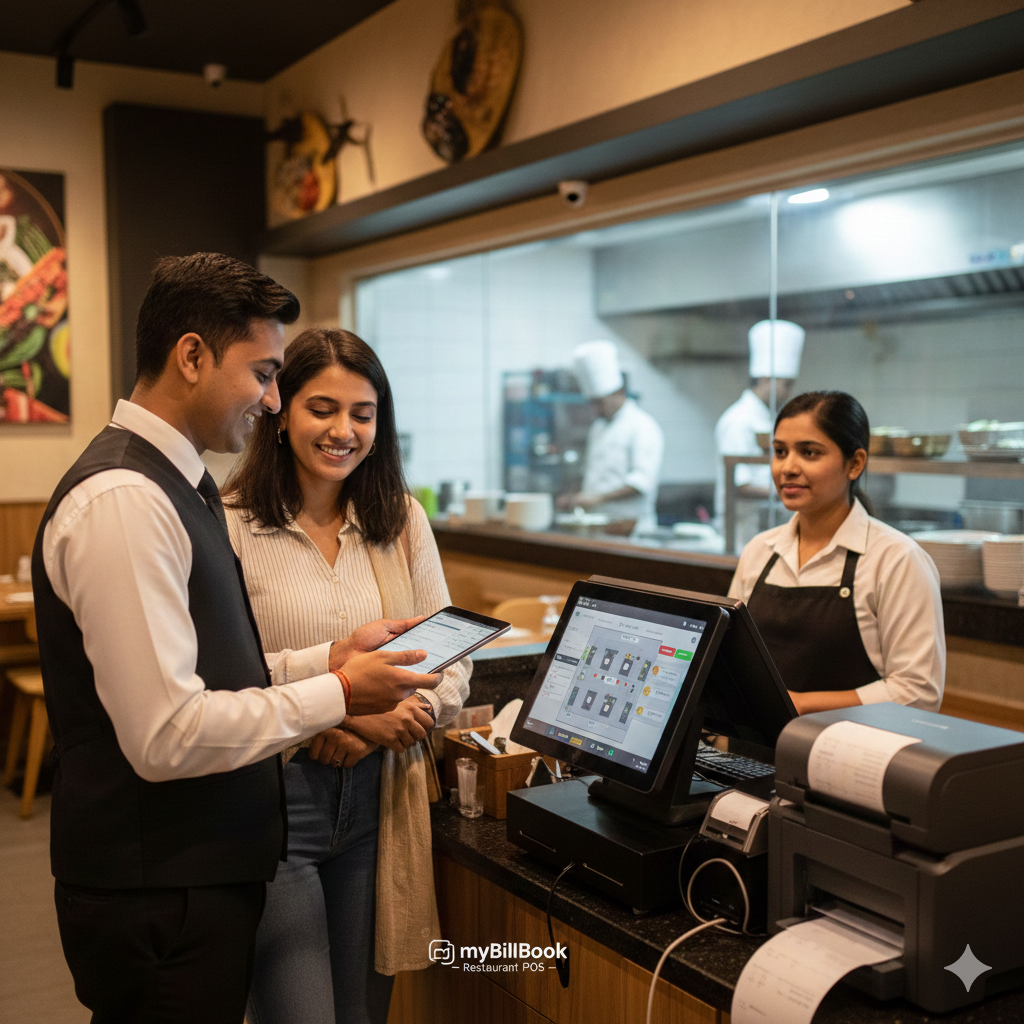
Restaurant billing software helps restaurants create GST-compliant bills, manage table-wise orders, record payments, track stock, and monitor sales from one system. It replaces manual billing with faster digital workflows so dine-in, takeaway, and counter orders can be handled accurately during busy service hours.
For Indian restaurants, billing software is most useful when it supports the complete billing counter workflow: quick item selection, running table bills, multiple payment modes, thermal invoice printing, digital menu updates, inventory tracking, and outlet-wise reporting. myBillBook brings these core billing and business-management tasks together in one platform.
Who Can Use myBillBook Restaurant Billing Software?
myBillBook restaurant billing software is useful for various food businesses that need quick billing, inventory tracking, payment management, and daily sales reports.
Powering Restaurants and Cafes Across India
Top myBillBook Features Tailored for Restaurant Billing
Fast POS Billing for Dine-In, Takeaway & Delivery
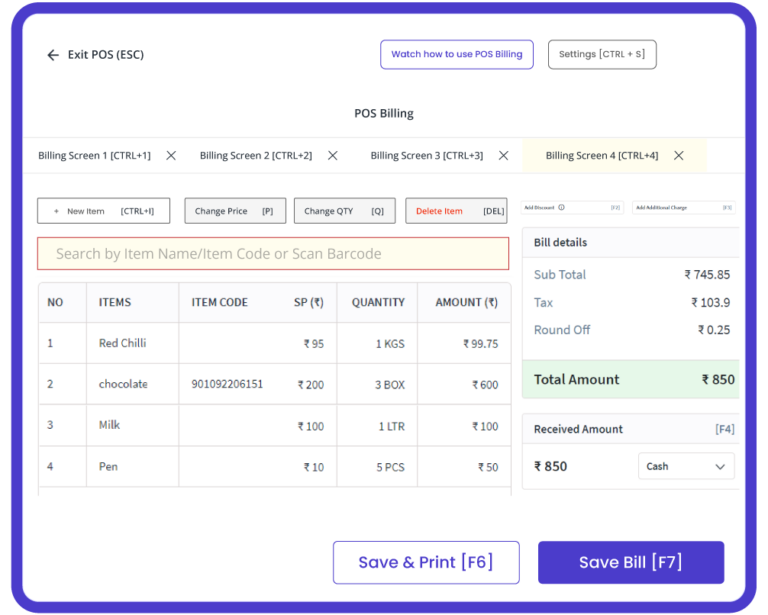
myBillBook helps restaurants handle busy billing counters for dine-in, takeaway, and delivery orders. Cashiers can use item-first billing, add the table number where needed, and quickly create GST-ready food bills without slowing down service.
The multi-billing workflow lets staff hold a running dine-in bill, create another bill from the same interface, and return to the earlier order without losing billing progress. This is useful when counter and table orders arrive together during rush hours.
Digital & QR Menu Management
myBillBook restaurant billing system helps restaurants manage digital menus by adding or removing dishes, updating prices, and keeping menu information current. Restaurants can also use QR-based digital menus so customers can view available items conveniently.
Keeping menu and billing information aligned makes order entry faster and reduces avoidable price or item mismatches at the counter.
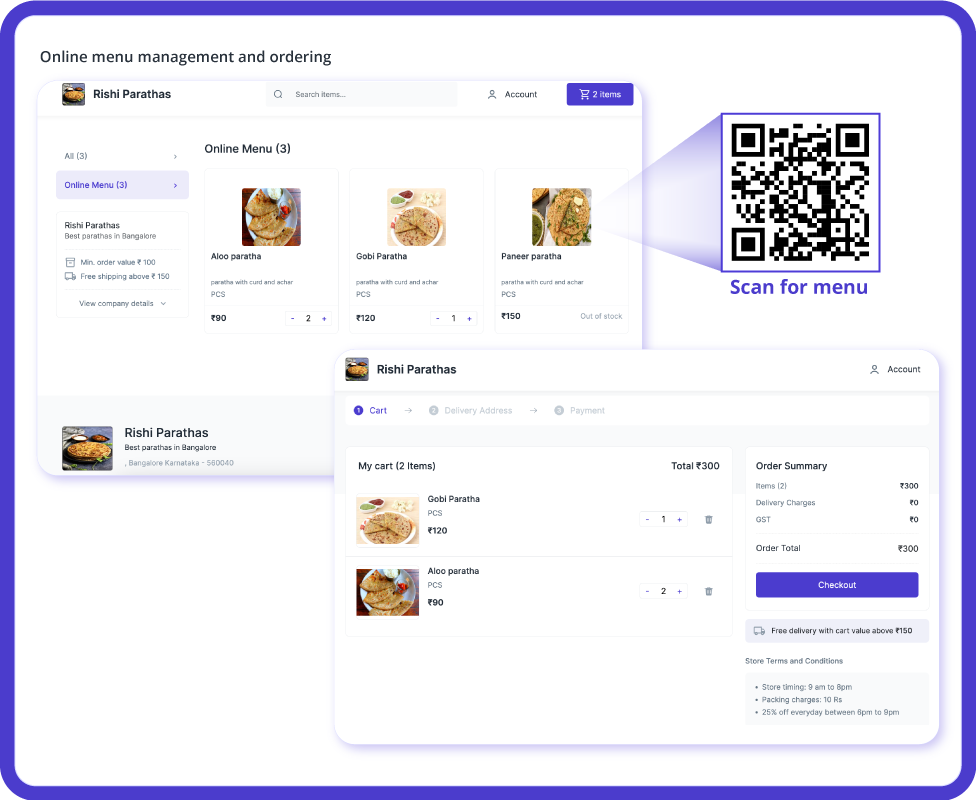
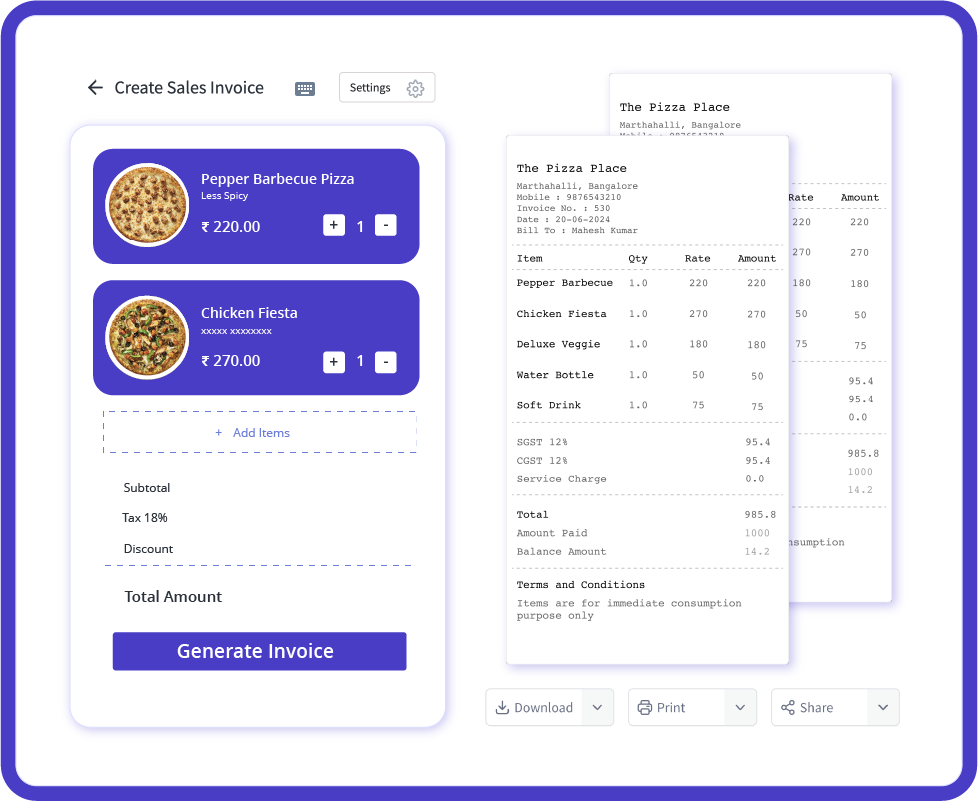
Table-Wise Billing
myBillBook restaurant billing software helps restaurants manage dine-in orders by treating each table as a separate billing unit. Staff can take, modify, and manage orders for a specific table without confusion, making peak-hour operations more organized.
Servers can keep adding food, drinks, or dessert items to the same running bill as customers place more orders. Once the guests are ready to leave, the system quickly generates an itemized invoice for that table, reducing mix-ups, billing errors, and operational delays.
Multi-Outlet Reporting & Central Visibility
For restaurant businesses operating more than one outlet, myBillBook supports multi-outlet management and reporting so owners can review billing and business performance without maintaining disconnected records for every location.
Centralised reports make it easier to compare sales, monitor payments, and keep day-to-day business data organised as the restaurant expands.

Restaurant Inventory Tracking
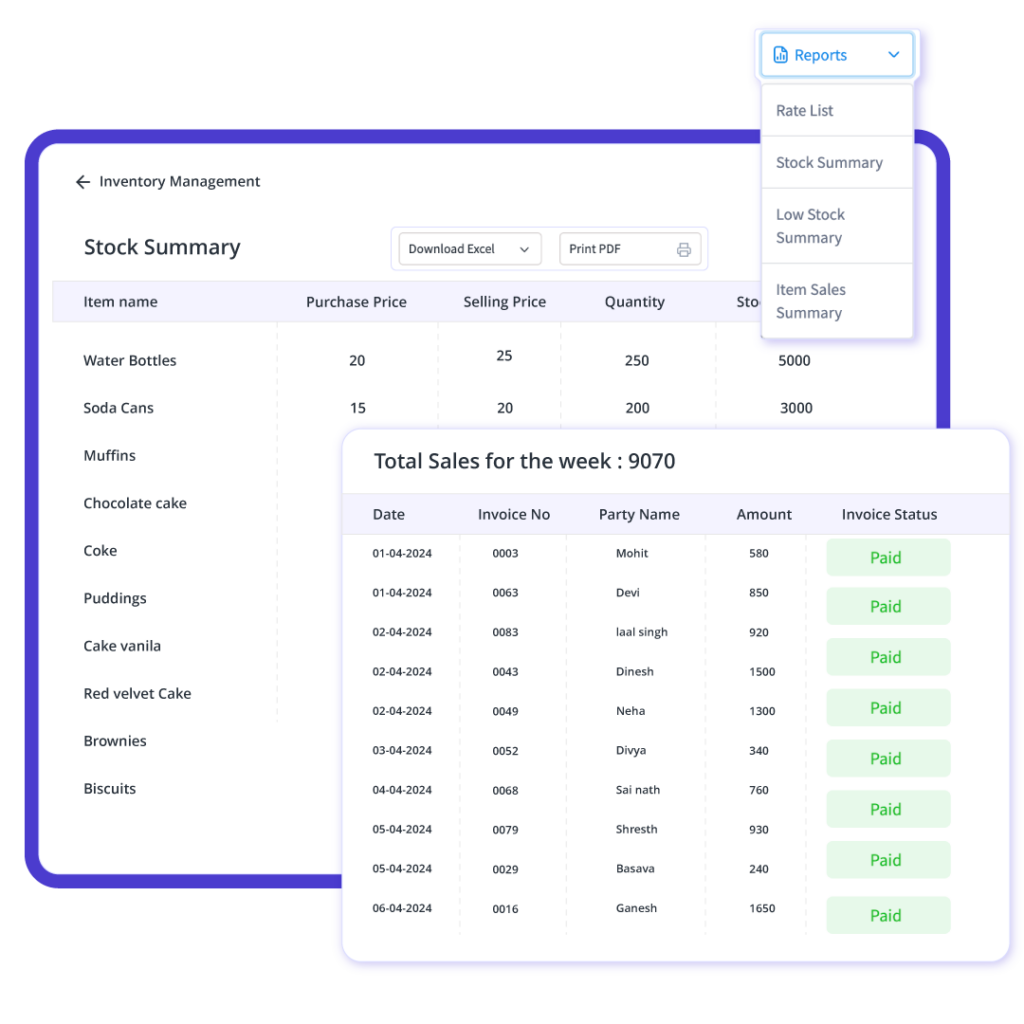
myBillBook helps restaurants track available stock and update inventory when purchases or stock changes are recorded. Restaurants that want to explore this workflow in more detail can also review our restaurant inventory management software. This gives owners better visibility into the items they keep for regular restaurant operations and supports more organised restocking.
For recipe-level or ingredient-consumption automation tied to each dish, restaurants should evaluate whether they require a dedicated restaurant POS or inventory system in addition to billing software.
Watch myBillBook Restaurant Billing Software in Action
See how myBillBook helps restaurants, cafes, bakeries, and takeaway counters create bills, manage orders, track inventory, and view reports from one simple platform.
Beyond Billing: Restaurant Business Management
Read and Watch myBillBook Users Talk About Our Restaurant Billing Capability

Rohit Sharma
Owner of Brew & Chew Cafe
“Ever since we started using myBillBook at our cafe, we’ve had zero billing mistakes. Customers love the speedy checkout and accurate bills — our service reputation has never been better.”

Priya Singh,
Manager at The Coffee Hub
“Tracking inventory used to be a nightmare for us. Now we never run out of key ingredients and have cut waste by 20%. myBillBook has been a complete game-changer for our café.”
Restaurant Billing Software Pricing
myBillBook plans start at ₹199/month. Choose a plan based on the devices, users and business-management features your restaurant needs.
- Create unlimited invoices
- Access to 1 business, 1 user & 1 CA
- Inventory management
- Android, iOS & Web
- Custom Invoice Themes
- Create your Online Store
- Generate, Print & Scan Barcodes
- Desktop app
- SMS + WhatsApp marketing*
- Unlimited Godown management
- Print Barcode (Label printer)
- Bulk Download & Bulk Print Invoices
- Access to 2 businesses, 3 users & 1 CA
- e-Way Bills (Unlimited)
- Generate e-Invoicing
- Loyalty & Rewards
- Automate Recurring Billing
- POS Billing (Desktop App, Web app)
- Data Export to Tally (on request)
- User Activity Tracker
How Restaurant Billing Works with myBillBook
- Create or select the running order: Start a counter bill or open the relevant table bill for dine-in service.
- Add menu items: Select the food and beverage items ordered and continue adding items to a running table bill when required.
- Apply taxes and discounts: Generate GST-ready bills with applicable taxes and authorised discounts.
- Record payment: Capture the customer’s payment mode such as cash, card, UPI or another supported method.
- Print or share the invoice: Print through a compatible thermal/POS printer or use available digital sharing options. Businesses that need a ready-to-use layout can also download a restaurant bill format in Word, Excel, or PDF.
- Review reports: Use sales, payment and outlet reports to monitor daily restaurant performance.
What Features Should Restaurant Billing Software Have?
| Feature | Why it matters for restaurants | myBillBook |
|---|---|---|
| Fast billing | Helps reduce checkout delays during peak hours | Available |
| Table-wise billing | Keeps running dine-in orders organised by table | Available |
| Hold/resume bills | Lets staff switch between running orders without losing progress | Available |
| GST invoicing | Supports tax-ready restaurant bills and records | Available |
| Multiple payment modes | Supports common checkout preferences such as cash, UPI and card | Available |
| Digital/QR menu | Keeps menu access convenient and reduces manual menu handling | Available |
| Thermal printer support | Useful for fast printed bills at the counter | Available |
| Multi-outlet reporting | Helps owners monitor more than one restaurant location | Available |
| KOT/Kitchen Display System | Routes orders directly to kitchen operations | Not currently available |
| Swiggy/Zomato integration | Brings aggregator orders directly into the POS | Not currently available |
| Recipe-level ingredient deduction | Automatically reduces ingredient quantities when dishes are sold | Not currently available |
Restaurant Billing Software for Different Food Businesses
Small restaurants: Digitise billing, payments and daily sales tracking without adopting an unnecessarily complex restaurant-management setup.
Cafes: Handle quick counter orders, table bills, menu updates and multiple payment modes from one billing system.
Dhabas: Replace handwritten bills with faster digital billing while keeping table orders and daily collections organised.
Cloud kitchens: Manage billing, stock records and sales reporting for delivery-focused operations without a dine-in floor.
Bakeries and food counters: Create quick item-based bills, update product/menu information and track everyday sales.
Multi-outlet restaurants: Use central reporting and outlet-level visibility as the business expands to more locations.
Restaurant Billing Software vs Restaurant POS Software
| Capability | Restaurant billing software | Dedicated restaurant POS |
|---|---|---|
| GST invoicing and payment recording | Core use case | Core use case |
| Table-wise and running bills | May be available | Commonly available |
| Inventory and business reports | Often available | Often available |
| KOT/KDS and kitchen routing | May not be included | Common in restaurant-specific POS systems |
| Delivery aggregator integrations | May not be included | Often available in specialised systems |
| Best suited for | Restaurants prioritising billing, GST, payments and business records | Restaurants needing deeper front-of-house and kitchen operations |
If your priority is GST billing, table-wise billing, payments, reporting and day-to-day business records, myBillBook can cover the core restaurant billing workflow. If you need deeper point-of-sale functionality, compare the capabilities on our Restaurant POS Software page before choosing.
What is cafe billing software? Is it different from restaurant billing software?
Cafe billing software helps cafés create GST bills, manage table-wise and running bills, accept multiple payment methods, show digital or QR menus, and print receipts with compatible thermal printers.
It is not fundamentally different from restaurant billing software. Both support day-to-day billing needs; cafe billing software is simply tailored to cafés and quick-service food businesses. myBillBook can be used for both cafés and restaurants, with plans starting at ₹199 per month.
What is a restaurant bill app? Can myBillBook be used as a restaurant bill app?
A restaurant bill app is a mobile-friendly billing tool that helps restaurants create GST invoices, manage table-wise and running bills, accept different payment methods, and print receipts with compatible thermal printers. myBillBook can be used as a restaurant bill app for these billing tasks, including multi-outlet management and digital or QR menus.
Yes. myBillBook can be used as a restaurant bill app to create GST-compliant bills, manage table-wise and running orders, accept different payment methods, and monitor multiple outlets. It also supports digital menus and compatible thermal printers.
How to Choose the Best Restaurant Billing Software?
- Start with your billing workflow: Check whether you need table-wise billing, running bills, quick counter billing, GST invoices and multiple payment modes.
- Match features to your restaurant type: A cafe or takeaway counter may need a simpler workflow than a full-service restaurant with complex kitchen operations.
- Check ease of use: Staff should be able to learn the billing interface quickly and use it during rush hours.
- Review device and printer compatibility: Confirm the software works with the devices and thermal/POS printer setup you plan to use.
- Plan for multiple outlets: If you intend to expand, choose software that can support outlet-level reporting and central visibility.
- Check GST and reporting needs: Make sure invoices, payment records and business reports fit your accounting workflow.
- Compare advanced POS requirements separately: If KOT/KDS, delivery-aggregator integrations or recipe-level ingredient deduction are essential, verify those capabilities before choosing a product.
- Compare pricing and support: Look at the total plan cost, onboarding, training and ongoing support rather than choosing only by headline price.
Frequently Asked Questions
What does restaurant billing software cost in India?
myBillBook restaurant billing software plans start at ₹199 per month. The right plan depends on the platform and features a restaurant needs, so check the current plan details before purchasing.
What is the difference between restaurant billing software and restaurant POS software?
Restaurant billing software focuses on GST invoices, payment recording, stock and sales management. A dedicated restaurant POS may also include kitchen workflows such as KOT/KDS and aggregator integrations. myBillBook supports the billing capabilities described on this page, but does not currently support KOT/KDS or Swiggy/Zomato integration.
Does myBillBook support table-wise and running restaurant bills?
Yes. Restaurants can maintain table-wise bills and hold or resume running bills as customers add items during service.
Can restaurants create a digital or QR menu with myBillBook?
Yes. myBillBook supports digital menu management and QR-based menu access, helping restaurants update and share their menu without repeatedly printing new copies.
Which payment modes can be recorded in restaurant bills?
Restaurant bills can record multiple payment modes, including cash, UPI and card, so the payment method is captured with the transaction.
Does myBillBook support thermal printers for restaurant bills?
Yes. myBillBook supports compatible thermal printers for printing restaurant invoices and receipts at the billing counter.
Can myBillBook support restaurants with multiple outlets?
Yes. myBillBook supports multi-outlet businesses and outlet-wise management and reporting, helping owners view operations across locations.
Does inventory automatically deduct recipe-level ingredients when a dish is sold?
No. myBillBook can track inventory items and stock, but selling a menu item does not automatically deduct its recipe-level ingredients or raw materials.