
Taxi Bill Format – Free Download in Word, Excel & PDF
Create a standard taxi bill format to record trip details, fare breakup, taxes, payment mode, and total amount for every completed ride. Download editable taxi bill templates in Word, Excel, and PDF or create digital taxi bills using myBillBook.
- Pre-designed formats for accurate taxi fare billing
- Acts as valid proof of travel and payment for passengers
- Designed for individual taxi drivers and small cab businesses
Powered by myBillBook - India's #1 Billing Software


What Is a Taxi Bill Format?
A taxi bill format is a structured document that records the details of a completed taxi ride, including the driver’s name, taxi number, trip date, pickup and drop-off locations, distance travelled, fare breakdown, taxes, and the total amount payable. It serves as official proof of travel for passengers and a billing record for taxi operators.
Using a standard taxi bill format ensures transparent pricing, accurate fare calculation, and proper documentation of each trip. It also helps taxi drivers and fleet owners maintain clear records, reduce fare disputes, and simplify expense tracking and passenger reimbursements.
The same format can also be used as a cab bill format for local rides, airport drops, rental trips, and travel reimbursements.
Download Ready-to-Use Taxi Bill Templates


Taxi Bill Format Sample with Fare Breakdown
Here is a sample taxi bill showing how trip distance, per-kilometre charges, waiting fees and toll charges are recorded. You can use the same structure when preparing a taxi or cab bill for a passenger.
Sample Taxi Bill
| Invoice No. | TX-001 |
| Trip | City Centre to Airport |
| Distance | 20 km |
| Payment Mode | UPI |
| Fare Details | Amount |
|---|---|
| Base Fare | ₹100 |
| Distance Fare (20 km × ₹15) | ₹300 |
| Waiting Charges | ₹50 |
| Toll Charges | ₹80 |
| Total (Before Applicable Tax) | ₹530 |
Note: This is an illustrative taxi bill. Actual fares and applicable taxes may vary.
How to Create a Taxi Bill Format?
Invoice Templates Are a Good Start—But Not the Fastest Option
Manual edits and calculations can slow down your billing process.
Upgrade to our free invoicing software to create accurate, personalised invoices with ease.
How Does a Digital Taxi Bill Format Differ From a Traditional Paper One?
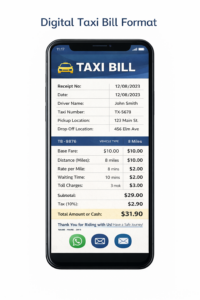
Digital Taxi Bill Format
A digital taxi bill format is created electronically and shared instantly via WhatsApp, email, or PDF. It offers automatic fare calculation, accurate records, easy storage, and quick retrieval. Digital bills reduce errors, prevent loss of data, and simplify expense tracking, reporting, and reimbursements for both passengers and taxi operators.

Traditional Taxi Paper Bill
A traditional paper taxi bill format is handwritten or printed and handed physically to passengers. It relies on manual fare calculation, is prone to errors, fading, or loss, and requires physical storage. Managing paper bills is time-consuming, making expense tracking, record maintenance, and long-term retrieval more difficult.
How to Prepare a Taxi Bill for Travel Reimbursement
A taxi bill or cab receipt can be used to claim reimbursement for business-related travel expenses. The bill should include the taxi operator’s details, journey information, fare breakdown, and payment details so that the employer or finance team can verify the expense.
When preparing a taxi bill for travel reimbursement, include the following details:
- Taxi operator details: Name, contact number, and GSTIN (if applicable).
- Vehicle information: Taxi registration number and driver name.
- Trip details: Date of travel, pickup location, drop-off location, and distance travelled.
- Fare breakdown: Base fare, distance charges, waiting charges, tolls, parking fees, and applicable taxes.
- Total amount: Final amount charged for the journey.
- Payment details: Payment mode (cash, UPI, or card) and transaction reference, if available.
Employees should submit the original taxi bill or receipt issued by the operator, along with any required payment confirmation. Reimbursement approval depends on the company’s travel and expense policy.
What are the Essential Elements that must be Included in a Standard Taxi Bill Format?
Taxi Service and Driver Details
Includes taxi service name, driver name, contact number, and vehicle registration number to identify the service provider clearly.
Taxi Bill or Invoice Number
A unique taxi bill number helps track each ride, manage records, and reference the invoice for future verification.
Passenger or Customer Details
The passenger name or customer reference links the taxi bill format to the correct individual or reimbursement claim.
Trip and Journey Details
The pickup location, drop-off location, trip date, distance travelled, and duration must be provided for journey verification.
Fare and Charges Breakdown
Shows base fare, distance charges, waiting charges, tolls, parking fees, taxes, and discounts separately.
GST Information (If Applicable)
Includes GST rate, GST amount, and GSTIN of the taxi operator when GST is applicable.
Total Payable Amount
Highlights the final amount payable by the passenger to ensure transparent and dispute-free taxi billing.
Payment Mode and Status
Records payment method, payment status, and transaction reference number for accounting and customer confirmation.
Signature or Authorization
The driver or service provider’s signature confirms the accuracy and authenticity of the taxi bill format.
What are the Advantages of Using a Taxi Bill Format?
Improves Billing Transparency
A taxi bill format clearly displays fare calculation, distance travelled, taxes, and additional charges, reducing confusion and disputes.
Acts as Proof of Travel
Taxi bills serve as official proof of travel for passengers, useful for reimbursements, expense claims, and business records.
Helps Maintain Accurate Records
Using a standard taxi invoice format allows drivers and operators to systematically track trips, payments, and daily earnings.
Supports Tax and GST Compliance
A proper taxi bill format helps maintain required documentation for GST reporting and tax audits, where applicable.
Enhances Professional Image
Issuing a well-structured taxi bill builds customer trust and presents the taxi service as reliable and professional.
Simplifies Payment Tracking
Recording payment mode and status in the taxi bill format makes it easier to track cash, UPI, or card transactions.
Reduces Fare Disputes
Clear fare breakdown and trip details help prevent disagreements related to distance, charges, or payment amounts
Learn More About Taxi Bill Format in Word, Excel, PDF
Taxi Bill Format in Word
A Taxi Bill Format in Word is ideal for users who want complete control over layout and content customisation. It allows taxi drivers and operators to edit text fields, adjust formatting, add logos, and modify fare details easily before printing or sharing. This format is suitable for small taxi businesses that prefer manual editing and personalised invoice designs.
Taxi Bill Format in Excel
A Taxi Bill Format in Excel helps automate fare calculations and maintain structured billing records. Using formulas, users can accurately calculate distance-based charges, taxes, and total payable amounts. This format is helpful for fleet owners and operators who generate multiple taxi bills daily and want better control over calculations and data organisation.
Taxi Bill Format in PDF
A Taxi Bill Format in PDF is best for sharing professional, non-editable taxi invoices with passengers. It ensures consistency in layout, prevents accidental changes, and works across all devices. PDF taxi bills are commonly used for digital sharing, printing, and official documentation such as reimbursements and record-keeping.
Looking to simplify your invoicing process?
Go digital and manage invoices easily with our free invoicing software

Frequently Asked Questions
Where can I find free taxi bill format templates to download?
You can find free taxi bill format templates on invoice template websites, business stationery platforms, or by generating taxi bills using billing software that allows downloads in Word, Excel, or PDF formats.
How can I customise a taxi bill format with my company logo and branding?
A taxi bill format can be customised by adding your company logo, business name, contact details, invoice prefix, and preferred layout using editable templates or billing tools that support branding.
What are the best tools or software for creating taxi bill formats?
The best tools are those that help you create taxi bills quickly, maintain records, apply branding, and share invoices digitally. Many taxi operators prefer tools like myBillBook as they simplify bill creation and sharing.
How do I ensure my taxi bill format complies with local regulations?
To stay compliant, include required details such as business information, invoice number, date, fare breakup, and applicable tax details. GST-registered operators should also mention GSTIN and tax amounts clearly.
What optional fields can be added to a taxi bill format to improve customer experience?
Optional fields like driver ID, vehicle type, trip duration, payment reference number, QR code for payments, and a thank-you note can make taxi bills more informative and customer-friendly.
Can I create a taxi bill online for free?
Yes, you can use myBillBook to create digital taxi bills with trip details, fare breakup, taxes, payment mode, and customer details. You can also download or share the bill as a PDF for records and reimbursements.
Can a taxi bill be used for office travel reimbursement?
Yes. A taxi bill can support an office travel reimbursement claim when it includes the operator's details, trip date, route, fare and payment information. Acceptance depends on the employer's reimbursement policy.
What is the difference between a taxi bill and a taxi receipt?
A taxi bill shows the charges for a trip, while a taxi receipt confirms payment. A completed taxi bill can also serve as a receipt when it clearly records the amount received, payment mode and payment status.
Can I use a taxi bill format without GST?
Yes. A taxi operator who is not required to charge GST can use a bill format without adding GST. A GST-registered operator must follow the applicable invoicing and tax rules for the service provided.