
Bill of Exchange Format
A bill of exchange format is a legal document used for payment transactions where the payee receives a written order to pay a specific amount of money to the payee or bearer on a future date. It outlines a business or person’s contractual duty to pay a supplier that has been reached by mutual agreement. The precise date by which the payment terms must be met is specified in this contract. The concerned authority, the product supplier, duly signs this official document and requests a commitment from the recipient or beneficiary. A bill of exchange gives one person or organisation the right to request that the beneficiaries on the other side pay the amount specified in the bill.
Parties Included in the Bill of Exchange Format
An essential financial document utilised in international trade and commerce is the bill of exchange, which is a binding agreement between parties involved in cross-border transactions. Three significant entities play distinct roles within the bill of exchange format:
Drawer – The initiator of the bill of exchange, known as the Drawer, is typically the seller or creditor with the legal right to receive payment from the debtor. As the bill’s creator, the Drawer is responsible for drafting and endorsing the bill with their signature before presenting it to the Drawee.
Drawee – The party receiving the bill of exchange, the Drawee, is usually the buyer or debtor owing the specified amount related to the goods or services outlined in the bill. Drawee is responsible for honouring the bill and making the fixed payment to the Payee upon the bill’s maturity.
Payee – The individual or entity entitled to receive the funds indicated in the bill of exchange is recognised as the Payee. In cases where the Drawer retains possession of the bill until the designated payment date, the Drawer also assumes the role of the Payee, ultimately receiving the funds upon the bill’s maturity.
Sample Bill of Exchange Format
A Invoice format sample is a flexible template that can be customised to fit the unique needs of any business. It offers a helpful reference point, showcasing the crucial information and structure required for an informative and precise bill of exchange Format.
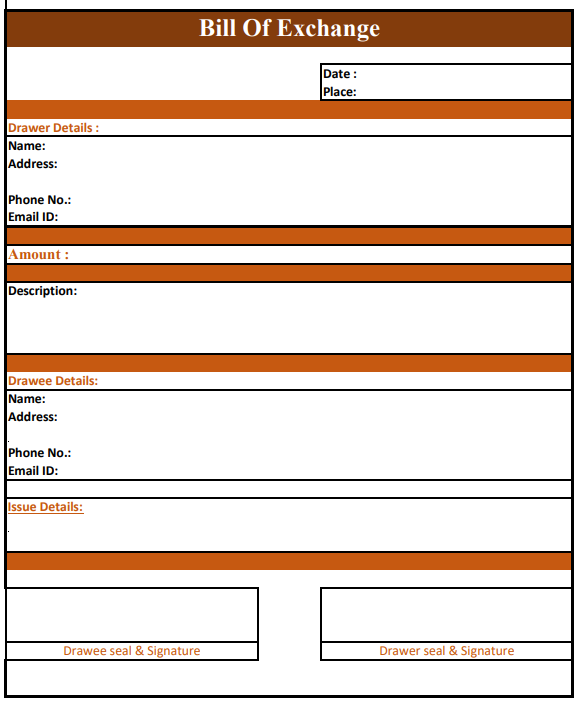
Bill of Exchange Format in PDF
The bill of exchange format in PDF allows efficient sharing and accessibility of financial data. With the help of a provided sample, one can comprehend the details and structure necessary to create an accurate bill of exchange.
Bill of Exchange Format in Word
The bill of exchange format in Word offers user-friendly formatting options, allowing for easy editing and sharing of financial information with clients or stakeholders through PDF conversion. By referring to the provided sample, one can gain insight into the data and structure required for accuracy.
Bill of Exchange Format in Excel
The bill of exchange Format can be conveniently created, edited, and shared in Excel, which offers advanced calculation and graphing features and password protection for added security.
Different Types of Bill of Exchange Format
- Documentary Bill: This bill of exchange format involves attaching relevant records that validate the underlying transaction and provide a layer of security and transparency.
- Demand Bill: A demand bill operates with an immediate payment requirement, prompting the recipient to fulfil the payment obligation upon presentation of the bill without a specified due date.
- Inland Bill: Limited to payment within the country of issue, the inland bill cannot be settled abroad; in contrast, a foreign bill is payable outside the country where it is issued.
- Clean Bill: Not backed by any supporting documentation, the clean bill carries a higher interest rate than other bills due to its lack of collateral.
- Foreign Bill: Often associated with international trade, the foreign bill can be settled outside the domestic borders, with examples including export and import bills.
- Accommodation Bill: This type of bill, devoid of any restrictions, is sponsored, created, and accepted without limitations, providing flexibility in financial transactions.
- Trade Bills: Tailored exclusively for trade-related activities, these bills are designed to facilitate seamless and efficient trade transactions.
- Bank Draft: As a specialised bill of exchange, a bank draft offers a secure payment mechanism backed by the bank’s assurance, providing a reliable and trustworthy means of financial settlement.
Features of a Bill of Exchange Format
- A bill of exchange must be written down.
- It is a payment order.
- The payment request is unconditional.
- The creator must sign the bill of exchange.
- The payment that is expected must be guaranteed.
- The time of payment must also be known with certainty.
- The bill of exchange must be made payable to a specific person.
- It must be stamped following legal requirements.
- The amount specified in the bill of exchange is due immediately upon demand or at the end of a predetermined period.
Advantages of Bill of Exchange Format
- Relationship framework: A bill of exchange format is a tool that establishes a framework for a credit transaction between a seller (the creditor) and a buyer (the debtor) on an agreed-upon basis.
- Term and condition certainty: Just as the creditor is entirely aware of when he will receive the money, so is the debtor of the deadline by which that money must be paid. This is because the terms and conditions governing the interactions between the debtor and the creditor, such as the amount that must be paid, the due date, the amount of interest that must be paid, and the payment location, are expressly stated in the bill of exchange format. This standardised format ensures clarity and legal validity in financial transactions, providing a clear framework for the timely exchange of funds between parties.
- Convenient credit method: A bill of exchange is a tool that helps the buyer to purchase the items on credit and pay for them later within the credit period. However, the seller of the products can receive payment right away, even after extending credit by discounting it with the bank or by endorsing it in the name of a third party.
- Conclusive evidence: A bill of exchange is regarded as a legal document proving a credit transaction occurred. It implies that the buyer of the products acquired credit from the seller of the goods during the trade and is, after that, responsible for paying the seller. When the buyer refuses to fulfil the payment obligation, the law mandates the creditor to obtain a certificate from a notary, establishing a conclusive record of the transaction and the subsequent refusal to honour the financial commitment, per the bill of exchange format.
- Simple transferability: A bill of exchange can easily be transferred by endorsement and delivery to settle a debt.
Importance of Bill of Exchange Format
- Facilitates Trade: Bills of exchange are essential in both local and international trade because they offer a reliable and well-liked mode of payment. They enable seamless transactions between buyers and sellers by allowing businesses to determine credit conditions.
- Financial Flexibility: The capacity to postpone payment to a later time is a noteworthy advantage of bills of exchange. This adaptability enables companies to manage their cash flow efficiently. Sellers might get payment later to continue functioning and investing in their businesses. On the other hand, buyers can postpone payment until a specific time to time their cash outflows with revenue development.
- Risk Mitigation: The bill of exchange format is crucial in mitigating risks associated with financial transactions. It provides a layer of security in transactions through their endorsement and transferability. They enable parties to minimise the risk of non-payment or default. If a buyer fails to make payment, the seller can utilise the bill of exchange as evidence of the debt, seeking legal recourse. This process effectively minimises financial uncertainties and potential losses from trade transactions.
- Legal Protection: Bills of exchange have legal weight and provide a solid basis for resolving disputes. The bill of exchange format serves as official proof of the owing debt in situations involving non-payment or breach of contractual commitments. They can be used in court to compel payment, giving firms legal defence and remedies.
Details to be Included in Bills of Exchange Format
It’s crucial to understand how a bill of exchange should be written. The following are some essential elements of a bill of exchange’s format:
- Date of the bill of exchange
- Amount of the bill of exchange
- Name and address of the person to whom you pay the bill
- Name and address of the person who has to pay the bill
- The maturity date of the bill
- Place where the bill is payable
- Signature of the person issuing the bill
This list of the details should be included in a bill of exchange format. It is a helpful reference for companies to ensure the inclusion of all the necessary information while preparing this financial document.
FAQs on Bill of Exchange Format
The creditor issues a bill of exchange and demands that a debtor pay a specific sum within a particular time. At the same time, a promissory note is a promise to pay a certain sum of money over a specific period and is issued by the debtor. The Drawer creates the bill of exchange. A buyer/debtor may be drawn upon by a seller/creditor entitled to payment from the debtor. The Drawer should sign the bill of exchange as its maker after writing it. Yes, providing all necessary information in the bill of exchange format is essential to ensure its accuracy. This includes facts about the parties concerned, the sum owed, the deadline, and other pertinent information. A Bill of exchange is a legally binding document that requires one party to pay another party a specific amount of money. It can be drawn in any currency and is often settled in the local currency of the issuing nation. It is transferrable and can be endorsed by a different party. The Drawer creates the bill of exchange. A buyer/debtor may be drawn upon by a seller/creditor entitled to payment from the debtor. The Drawer should sign the bill of exchange as its maker after writing it.Who is responsible for creating bills of exchange?
Who drafts an exchange bill?
Is it required to include all the information in the structure of the bill of exchange?
Is a bill of exchange considered a legally binding document?
How is an exchange bill prepared?