
Free Online Purchase Order Generator – Create GST-Ready POs
Create a purchase order online for free. Add buyer, supplier, item and GST details, then download your professional PO as a PDF—no signup required.
What is a Purchase Order Generator?
A purchase order generator is an online tool that creates a purchase order using your buyer, supplier, item, price, tax, delivery and payment details. With myBillBook’s free PO generator, you can create and download a professional purchase order as a PDF without signing up.
How to Create a Purchase Order Online for Free
Create Free POs in 3 Easy Steps
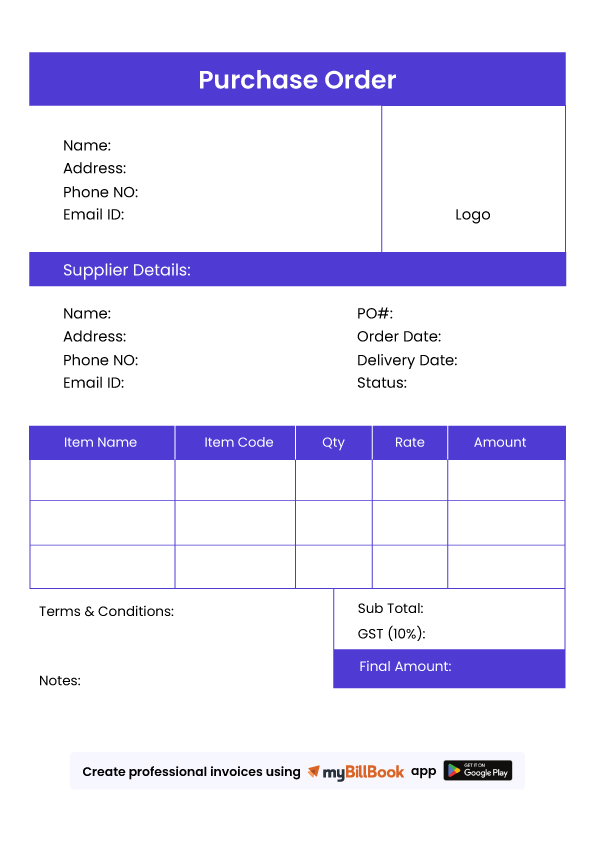
What Should a Purchase Order Include?
A purchase order should normally contain:
- Unique PO number
- PO date
- Buyer/business details
- Supplier details
- GSTIN where applicable
- Item or service description
- HSN/SAC where applicable
- Quantity and unit price
- GST rate and tax amount
- Delivery date and address
- Payment terms
- Terms and conditions
- Total purchase amount
- Authorised signatory, where required
Does a Purchase Order Include GST?
A purchase order can show the expected GST applicable to the goods or services being ordered. For intra-state purchases, this may be shown as CGST and SGST, while inter-state purchases generally use IGST. However, a purchase order is not a GST tax invoice and does not replace the supplier’s tax invoice.
Difference Between Purchase Order and Invoice
While they may seem similar, a purchase order is created by the buyer before the transaction, while the seller sends an invoice after goods or services are delivered.
| Difference | Purchase Order | Invoice |
|---|---|---|
| Created by | Buyer | Seller |
| Purpose | Places/authorises an order | Requests payment |
| Usually created | Before supply | After or during supply |
| Contains | Items, quantity, agreed price and terms | Supplied items, taxes and amount payable |
| Payment request | No | Yes |
| GST tax document | No | A valid tax invoice may be |
Where Does a Purchase Order Fit in the Purchase Process?
A purchase order is usually created after a supplier quotation is accepted and before the goods or services are delivered. It helps both the buyer and supplier confirm what is being ordered, at what price, and under which terms.
Quotation → Purchase Order → Delivery → Purchase Invoice → Payment
- Quotation: The supplier shares the proposed price, items and terms.
- Purchase Order: The buyer creates and sends the PO to confirm the order.
- Delivery: The supplier provides the goods or services as agreed.
- Purchase Invoice: The supplier issues an invoice for the completed supply.
- Payment: The buyer verifies the invoice and makes payment based on the agreed terms.
Need to Manage Purchase Orders Regularly?
The free PO generator is ideal when you need to create a quick purchase order. If your business creates POs regularly, myBillBook’s purchase order software lets you save suppliers and items, track purchase orders and connect your purchase workflow with inventory and purchase bills.
Create Customised Purchase Orders with myBillBook
Features offered by myBillBook for PO Generation
How myBillBook Simplified Purchase Orders for Growing Businesses

Retail Shop Owner
“Earlier, I used to make POs in Word and send them over WhatsApp. Now with myBillBook, I generate and send professional POs in just one click — and everything is saved automatically. It’s faster and more reliable.” — Ravi Jain, Electronics Retailer, Jaipur

Manufacturing Business Owner
“We order raw materials from 6–7 vendors regularly. myBillBook’s PO feature helps us keep track of every order, link it to stock, and even convert it to bills when goods arrive. Total game-changer for our purchase process.” — Sangeeta Nair, Factory Owner, Coimbatore

Wholesale Trader
“Creating purchase orders on myBillBook is super simple. I just enter supplier details once, and it saves everything for next time. Plus, all my POs show up in the GST purchase report automatically — no extra work.” — Imran Shaikh, FMCG Wholesaler, Mumbai

Understanding Purchase Order Generators
What is a Purchase Order Generator?
A purchase order generator is an online tool or software that helps businesses create professional purchase orders (POs) digitally. Instead of manually drafting a PO in Word or Excel, businesses can fill in supplier, item, and pricing details in a structured form and instantly generate a PO in PDF format.
These tools are especially useful for small businesses, wholesalers, retailers, and service providers who want to streamline their procurement process.
Who Uses Purchase Order Generators?
Purchase order generators are commonly used by:
- Small & Medium Businesses (SMBs): To order goods from suppliers and keep track of expenses
- Retailers & Distributors: To manage stock purchases and reorder inventory efficiently
- Manufacturing Companies: To issue POs for raw materials and services
- Freelancers & Agencies: For service-based contracts with clearly defined deliverables
- Accountants & Bookkeepers: To maintain records for client purchases and supplier payments
Benefits of Using a Digital PO Generator
- ✅ Reduces manual errors and paperwork
- ✅ Standardizes communication between buyer and supplier
- ✅ Speeds up approval and procurement process
- ✅ Provides documentation for audits and tax filing
- ✅ Keeps purchase records organized and searchable
Difference Between Purchase Order and Invoice
While they may seem similar, a purchase order is created by the buyer before the transaction, while the seller sends an invoice after goods or services are delivered.
| Difference | Purchase Order | Invoice |
|---|---|---|
| Created by | Buyer | Seller |
| Purpose | Places/authorises an order | Requests payment |
| Usually created | Before supply | After or during supply |
| Contains | Items, quantity, agreed price and terms | Supplied items, taxes and amount payable |
| Payment request | No | Yes |
| GST tax document | No | A valid tax invoice may be |
Why myBillBook Billing Software is More Reliable Than a Free PO Generator?
While a free purchase order generator is great for quick, one-time use, it lacks the depth and reliability that growing businesses need. That’s where myBillBook PO generator software stands out.
With myBillBook, you don’t just create a PO — you build a full record of business transactions that’s synced, saved, and connected to your inventory, payments, and reports.
Here’s why myBillBook is more dependable than a free PO tool:
-
Auto-Save & Cloud Backup: Your POs are stored securely and accessible anytime. No more lost files or repeated data entry.
-
Linked Workflows: POs connect directly with purchase invoices, stock updates, and payment tracking — all in one system.
-
GST Compliance: myBillBook generates GST-ready purchase reports automatically, saving time and avoiding penalties.
-
Multi-User Access: Let your staff create and manage POs with role-based controls, ensuring transparency and accuracy.
-
Error-Free Calculations: No manual errors — myBillBook handles taxes, totals, and inventory updates automatically.
Whether you’re dealing with multiple vendors, tracking stock, or filing GST returns, a full-featured billing software is far more reliable than using standalone tools.
FAQs on Free Purchase Order Generator
Is this PO Generator really free?
Yes, it’s completely free to use without any hidden charges.
Can I customize the purchase order format?
Yes, you can enter your own business logo, PO number, and customize all fields. For further customisations like use of different colour themes, custom fields, etc, you can use myBillBook purchase order generator software.
Do I need an account to use the free po generator?
No registration or sign in required – just fill and download instantly.
Is a purchase order legally binding?
Yes, once a vendor accepts a purchase order, it typically becomes a legally binding contract between the buyer and the seller.
Which comes first - a purchase order or an invoice?
The purchase order (PO) comes first. It's created by the buyer to formally request goods or services from a vendor. The invoice is then generated by the vendor after the order has been fulfilled or shipped, requesting payment for the delivered goods or services.
Are free purchase order generators secure for my business data?
Reputable free purchase order generators, like myBillBook, prioritize data security. They often use encryption and secure servers to protect your information. However, for highly sensitive data or large volumes of transactions, a dedicated, paid PO software might offer more robust security features and compliance certifications.
Is myBillBook a reliable PO generator software for businesses in India?
Yes, myBillBook is a highly reliable and popular PO generator and billing software, especially for small and medium-sized businesses in India. It offers a user-friendly interface, comprehensive features, and is designed to streamline purchase order management and overall accounting.
Can myBillBook help with GST compliance for purchase orders?
Yes, myBillBook's purchase order and billing software are designed to ensure GST compliance by automating tax calculations, generating accurate tax invoices, and simplifying GST filing.
Does myBillBook offer a free trial to test its PO generator features?
Yes, myBillBook typically offers a free trial period of 14 days for Android users. You can explore its features, including the PO generator, before committing to a paid plan.