


Billing Software for Retail Store - Simple POS for Every Shop
Batch-wise billing, low stock alerts, barcode-fast POS, instant payment reconciliation, and real-time P&L snapshots—everything your retail shop needs in one software.
India's Most Trusted Retail Billing Software

From Low-Stock Alerts to Instant Reconciliation—Here’s How myBillBook Addresses Shop Billing Requirements
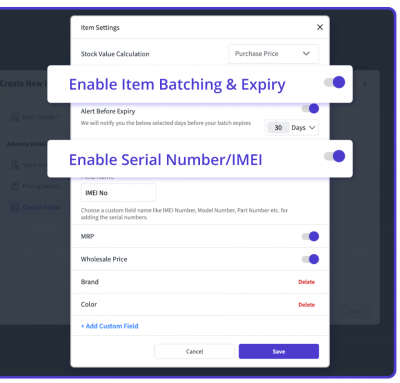
Batch-Wise Billing - Keep Products in Stock Always
FMCG or Fast-moving consumer goods typically come in different manufacturing batches, each with its own expiry date. The batch-wise billing is one of the key features of myBillBook billing software for retail shops that enables users to add the batch number, manufacturing (MFG) date, and expiry whenever new stock arrives. Cashiers can view the precise "best-before" date on their screens as they scan items, eliminating the need for anyone to struggle with small labels while customers wait in line.
The store's billing software employs a first-in, first-out method. This means that when there are two lots of the same product, it will always use the one that expires first. If a product is approaching its clearance date, it gives a gentle reminder to consider discounting, bundling, or returning it. This helps reduce waste and ensures compliance with food safety regulations.
Barcode Scanning for Faster Bill Creation
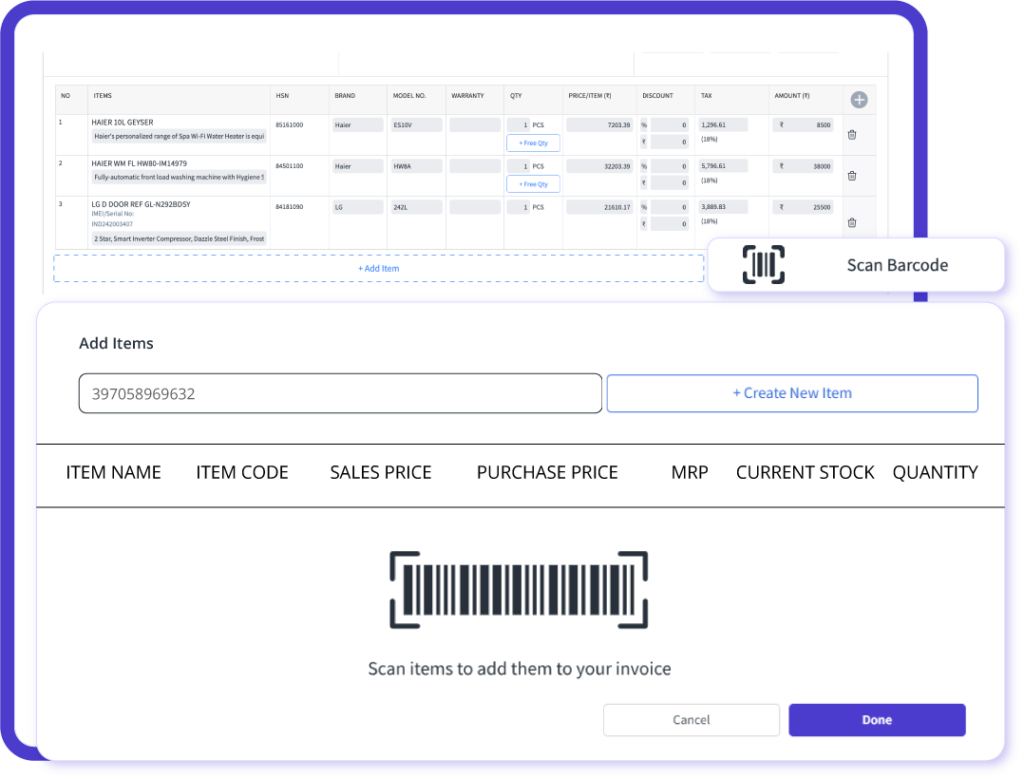
With myBillBook’s POS billing feature, you can add items to a bill instantly by scanning barcodes using a handheld scanner or your mobile camera. The system automatically fills in item names, prices, GST rates, stock quantities, and discounts, saving time and reducing manual errors during the checkout process.
For businesses without barcoded inventory, myBillBook allows you to generate custom barcodes — or create free product barcodes instantly via our tool — and print labels directly from the software. Whether you’re handling packaged goods or loose items, you can barcode every product to streamline billing and inventory tracking.
Inventory Management with Low-Stock Alerts
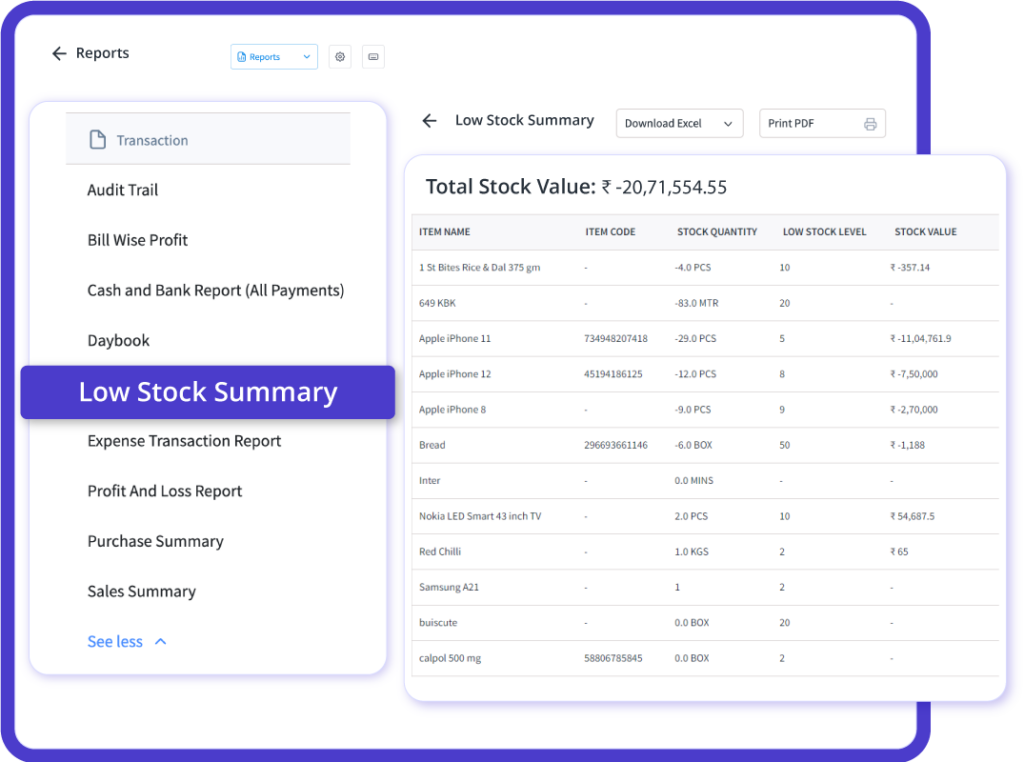
Managing a busy retail counter means popular products can sell out fast. myBillBook’s Inventory Management tracks stock in real-time. If your best-selling product gets low, it alerts you on your computer or phone. This helps you reorder on time and ensure the products are always in stock, which in turn helps keep customers satisfied.
These alerts enable you to quickly create a purchase order with supplier details, including the latest price and GST code, without errors or over-ordering. The tool also identifies slow-selling items, allowing you to make an informed decision about whether to reduce your order next time or promote it through WhatsApp marketing, another interesting feature of myBillBook retail store software.
Payment Reconciliation: End-of-Day Balancing in Minutes
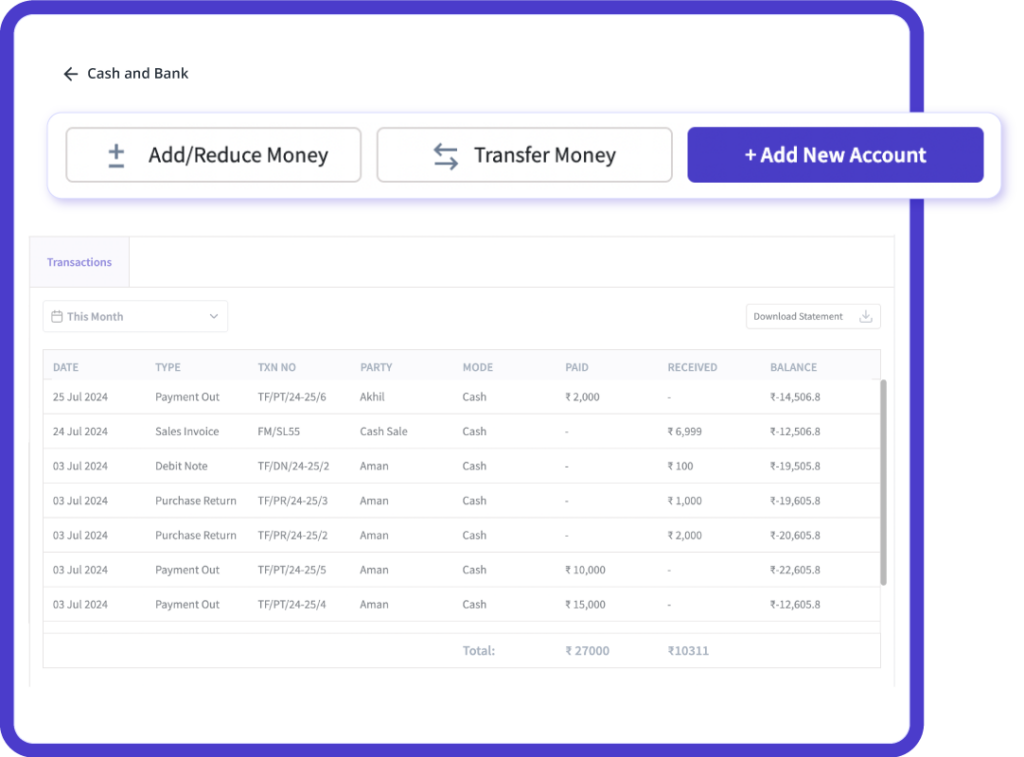
Closing the books of a day shouldn’t take hours; it should be quick and easy. With myBillBook’s billing software for shops, every sale, whether made with cash, card, UPI, or QR, is automatically recorded in a balanced ledger as soon as the bill is printed, and the software automatically compiles all payments.
Just hit the ‘Reconcile’ button at the end, and the screen shows what came in by cash, what went on cards, and what should reach your bank. Any mismatch as small as INR 10 turns yellow, so you can fix it on the spot.
Bookkeeping Made Easy - Instant Sales & P&L Snapshot
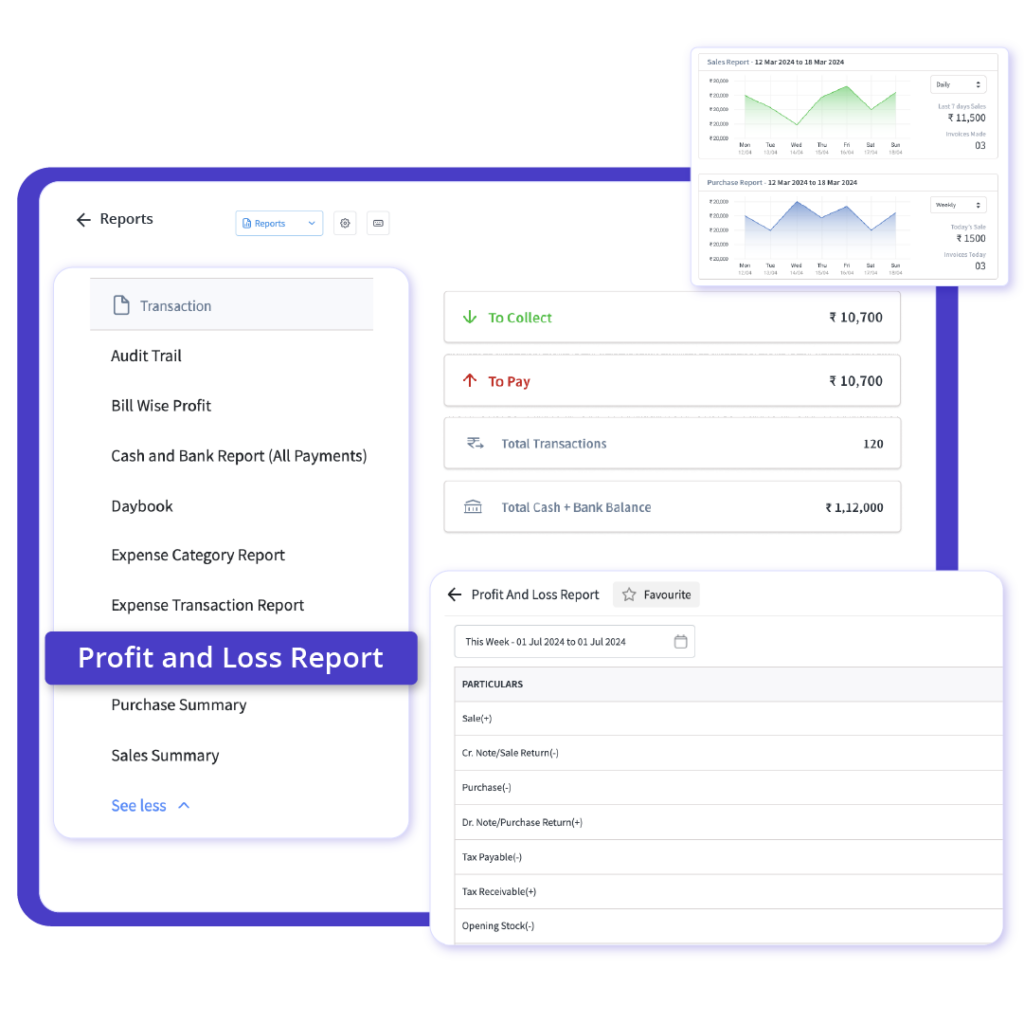
Tired of late-night spreadsheet work? With myBillBook’s billing software for retail shop, every sale, return, and discount feeds a live profit-and-loss screen as soon as you print the bill. One glance shows today’s sales, costs, and margin—easy colours, no formulas.
Need a wider view? Tap a button to see the week or month. Because the numbers come straight from the same POS software that runs your counter, you’re never guessing or waiting for uploads.
Online Store & Promotions
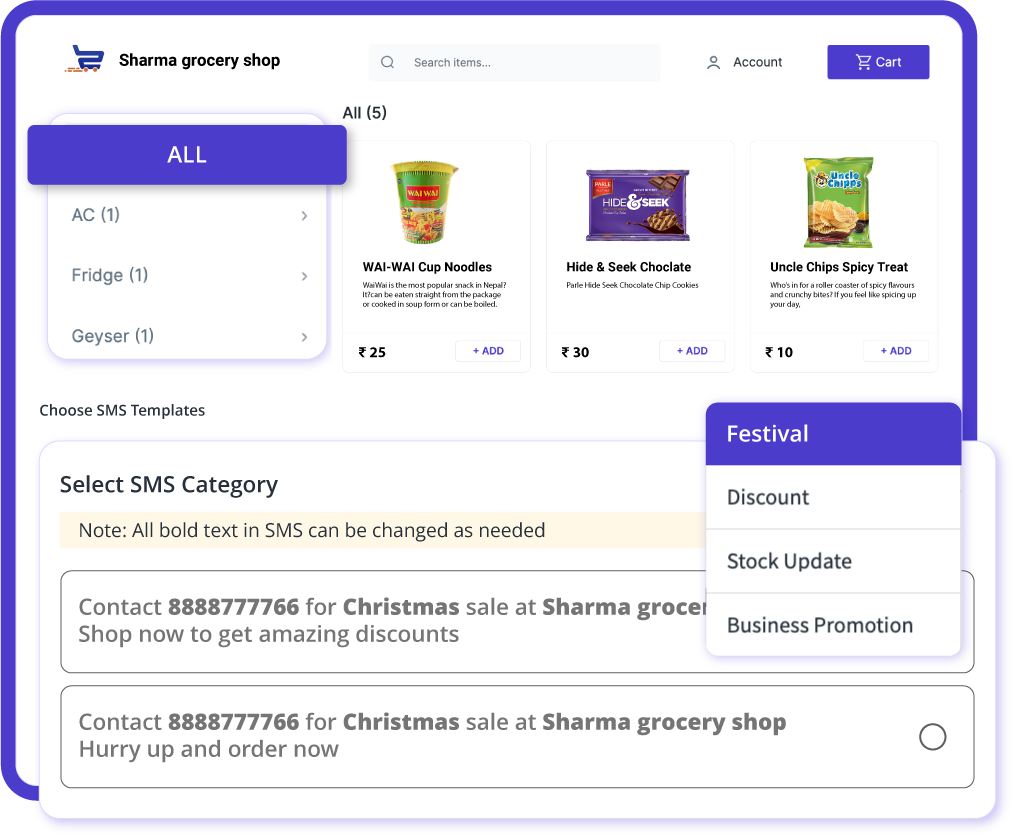
Turn your in-store visitors into online shoppers with just one click. By using myBillBook’s retail billing software, you can open an online store for your retail shop. Create a product catalogue and share the online store link directly with your customers. Take online orders, launch effective WhatsApp and SMS marketing campaigns to reach your customers directly and maximise sales opportunities.
You can choose which products to display in your online store and set a minimum order value. It’s easy to manage online orders, and you can run effective WhatsApp and SMS marketing campaigns to connect with customers and boost sales.

~2.5 lacs saving
from billing errors

24% Increase
in Profit Margin

2.3x increase
in Stock Rotation
Retail Shop Billing Software - Product Demo


“Superb customer service. Helped me set up my account as required”
Success Stories from Real Retail Businesses
With myBillBook’s billing software for shops, you can enjoy a quick and precise digital checkout experience. Additionally, receiving reports and updating your inventory is extremely easy; simply tap, and your work will be done.

Ravish Rathod,
Grocery Store owner – Chennai
myBillBook’s grocery store billing software has been a real game-changer for us. It helps us effortlessly manage batch numbers and expiry dates, while also keeping our stock updated in real-time.

Ravi Rao,
Stationery Owner – Banglore
After using myBillBook’s free billing software for our retail shop, we noticed a significant increase in sales. It keeps track of our inventory in real-time, which helps us restock the most sold item,which makes the customers happy

Arun Rane,
Clothing Retailer – Delhi
What is Retail Billing Software
Retail billing software is specially designed for retail establishments to manage their billing, accounting, and inventory management requirements electronically. As the billing and inventory management requirements have become more demanding, efficient billing software is a must for most retail establishments to thrive and stay competent in the industry.
To fulfil billing demands and serve customers more effectively and efficiently, a billing system that automates most billing functions and meets compliance requirements like e-invoicing and e-way billing is necessary for every small to medium-sized retail establishment.
Need fresh labels for new SKUs? Use our free barcode generator to create barcodes in seconds—ready to print and stick on products or shelves. It plugs in smoothly with myBillBook’s item master and POS scanning, keeping checkout fast and error-free
4 Reasons Your Small Retail Shop Needs a Billing Software
The term ‘billing software’ might sound overwhelming or complicated to you, especially if you’re a small retail shop owner. But let’s assure you that it is the least complicated system that you could ever imagine.
With the advent of cloud billing software, the billing system is currently available in a much simpler and easier-to-use model. Anyone with a basic smartphone can download and start using the billing application instantly. Want to know more about how this software adds value to your business? Here are six reasons why your shop needs it.
1. Most Customers Look for a Bill
‘If you don’t get the bill, consider your order free’—We’re sure you’ve seen this in most retail establishments. It tells that getting a bill for every purchase has become very important, especially after the GST implementation. Even the government is creating awareness among consumers to get a copy of the bill on every purchase to prevent tax evasion. Hence, from both the government’s mandate and the need to gain the customers’ confidence, a bill has become quite critical.
In this situation, sticking to the old format of providing handwritten bills or other paper bills doesn’t seem appropriate. Either a thermal bill copy or a normal A4 or A3 size bill copy looks more professional. So, how do you produce it effortlessly? Of course, by using billing software that can be installed on your computer or smartphone.
2. Error-Free Transactions
With billing software in place, most billing operations become automated—like item prices, total amount, GST tax additions, discount and promotion applications, etc. This makes your billing process accurate and enables you to create bills without errors. Doesn’t this make your job easy and your accounts error-free?
With an effective billing system in place, you can rest assured about your billing errors and concentrate on other key areas of your business.
3.All Bills at One Place
Once you start generating bills using billing software, all the bills created using the system will be saved in the software. With such a record in place, you can have other privileges like –
- You can easily check how many sales you have made at the end of the day, week, month, etc.
- If there is any discrepancy, you can easily go back to the bill and check the details.
- If there is any mistake in any of the bills, you can re-visit, edit and save the updated version.
- If you’re a GST-registered retail business, tax filing becomes seamless.
4.Track Your Stock at Your Finger Tips
You will get a double jackpot if your billing software comes with an inventory management feature. If it is good software, it does come with the feature. Well, what can you do with this feature for your retail shop?
We know how messy it is with the amount of stock you always hold at your store or godown.
The inventory management feature is created to help retail shops deal with their unlimited stock.
Guess how this feature helps –
- Keeps track of your entire stock – Entire all your stock information and the stock gets auto-adjusted whenever you create an invoice
- Alerts you during low stock—You set a minimum threshold and receive an alert when the stock of a particular item reaches that threshold.
- Know the About to Expire Items – With Batch Tracking and Serialisation features, you can know when a batch of items is going to expire if they are still in stock.
Improve Your Retail Profits by 1.3X
Now that you know how retail billing software helps you with your billing, inventory management, and record-keeping processes, let’s understand how it helps you with the financial outcomes of your business. After all, this is what matters for your SMB, isn’t it? The amount you have invested in billing software must bring in some good returns to make it worthwhile.
Improves Gross Profit Margin
Accurate tracking of inventory levels with the billing software ensures that the cost of goods sold (COGS) is correctly calculated. As the gross profit margin is calculated by considering both sales revenue and COGS, accurate COGS calculation impacts the gross profit margins.
Accurate profit margins help to gain profitability insights into how efficiently the retail shop is producing and selling goods. They also help assess the effectiveness of pricing strategies and cost control measures. They further reflect how well the business manages its production and operational costs.
Higher Turnover Rates
The Inventory Turnover Ratio is a measure of how often a company’s stock is sold and replaced over a specific period. Regularly checking inventory levels using the billing software helps maintain optimal stock, impacting turnover. It also ensures that popular items are always in stock, increasing turnover rates.
A high turnover ratio shows how quickly inventory is converted into sales. It also reduces storage costs and minimises the risk of expired products. Further indicates efficient inventory management and strong sales.
Efficient Cash Flow Management
Efficient management of invoices with the billing software ensures timely collection of payments, improving cash inflow. The payment reminders feature helps to make timely payments to the suppliers, thus enabling good relationships and improving payment terms. Positive cash flow provides the business with opportunities for expansion and investment.
Improved Net Profit Margin
With effective tracking and management of expenses, the software helps businesses to improve their net profits. As maintaining accurate financial records and generating financial reports is crucial to calculate the exact net profit, the software helps do the job efficiently.
Lowers Expense Ratio
The Expense Ratio measures a company’s efficiency in managing its operating expenses. Accurate tracking of operating expenses using billing software helps maintain a low expense ratio. Further, precise financial records contribute to better monitoring and control of expenses.
These 5 financial outcome metrics are more than just numbers. They help you gain valuable insights into your retail store’s operational efficiency, cost management, and overall financial health. These metrics help you make informed decisions, improve profitability, and ensure the sustainable growth of your business.
For businesses like laundries, laundry billing software can also offer similar advantages, enabling them to manage inventory, track orders, and handle invoices with ease.
Which Billing Software is Good for Retail Billing?
Know the Must-Have Features in a Shop Billing Software
Now that you understand how a billing system works let’s look at the parameters that make an efficient billing software. These metrics help you evaluate the efficiency of billing software with respect to retail businesses.
Enables Faster Transactions
The billing software you choose must enable faster transactions speeds to reduce wait times for your customers. This enhances the customers shopping experience at your store front and also increases the chances of repeat business. This functionality plays a crucial role during peak hours or days on which the customer footfall is high to prevent long queques and customer dissatisfaction.
An efficient billing software thus enables faster transaction speeds by allowing quick item scanning, fast payment processing, and rapid bill printing.
Provides Accurate Inventory Management
The inventory management feature provided by the software must update and maintain accurate inventory records. The recorded stock levels must match the actual inventory on hand to prevent stockouts and overstock situations. During the trial period, you can check how the software’s inventory management feature works.
Offers Different Payment Methods
The billing software must be able to accept and process various payment methods, including cash, credit/debit cards, UPI payment, digital wallets, and other electronic payment options. Offering a wide range of payment options caters to diverse customer preferences, making it easier and more convenient for them to complete their purchases.
Provides Accurate Financial Records
Accurate financial records are quite essential for compliance with GST regulations and other financial policies. They also provide a clear picture of the business’s financial health, supporting better decision-making and planning. Hence the billing software must be capable of producing accurate financial records.
Reconciliation Efficiency
Reconciling daily sales, payments, and financial records with bank statements, payment processors, and other financial systems is crucial for every business. The billing software you choose must complete reconciliation tasks with speed and efficiency. An efficient reconciliation process reduces the time and effort required to ensure that recorded transactions match actual financial activity.
Test GST-ready invoices using the free GST Invoice tool, then scale to barcode/POS and inventory.
myBillBook Billing Software - India’s #1 GST Billing Software
myBillBook is a cloud-based billing software that offers billing, inventory management, accounting, and e-invoicing features. Specially designed with the billing and invoicing requirements of small and medium retail businesses in India in view, the software is a comprehensive billing solution offering a variety of features.
Cloud-Based Affordable Solution
myBillBook is a cloud-based billing platform which can be accessed from any device with an internet connection, thus enabling remote operations. It can be scaled up or down based on business needs without the need for significant hardware investments. It is offered on a subscription basis; hence, there is no need for high upfront costs to purchase and maintain infrastructure. With a basic plan starting at just Rs.399/year, myBillBook is an affordable yet efficient billing solution for businesses of all sizes.
GST/non-GST Invoice Generation
To support both GST and non-GST retail businesses, myBillBook software offers both GST and non-GST bill generation. When entering your business details in the billing software, indicate whether you are GST-registered or not. The software will then automatically generate GST or non-GST invoices. A registered business can use the ‘Without Tax’ option to create an invoice without GST. Once you generate an invoice, you can print, save, download, or share it directly with your customers through Whatsapp or SMS.
Customised Invoices
Not all businesses require a similar invoice format. Therefore, we provide a feature to customise your bills to match the unique style of your retail store. Choose from different templates, fonts and colours. Add brand logos, headers, custom fields, signature boxes, watermarks, and more. Personalise your invoices at no extra cost with myBillBook retail billing software. Always remember that a customised invoice makes you stand out from the rest and helps build a brand image while making the invoices look professional to your customers.
Items Library of 1 Lakh+ Product
If you run a retail business that deals with a large number of products, it’s recommended to maintain a product inventory in the retail software to streamline the billing process. However, manually entering all the product details, such as descriptions, prices, etc., can be a daunting and time-consuming task.
myBillBook has a pre-loaded inventory with products from various industries, making it easy for users to choose the relevant products for their business. You will also find other data transfer options like ‘Bulk Upload from Excel file’, ‘Transfer Data from Other Software’, etc.
POS Billing Functionality
The POS Billing feature offered by the retail billing software is highly useful for a retail shop. With the POS feature, you can generate invoices swiftly and reduce queues at the counters.
The POS feature also offers a multi-billing functionality that enables you to create up to 5 bills simultaneously without needing to complete any of them. To add products to the bill, simply scan the product barcode or manually enter product details.
The POS billing feature comes with a different yet easy-to-use user interface, making it easy for your staff to use the facility without formal training. Additionally, you will have 3 different printing options, including A4, Thermal-2 Inch, and Thermal-3 Inch.
Godown Management
Managing inventory across multiple godowns or warehouses can be a challenge for small and medium-sized businesses. Our platform offers a godown management feature that can help you efficiently manage your stock levels, facilitate seamless stock transfers between godowns, and optimise your inventory.
This feature ensures inventory accuracy, which is essential for smooth order fulfilment and informed decision-making processes. Ultimately, it can enhance your overall operational efficiency and productivity.
Online Store Enabler
Would you like to expand your retail business by creating an online store? You can do this using myBillBooks’ billing software for retail shops. By enabling the online store option on the software, you can kickstart your online business in no time.
Share your online store link with your customers via Whatsapp and Facebook and start taking orders. Not only that, you can also send promotional messages about discounts, offers, sales, festive deals, and more directly to your customers through the software. Take orders online and watch your business grow 2X faster.
Manage Cash in Hand & Bank
For retail shops, managing cash flow is crucial. Using myBillBook retail software, you can record all your cash transactions – both inflow and outflow, thus can track the cash flow easily. By allowing multiple bank account management, the software facilitates bank reconciliation, helping retailers match their bank statements with internal records to identify any discrepancies. You can also show account details of choice on invoices, and transfer cash between ledgers using this feature.
e-Invoicing & e-Way Billing
For GST-registered retail shops, generating e-invoices and e-way bills on the government portal is a big challenge. To make it easy for busy shop owners, myBillBook has introduced an automatic e-invoice generation feature within the software. With a single click, retailers can convert tax invoices into e-invoices and also generate e-way bills for the applicable invoices. By generating GST-compliant e-invoices, businesses can ensure seamless tax reporting and compliance with regulatory requirements.
Expense Management
Retailer shops can record and categorise all business expenses through the ‘Manage Expenses’ feature in myBillBook. By regularly recording expenses, retailers can get a clear view of spending patterns. This helps in budgeting and controlling costs more effectively. The software also enables recording of petty cash expenses, ensuring that all financial transactions are accounted for.
Staff Attendance & Payroll
The staff attendance and payroll feature is particularly beneficial for retail shops with multiple employees. With this feature, retailers can record attendance, track working hours, and automate payroll calculations. This enables timely and accurate payment to staff and also helps in maintaining compliance with labor regulations.
SMS Marketing
With the SMS marketing feature, businesses can share promotional messages for festival sales, discount offers and updates with their customers directly. This direct communication promotes new products and boosts sales through targeted marketing campaigns. Start an SMS campaign today with myBillBook and make your sale a success.
Free 14-Day Trail and Demo
Want to experience all these features by yourself? Subscribe to myBillBook free trial today or request a demo. You can also call our customer support team to get the details and the best deal for a subscription to the billing software.
Easy Implementation
Once you subscribe to myBillBook software, you can immediately start using the software. Just download it from the respective play stores – Available on both Apple App Store and Google Play Store. You can also download the billing app for your PC for both Windows and iOS platforms.
Once you download myBillBook billing app, register with your mobile number, login to the account, enter your business details, and TaDa..! – you’re all set to create your first invoice on myBillBook.
myBillBook for Various Retail Establishments
Here is the list of businesses that can use myBillBook retail software for their specific billing needs.
Automobile Shop Billing Software
myBillBook billing software for automobile shops is meticulously designed to cater for the needs of automobile showrooms. Besides enabling the creation of professional and customised invoices, the automobile software provides inventory management, accounting, staff management, and business report generation features to help auto shops perform their job with ease.
Bakery Shop Billing Software
myBillBook’s billing software for bakeries enables businesses to bill consumers easily. It minimises the possibility of human mistakes and offers custom invoices. It has a built-in inventory management feature that helps bakery shops track their entire stock.
Bookstore Billing Software
myBillBook’s billing software for bookstore is a specially designed billing software that helps bookshops conduct their billing and accounting operations effortlessly. myBillBook bookshop billing software is one of the fastest emerging billing software for bookshops and provides a comprehensive billing and accounting experience.
Departmental Store Billing Software
myBillBook’s billing software for departmental stores is a user-friendly solution for all department stores offering various products like readymade garments, foods, utensils, shoes, and other groceries. It is a ready-to-use tool with a POS feature that enables quick and easy billing.
Electrical and Electronics Shop Billing Software
With myBillBook billing software for electrical shops, electronic shop owners can quickly create invoices, manage customer information, and easily track payments. The software reduces manual effort and the risk of errors.
FMCG Billing Software
myBillBook’s FMCG billing software is designed to cater to fast-moving consumer goods businesses. Designed for FMCG wholesalers and retailers, the FMCG software has POS functionality to enable quick and easy billing.
Fruits and Vegetables Shop Billing Software
myBillBook billing software for fruits and vegetable shop is an application designed to help fruit and vegetable businesses conduct their billing functions easily. Small businesses can generate bills quickly with the POS functionality and get their daily sales report at the end of every day.
Garment Shop Billing Software
myBillBook’s garment shop billing software is highly recommended for all kinds of garment shops, including small textile stores, big readymade showrooms or wholesale garment suppliers. The billing app has everything from super-fast GST billing, stock management, barcode generation and scanning to e-commerce integrations.
Gift Shop Billing Software
myBillBook’s billing software for gift and stationery shops helps small gift shops, stationery stores, and other related businesses manage their billing and accounting operations with little effort. Gift shop owners can generate purchase orders and deliver their stock on time.
Hardware Store Billing Software
myBillBook billing software for hardware shops is specially designed for small and medium businesses and would cater to most of the billing and accounting requirements of hardware stores. If you want to look professional to your clients and take your hardware shop to the next level, download the myBillBook billing app today!
Jewellery Shop Billing Software
myBillBook’s Jewellery billing software is the most effective billing and accounting software for any jewellery store. You may use it to create invoices and track your company’s financial flow. Other features include e-invoicing, e-way billing, inventory management, and other accounting facilities.
Kirana Billing Software
myBillBook’s billing software for Kirana Shops helps a wide range of grocery businesses, such as Kirana, supermarkets, grocery stores, small shops, etc., track their billing operations efficiently. By generating invoices, the Kirana stores can identify various business elements like fast-moving items, out-of-stock items, least-moving items, about-to-expire items, etc.
Milk & Dairy Billing Software
myBillBook’s dairy billing software offers a simple solution for generating GST-compliant invoices, ensuring a smooth billing process. The software combines time management and invoicing and streamlines the entire billing procedure, making it easy to create invoices with minimal errors.
Supermarket Billing Software
myBillBook’s supermarket billing software comes with a POS feature that helps supermarkets handle their cash counters more efficiently. They can generate quick bills with the help of POS functionality and ensure the checkout time is shorter at their supermarkets.
Tyre Shop Billing Software
myBillBook’s tyre shop invoicing and billing software enables tyre shops to conduct billing, inventory management, accounting, customer and staff management, multiple store management, and many other things effectively with a single application.
Textile Shop Billing Software
myBillBook’s textile billing software is designed for small and medium textile and other garment businesses to conduct their billing and inventory management operations with ease. With SMB-friendly features like delivery challan creation, accounting, inventory management, staff payroll management, etc., the billing app is a comprehensive solution for all business types. \
Optical Shop Billing Software
myBillBook’s optical billing software helps optical stores manage their billing, accounting and inventory operations easily. Optical shop owners can customise the options, especially the invoices or bill formats, as per their business needs and provide their customers with a personalised experience.
Listed above are only a few retail categories the myBillBook serves. In fact, the billing software can be used by any business. The software for retail billing offers various subscription plans that businesses can choose based on their size and requirements.
FAQs about billing software for retail shop
What is billing software for retail shops?
Billing software for retail shops helps retail businesses like supermarkets, kirana stores, and grocery shops create customised invoices and enables faster billing. In addition, it streamlines the entire billing process and integrates it with other business processes like inventory management, accounting, GST filing, etc.
Why do retail stores require billing software?
Retail stores have a fast turnaround of products. Recording every sale manually is a big hassle and decreases business efficiency. Investing in billing software for retail shops can significantly enhance a business’s efficiency and customer satisfaction. It streamlines the billing process, simplifies accounting, and helps keep track of inventory. It is a worthwhile investment for any retail business looking to improve its billing operations.
Which businesses can use myBillBook’s billing software for retail shops?
Most retail businesses can use the billing software without any limitations. Some of the retail fronts where the software could provide optimal benefits include supermarkets, grocery stores, kirana stores, restaurants, pharmacies, salons, optical shops, garment stores, fruits and vegetable stores, etc.
What is the best billing software for retail business?
myBillBook is a top choice for retail billing software in India due to its user-friendly interface, comprehensive features for invoicing, inventory management, and accounting, and its affordability for small and medium businesses.
How much does retail software cost?
Different companies offer retail billing software at different price ranges. If you wish to choose an affordable yet efficient choice, you can use myBillBook billing software. Designed for Indian SMBs, the software offers affordable pricing plans starting at INR 399 per month. Visit our Pricing Plans for more details.
What is a retail billing system?
A retail billing system is a software solution designed to manage the billing process in retail businesses. It typically includes features for creating invoices, managing inventory, processing payments, and maintaining financial records.
What is a POS billing system?
POS (Point of Sale) billing system is a software solution used to process transactions and manage sales at the point of purchase in retail stores. It typically includes features like scanning items, calculating totals, accepting various payment methods, and generating receipts.
What is the difference between wholesale billing and retail billing?
Wholesale billing typically involves selling goods in large quantities to other businesses or retailers at discounted prices. Wholesale billing software may focus more on bulk invoicing and inventory management features tailored to wholesale operations.
On the other hand, retail billing involves selling goods directly to consumers at regular prices through retail stores. Retail billing software, like myBillBook, is designed to manage individual sales transactions, handle GST compliance, and track inventory levels in a retail environment.
Which software is used in retail stores?
Retail stores often use billing software that is specifically designed for retail shops. Billing software for retail shops like myBillBook features specifically tailored to the needs of retail businesses, including invoicing, inventory management, and accounting functionalities.
Which software is best for business billing?
myBillBook stands out as an excellent choice for business billing due to its comprehensive features, affordability, and user-friendly interface. It streamlines invoicing processes, ensures GST compliance, and facilitates efficient inventory management.
Which software is used for billing in shops?
For billing in shops, billing software for retail businesses is the best choice. myBillBook is one of the popular retail shop billing software due to its simplicity, efficiency, and suitability for various retail environments. It allows shop owners to create GST-compliant invoices quickly and accurately, manage inventory effectively, and integrate seamlessly with payment gateways.
Can I transfer my data from the old billing software for retail shops to myBillBook billing software?
Yes, myBillBook supports the export of customer and inventory details through images, excel sheets and data from other billing softwares like Vyappar, Marg, Tally, etc.