
Sales Invoice Workflow
GST Billing & Invoicing
Create, manage, print and share GST or non-GST sales invoices in myBillBook from one connected billing workflow.
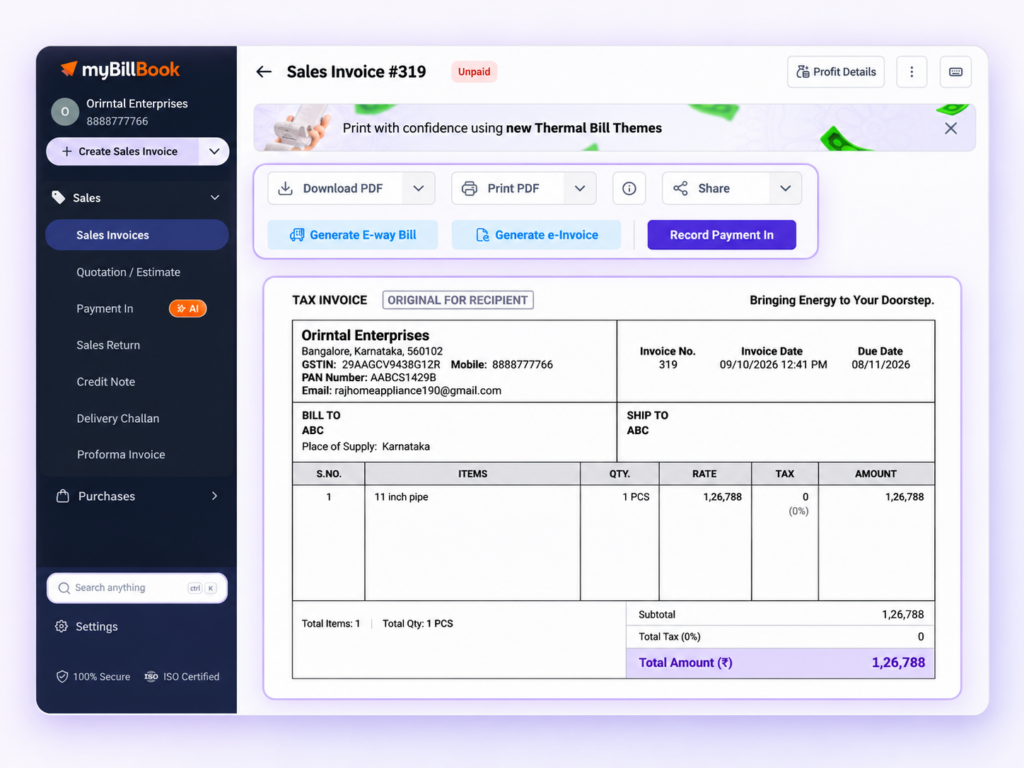
GST Billing & Invoicing in myBillBook
GST Billing & Invoicing in myBillBook is the sales-invoice workflow businesses use to create customer bills with the required party, item, pricing, tax and payment details. The same workflow also supports businesses that need to create non-GST invoices.
Invoicing sits inside the same business billing and invoicing software used for sales, payments and records, you can create the bill, save it, manage it and share the final invoice without moving between separate tools.
How to Create a GST Invoice in myBillBook
Step 1: Open Sales Invoice
Open the Sales Invoice workflow and start a new customer invoice.
Step 2: Select or Add the Party
Choose an existing customer or add a new party with the required business and GST details where applicable.
Step 3: Add Items or Services
Add the products or services being billed, along with quantity, rate and the applicable tax details.
Step 4: Review Discounts and Charges
Apply supported item-level or invoice-level pricing adjustments and review any additional charges used in the transaction.
Step 5: Record Payment Details
Record the amount received or keep the applicable balance pending based on the customer payment status.
Step 6: Save the Invoice
Review the invoice details and save the transaction to create the customer bill.
Step 7: Preview, Print, Download or Share
Open the saved invoice to preview it and use the available print, download and sharing options.
Create GST or Non-GST Customer Invoices
GST Invoices
For GST-registered billing workflows, include the applicable business, party, item and tax information required for the transaction.
Non-GST Invoices
Businesses that do not need GST on a transaction can create customer invoices without adding GST to the bill.
Party GST Details
Store all the customer details in party records so that the required GST information can be used in the supported invoice workflows.
GSTIN Duplicate Warning
On supported platforms, myBillBook can warn you when a GSTIN entered for a new party already exists on another party record, helping you reduce duplicate entries.
Add Customer, Item and Tax Details While Billing
Add Party Details
Select the customer and use the saved party details required for the invoice.
Add Products or Services
Add the items or services being sold, with the quantity and selling rate for each line.
Apply Applicable Tax
Use the tax information configured for the transaction so the invoice can reflect the applicable GST values.
Use HSN/SAC and Other Item Details Where Applicable
Where configured in the item or service record, supported classification and item details can flow into the invoice.
Calculate Tax, Discounts and Invoice Totals
Calculate Invoice Values as You Bill
Once quantity, rate, discount and applicable tax are entered, myBillBook calculates the corresponding invoice totals as part of the billing workflow.
Use Item-Level Discounts
Supported item-level discounts can be set on the item and applied automatically to Sales Invoices, while remaining editable during billing.
Show Discount on MRP
Where enabled and applicable, Discount on MRP can be displayed in the sales-invoice workflow and supported invoice themes.
Record Full, Pending or Split Payments
Record Payment at Invoice Creation
Enter the payment received while creating the invoice or leave the applicable amount pending against the party.
Track the Remaining Balance
When the full invoice amount is not received, the outstanding amount remains connected with the customer record for follow-up and payment tracking.
Split Sales Invoice Payments on Supported Platforms
On supported Web billing flows, a Sales Invoice payment can be split across up to three payment modes such as Cash, UPI or Bank. Each split is recorded separately for payment tracking.
For payment collection and reconciliation workflows beyond invoice creation, see the Online Payments feature and Cash & Bank feature.
Manage Saved Sales Invoices
View Saved Invoice Details
Open a saved invoice to review customer, item, tax, total and payment information.
Edit Where the Workflow Allows
Update invoice information where editing is supported and appropriate for the transaction state.
Keep Payment Status Connected
Use the saved invoice and party records to keep track of received and pending amounts.
Cancel an Invoice Without Losing Its Record
On supported invoice workflows, myBillBook lets you cancel a Sales Invoice instead of simply deleting it. The invoice number remains on record, cancelled invoices can continue to appear in the relevant reporting flow, and the cancelled invoice PDF can still be viewed, downloaded or shared.
For the complete cancellation rules and payment impact, see the Invoice Cancellation feature.
Print, Download and Share Customer Invoices
Preview the saved invoice and use the supported printing workflow when a physical customer bill is required.
Download
Download the saved invoice when you need a digital copy for records or customer sharing.
Share
Use the available sharing options from the invoice workflow to send the completed bill to the customer.
Customise How Customer Invoices Look
Use supported invoice themes and appearance settings when you want to change how the final customer bill looks. This can include supported theme, logo, font, colour and background options depending on the available invoice-customisation workflow.
For the full design and theme workflow, see the Invoice Customization feature.
Connect Invoice Data with GST Reporting
GST transaction data captured through supported invoices feeds into the relevant GST reporting workflows in myBillBook. This feature page focuses on creating and managing invoices rather than explaining GST return filing or reconciliation.
For those reporting workflows, see the GST Reports feature.
Important Things to Know About GST Billing & Invoicing
GST Treatment Depends on the Transaction Setup
The tax shown on an invoice depends on the business, party, item and transaction details entered or configured for that bill.
GST Reports, e-Invoicing and e-Way Bills Are Separate Workflows
The invoice can connect with those downstream capabilities where applicable, but each has separate rules and product flows.
Invoice Design Is Managed Separately
Use the dedicated Invoice Customization workflow for themes and broader visual changes instead of treating this billing page as a design feature.
Where GST Billing & Invoicing Helps
GST-Registered Businesses
Create sales invoices with the applicable customer, item and tax details used in the GST billing workflow.
Non-GST Businesses
Create customer invoices without GST when the business or transaction does not require GST billing.
Credit Sales
Save invoices with pending balances and keep the outstanding amount connected to the customer record.
Counter and Regular Sales
Create the invoice, record payment, then print, download or share the customer bill from the same workflow.
Frequently Asked Questions
Can I create both GST and non-GST invoices in myBillBook?
Yes. myBillBook supports GST billing workflows where tax details are applicable and non-GST invoices for businesses or transactions that do not require GST.
How do I create a GST invoice in myBillBook?
Open Sales Invoice, select or add the customer, add items or services, review quantity, rate, discount and applicable tax, record payment details, then save the invoice.
Can I record a pending payment while creating an invoice?
Yes. You can record the amount received and keep the applicable remaining amount pending against the customer.
Can I split a Sales Invoice payment across multiple modes?
On supported Web billing flows, a Sales Invoice payment can be split across up to three supported payment modes such as Cash, UPI or Bank.
Can I print, download and share a GST invoice from myBillBook?
Yes. After saving the invoice, use the available preview, print, download and sharing options for the customer bill.
Does this feature also handle GST reports, e-Invoices and e-Way Bills?
The Sales Invoice workflow connects with those capabilities where applicable, but GST Reports, e-Invoicing and e-Way Bill generation are separate myBillBook workflows with their own rules and feature pages.