
Invoice Record Control
Invoice Cancellation
Cancel incorrect sales invoices without deleting the record
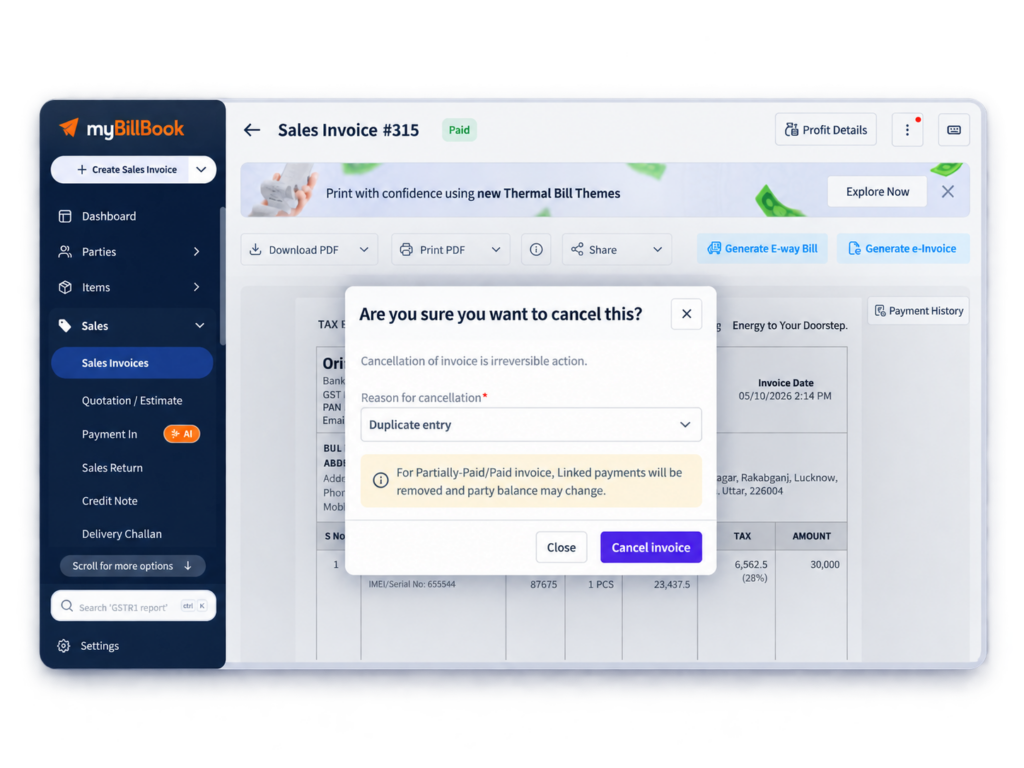
Invoice Cancellation Feature in myBillBook
Invoice Cancellation in myBillBook lets you cancel a wrong or unwanted sales invoice while keeping the invoice record and serial number intact.
After cancellation, the invoice is marked as Cancelled. Stock changes from the original sale are reversed, the invoice is excluded from sales calculations, and the cancellation is recorded in the audit trail.
This is different from deleting an invoice, which removes the record entirely. Cancellation is designed for cases where you need to keep a visible record of the invoice and the reason it was cancelled.
How to Cancel an Invoice in myBillBook
Step 1: Open Sales Invoices
From the myBillBook dashboard, go to Sales and open the sales invoice you want to cancel.
Step 2: Choose Cancel Invoice
Open the invoice options and select Cancel Invoice.
Step 3: Select a Cancellation Reason
Choose a reason such as Order Cancelled, Duplicate Entry, Wrong Entry, or Other.
Step 4: Review the Warning
Check the invoice before confirming. Invoice cancellation is irreversible.
Step 5: Submit the Cancellation
Click Submit. The invoice status changes to Cancelled.
Why Use Invoice Cancellation Instead of Deleting an Invoice?
What Happens After You Cancel a Sales Invoice?
Unpaid Invoice
The invoice is marked Cancelled, stock quantity changes are reversed, and no further Payment-In can be recorded against that invoice.
Paid or Partially Paid Invoice
myBillBook provides cancellation handling based on the payment status. You may be able to cancel with a Credit Note or cancel without a Credit Note, depending on the transaction.
Payment-In Already Recorded
If an active Payment-In is linked separately to the invoice, the Cancel Invoice option can remain disabled until that Payment-In is removed. After removal, the invoice can be cancelled.
Cancelled Invoice PDF
The cancelled invoice can still be downloaded or printed with a visible Cancelled watermark.
How Invoice Cancellation Affects Reports and Records
Sales Summary and P&L
Cancelled invoices are excluded from total sales and profit calculations.
Stock Reports
Stock reductions created by the cancelled sales invoice are reversed.
Party Ledger
Unpaid cancelled invoices are excluded from the party’s outstanding balance. Paid cancellation cases depend on how the payment is handled during cancellation.
Day Book
The transaction is shown as a cancelled sales invoice with nil values.
Audit Trail
The cancellation action is logged so the invoice history remains traceable.
GSTR-1
Cancelled invoices are excluded from GSTR-1 tax calculations and remain relevant to document-issued reporting. If a Credit Note is generated, it is reported through the applicable credit-note section.
When Is Invoice Cancellation Useful?
Duplicate Invoice
Cancel an accidentally created duplicate while keeping the invoice number visible in records.
Wrong Invoice Entry
Cancel an invoice created with incorrect transaction details when you need to preserve the record.
Customer Order Cancelled
Cancel the sales invoice when the underlying customer order is cancelled.
Audit-Friendly Corrections
Keep the original invoice number and cancellation history available instead of removing the transaction completely.
Things to Know About Invoice Cancellation in myBillBook
Sales Invoices Only
The current cancellation flow is available for Sales Invoices. Credit Notes, Proforma Invoices, Quotations, and Purchase Invoices are not covered by this cancellation feature.
Cancellation Is Irreversible
A cancelled invoice cannot be un-cancelled or edited.
Web and Android Support
Invoice cancellation is supported on Web and Android.
iOS View Support
Cancelled invoices can be viewed on iOS, but cancellation cannot currently be initiated from iOS.
Deletion Is Still Different
A cancelled invoice can still be deleted where allowed, but deletion removes the record and is also irreversible.
Frequently Asked Questions
Can a cancelled invoice be restored in myBillBook?
No. Invoice cancellation is irreversible. Create a new invoice or duplicate the cancelled invoice on Web where supported.
What happens to stock when a sales invoice is cancelled?
The stock quantity changes created by the original sales invoice are automatically reversed.
Can I cancel an invoice if Payment-In has already been recorded?
If an active Payment-In is linked separately to the invoice, remove that Payment-In first. The Cancel Invoice option can then become available.
Does a cancelled invoice affect GSTR-1 sales calculations?
Cancelled invoices are excluded from GSTR-1 tax calculations. They remain relevant to document-issued reporting, and any Credit Note generated is reported through the applicable credit-note section.
Is Invoice Cancellation available on mobile?
Invoice cancellation is supported on Android and Web. iOS currently supports viewing cancelled invoices but not initiating cancellation.
What is the difference between cancelling and deleting an invoice?
Cancellation keeps the invoice record and number with a Cancelled status and audit trail. Deletion removes the invoice record entirely.