
Design Invoices Your Way
Customize Invoices
Choose themes, add your logo and colors, and customize invoice details.
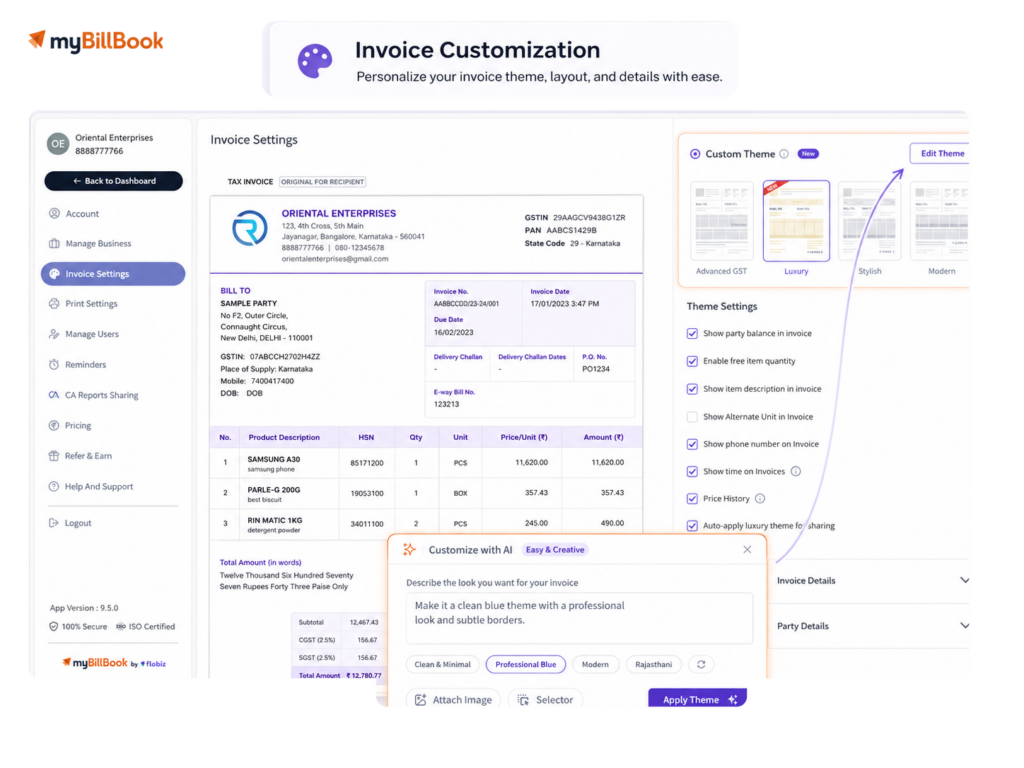
Invoice Customization Feature in myBillBook
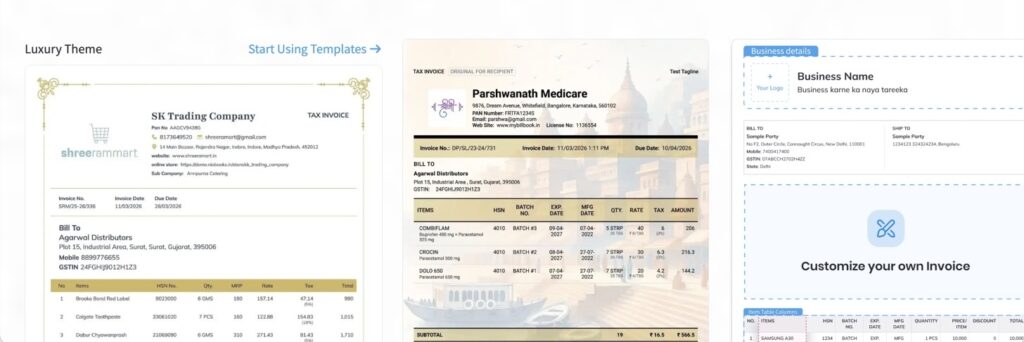
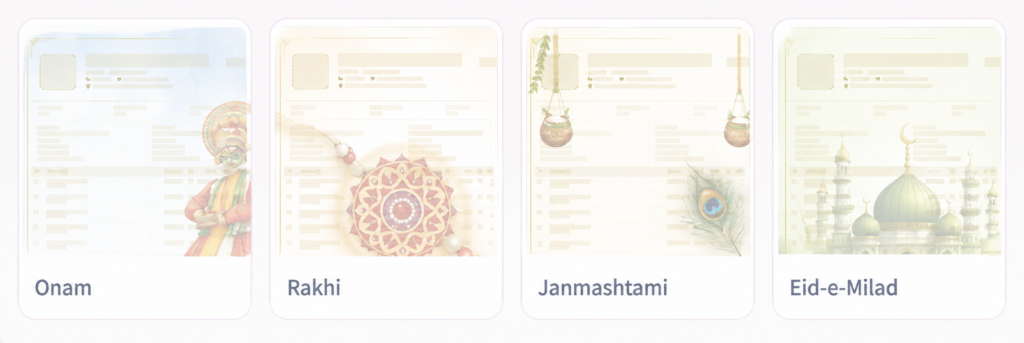
Choose from Ready-Made, Business & Festive Invoice Themes
Choose an invoice theme based on how you bill, print and present invoices to customers. myBillBook provides different layouts for regular billing, GST invoices, compact printing, business-specific requirements and special occasions.
Create a Custom Invoice Theme with AI
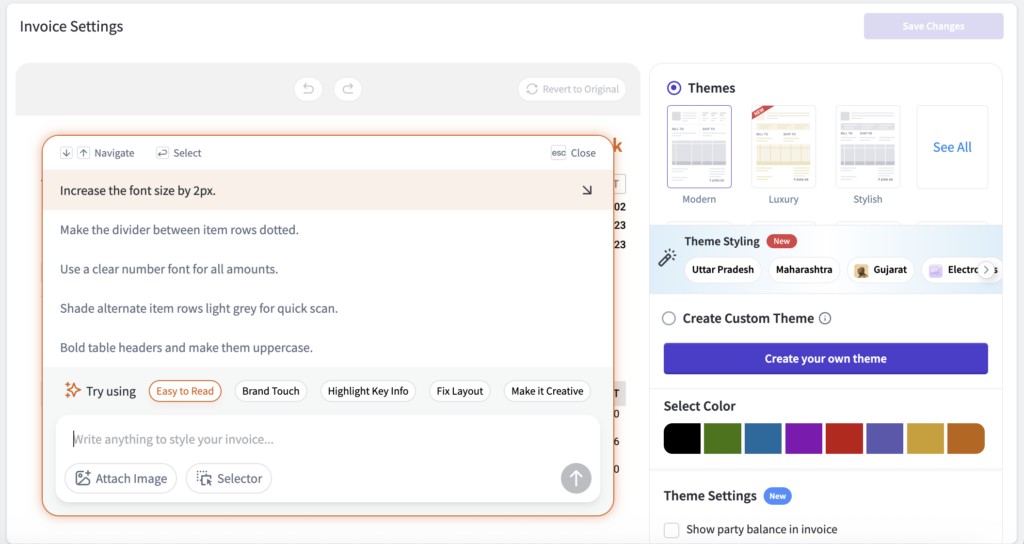
myBillBook’s AI-powered Custom Theme editor lets you customize an invoice theme by describing the changes you want. Instead of manually adjusting every design element, you can use prompts, preset suggestions, image references and selector-based editing to create a custom invoice design.
Prompt-Based Styling
Describe the layout, colors, theme or visual style you want for your invoice.
Preset Suggestions
Start with suggestions such as Easy to Read, Brand Touch, Highlight Key Info or Make it Creative.
Attach Image
Add a reference image to help guide the look and styling of your custom invoice theme.
Selector Editing
Select a specific area of the invoice when you want to customize only that part.
Theme Preview
Review how your customized invoice will appear before saving the theme.
How to Customize Invoices in myBillBook
Step 1: Open Settings
Open Settings from your myBillBook dashboard.
Step 2: Open Invoice Settings
Select Invoice Settings to access the available invoice configuration options.
Step 3: Open Theme & Color
Go to Theme & Color to view available invoice themes and design options.
Step 4: Choose an Invoice Theme
Select a ready-made theme, explore available designs in ThemeStore, or open Custom Theme for more advanced customization.
Step 5: Customize Invoice Details
Update supported colors, branding, invoice fields, item-table information, payment details, terms, signatures and print-related settings.
Step 6: Preview and Save
Check how the customized invoice will appear and save your changes so the updated format can be used for future invoices.
Need to create a new invoice first? Use myBillBook’s online invoice generator to create and share professional, GST-ready invoices.
Customize Invoice Fields While Creating a Bill
myBillBook also lets you customize invoice information directly while creating a bill through Quick Settings. This makes it easier to adjust the information shown on an invoice without leaving the billing workflow.
Quick Settings are available around Invoice Details, Party Details and Item Table, allowing businesses to control supported fields, columns and display options. You can also manage invoice prefix and sequence numbers and create invoice or party custom fields based on your requirements.
Invoice Settings
Control invoice fields, numbering, prefix, sequence and other supported invoice details.
Party Settings
Choose which customer or party information should appear and create additional party fields where required.
Item Table Settings
Control the information and columns shown for products or services on the invoice.
Custom Fields
Add additional invoice or party information specific to your business workflow.
Why Should You Use Invoice Customization?
What Can You Customize on an Invoice?
Business Details
Show or hide your business name, address, phone number, email, GSTIN, logo and other supported business information.
Customer & Party Details
Control customer information such as party details, billing address, shipping address and party balance where applicable.
Invoice Details
Customize details such as invoice title, invoice number, date, due date, PO number, vehicle number and e-Way Bill information.
Item Table
Control displayed item information such as item name, quantity, rate, HSN, GST, batch, expiry, description and supported columns.
Payment Details
Add supported payment information including bank details, payment information and QR codes to make payment collection easier.
Terms & Signatures
Add terms and conditions, notes and signature information based on how your business needs to present invoices.
Custom Fields
Create additional invoice or party fields when your business needs information that is not covered by the standard invoice fields.
Print & Layout
Choose suitable themes, paper formats and supported print settings based on how invoices need to be printed or shared.
Which Businesses Benefit Most from Invoice Customization?
Retail Shops
Benefit from clear item, price, tax, payment, and logo details on everyday customer invoices.
Service Businesses
Add client-specific fields, service descriptions, terms, signatures, and professional branding
Pharmacy & FMCG Businesses
Use item details like batch, expiry, HSN, GST, and product information clearly.
Frequently Asked Questions
How can I customize an invoice in myBillBook?
You can open Invoice Settings to choose themes, change supported design options and control invoice information. myBillBook also provides Quick Settings while creating invoices for supported field and table customization.
Can I customize an invoice template with my logo and business details?
Yes. You can include supported business information such as your logo, business name, GSTIN, address and contact details on invoices.
Can I add custom fields to an invoice in myBillBook?
Yes. myBillBook supports custom fields for additional invoice or party information when your business needs details beyond the standard fields.
Can I customize the item table on my invoice?
Yes. Supported item-table settings allow you to control information and columns such as item details, quantity, rate, HSN, GST and other available fields.
Does myBillBook provide festive invoice themes?
Yes. myBillBook ThemeStore can include festive and seasonal invoice themes for different occasions. Available themes may change as new festivals and special occasions approach.
Can I customize a GST invoice in myBillBook?
Yes. You can choose suitable GST invoice themes and control supported invoice information while retaining the tax and transaction data recorded in the invoice.
Can I preview my customized invoice before saving it?
Yes. On the redesigned web invoice creation screen, the Edit/Preview option lets you check how the final invoice will appear before completing it.
Does invoice customization change the invoice amount or GST calculation?
No. Customization controls how supported information and design elements appear. Invoice amounts, taxes and totals continue to come from the underlying transaction data.