
Track Money Movement
Cash & Bank
Track cash, bank accounts, incoming and outgoing payments, and reconcile transactions from one place in myBillBook.
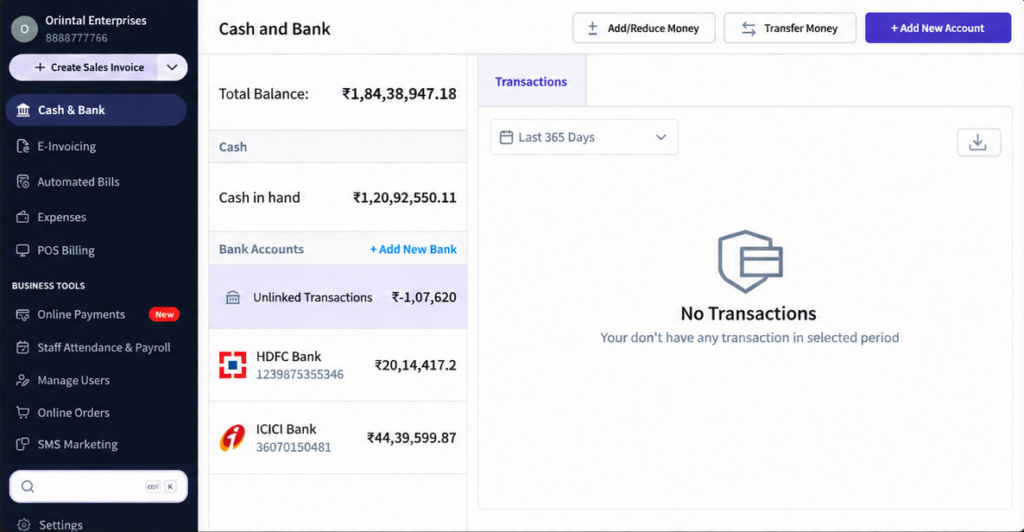
Cash & Bank Feature in myBillBook
The Cash & Bank feature in myBillBook helps you keep track of money moving through cash and bank accounts. You can maintain multiple bank accounts, record money received and paid, review transaction history and reconcile bank transactions from the same business workspace.
Cash & Bank works inside the same billing system you use for sales, purchases and customer payments, the recorded money movement stays connected with your day-to-day business transactions.
How Cash & Bank Works in myBillBook
Step 1: Open Cash & Bank
Go to Cash & Bank from the left menu to view the cash and bank accounts recorded for the business.
Step 2: Select or Add a Bank Account
Open an existing account or add another bank account when your business needs to track money separately across multiple accounts.
Step 3: Record Money Received or Paid
Use Payment In for money received and Payment Out for money paid. Link the entry to a pending transaction where applicable or keep it as an advance when it is not linked.
Step 4: Select the Payment Mode
Record the transaction using the relevant mode such as Cash, UPI, Cheque or Bank Transfer so the money movement is classified correctly.
Step 5: Review Account Transactions
Use the account transaction history to review entries and understand the balance and movement recorded against that cash or bank account.
Step 6: Reconcile Bank Transactions
Where required, use bank-statement reconciliation to compare bank transactions with entries already recorded in myBillBook.
Manage Cash and Multiple Bank Accounts
View Cash and Bank Balances
Use Cash & Bank to review balances and transaction movement recorded against the accounts used by your business.
Add Multiple Bank Accounts
Maintain more than one bank account in myBillBook so transactions from different business accounts can be recorded separately instead of being mixed into one balance.
Keep Bank Details Available for Transactions
Saved bank details can be reused in supported transaction flows, including invoice and payment-related workflows where applicable.
Use Bank Details on Sales Invoices
A saved bank account can be selected for supported invoice workflows. If a UPI ID is configured, the payment information can also support QR-based collection on the invoice. For direct customer collection flows, see the Online Payments feature.
Track Money In and Money Out
Payment In
Record money received from customers and link it to pending invoices when applicable. Unlinked amounts can remain as advances for later adjustment.
Payment Out
Record money paid to suppliers and other parties and keep the outgoing transaction reflected in the relevant cash or bank account.
Different Payment Modes
Classify entries using the available payment mode such as Cash, UPI, Cheque or Bank Transfer so transaction records match how the payment was actually made.
Payment Discounts
Where a settlement discount is applied during collection or payment, myBillBook records the related accounting adjustment separately instead of changing the original invoice.
Reconcile Bank Statement Transactions
Upload a Supported Bank Statement
Use the reconciliation workflow to upload supported statement files such as CSV, XLSX or XLS when you want to compare bank activity with transactions already recorded in myBillBook.
Review Suggested Matches
myBillBook can suggest matches between bank statement entries and recorded transactions, helping reduce the amount of manual searching needed during reconciliation.
Check Confidence Levels
Suggested results can be grouped into confidence levels such as High Confidence, Low Confidence and Unmatched so you can prioritise what needs review.
Confirm, Skip or Match Manually
Review the suggested transaction, confirm the correct match, skip a bank entry when appropriate, or manually select the right invoice or payment when the suggestion is not suitable.
Review Cash & Bank Activity with Business Reports
Review Account Transaction History
Use the transaction history for each account to understand how receipts, payments and adjustments changed the recorded balance over time.
See Payment Activity with Other Business Data
Cash and bank entries form part of the broader accounting view in myBillBook. Use business performance reports to review payment activity alongside sales, purchases and other financial information.
Connect Money Movement with Accounting
For broader ledger, balance and accounting workflows beyond the Cash & Bank feature, myBillBook also supports business accounting workflows.
Important Things to Know About Cash & Bank
Cash & Bank and Online Payments Are Different
Cash & Bank is used to record and review money movement across cash and bank accounts. Online Payments is the separate customer-collection workflow for accepting supported digital payments.
Payment Entries Can Be Linked or Unlinked
A Payment In or Payment Out can be linked to the relevant pending transaction when applicable. An unlinked amount can remain as an advance until it is adjusted later.
Reconciliation Suggestions Should Be Reviewed
Smart reconciliation helps identify likely matches, but users should review the suggested transaction before confirming the accounting entry.
Multiple Bank Accounts Stay Separate
When you maintain multiple bank accounts, record transactions against the correct account so the individual account balances and transaction histories remain meaningful.
Where Cash & Bank Helps
Customer Collections
Record money received against invoices or as advances and keep the receipt reflected in the correct cash or bank account.
Supplier Payments
Record outgoing payments and maintain a transaction history for the account used to make the payment.
Businesses with Multiple Accounts
Keep transactions from different bank accounts separated while reviewing all business money movement inside myBillBook.
Bank Reconciliation
Compare bank statement activity with recorded transactions and resolve unmatched entries before finalising the books.
Frequently Asked Questions
Can I add multiple bank accounts in myBillBook?
Yes. You can maintain multiple bank accounts and record transactions separately against the account used by the business.
What is Payment In in Cash & Bank?
Payment In is used to record money received from customers. It can be linked to pending invoices where applicable or kept as an advance when it is not linked.
What is Payment Out in myBillBook?
Payment Out is used to record money paid to suppliers or other parties and reflect the outgoing amount in the relevant cash or bank account.
Can I reconcile a bank statement in myBillBook?
Yes. The bank-statement reconciliation workflow can use supported CSV, XLSX or XLS files and suggest likely matches against transactions recorded in myBillBook.
Is Cash & Bank the same as Online Payments?
No. Cash & Bank is used to record and review money movement across accounts, while Online Payments is the separate feature for supported customer payment collection.
Can bank details be shown on an invoice?
A saved bank account can be used in supported invoice workflows, and configured UPI details can support payment information such as a QR code where applicable.