
GST Report Access
GST Reports
View GST, HSN, TDS, and TCS reports in one place
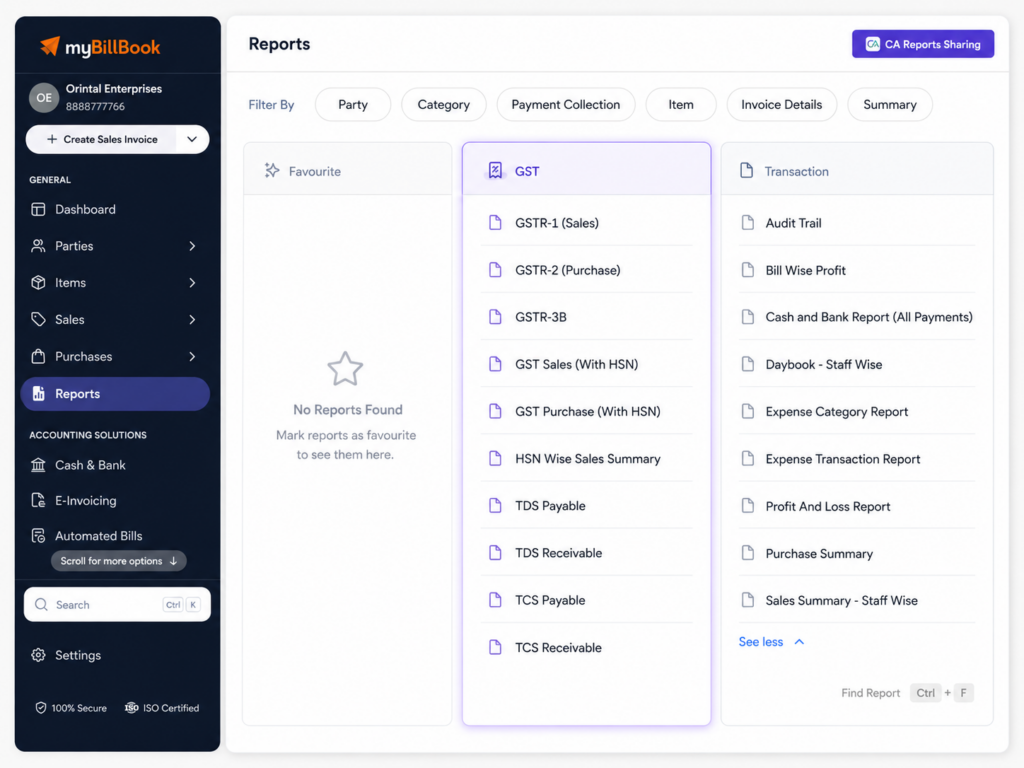
GST Reports Feature in myBillBook
How to Access GST Reports in myBillBook
Step 1: Open Dashboard
Log in to myBillBook and open your business dashboard.
Step 2: Go to Reports
Select Reports from the dashboard menu.
Step 3: Open GST Reports
Go to the GST Reports section.
Step 4: Select a Report
Choose the GST report you want to view.
Step 5: View or Download
Check the report data, apply filters if needed, and download or share it.
Why Should You Use GST Reports?
GST Reports You Can Access in myBillBook
Balance Sheet
View assets, liabilities, and business balance details.
GSTR-1 (Sales)
View sales-related GST data for outward supplies.
GSTR-2 (Purchase)
View purchase-related GST data for inward supplies.
GSTR-3B
View GST summary data used for monthly return preparation.
GST Purchase (With HSN)
View GST purchase details along with HSN-level information.
GST Sales (With HSN)
View GST sales details along with HSN-level information.
HSN Wise Sales Summary
View sales summary grouped by HSN codes.
TDS
View entries where TDS is withheld or deducted.
TCS
View entries where TCS is collected or paid.
What You Can Check in GST Reports
Sales GST Data
Check GST details from recorded sales invoices and related transactions.
Purchase GST Data
Review GST details from purchase invoices and purchase-related entries.
HSN Details
View item-level tax data grouped by HSN where available.
TDS Entries
Check payable and receivable TDS entries from applicable transactions.
TCS Entries
Check payable and receivable TCS entries from applicable transactions.
Business Summary
Use Balance Sheet to view business assets and liabilities.
Who Can Use GST Reports
GST-Registered Businesses
Review sales, purchase, and tax data.
Accountants
Use downloaded reports to review business GST data faster.
Retailers
Check your GST sales and purchase details from the daily billing.
Frequently Asked Questions
Do GST Reports file returns automatically?
No. GST Reports help you check and prepare data, but filing must be reviewed and completed separately.
Why is my GST report showing incomplete data?
GST Reports depend on the invoices, purchases, tax rates, HSN codes, and entries recorded in myBillBook.
Why are some HSN details missing in reports?
HSN details appear only when HSN codes are added correctly to items or vouchers.
Can GST Reports replace accountant review?
No. GST Reports organize business data, but accountant review is still recommended before filing.
Will old invoice changes affect GST Reports?
Yes. Edited, cancelled, or deleted invoice records may affect report values depending on how they are handled.