
Medical Bill Format for Easy Hospital, Clinic & Pharmacy Billing
Create a standard medical bill format to record patient details, consultation charges, medicines, lab tests, treatment details, taxes if applicable, payment mode, and final bill amount.
- Pre-designed formats for accurate medical and hospital billing
- Available in Word, Excel, and PDF for easy editing, printing, and sharing
- Designed for clinics, hospitals, doctors, pharmacies, labs, and medical shops
Powered by myBillBook - India's #1 Billing Software

What is Medical Bill Format?
A medical bill format is a structured template used by hospitals, clinics, doctors, pharmacies, labs, and medical shops to record charges for healthcare services, medicines, tests, treatment, or consultation. It usually includes provider details, patient details, bill number, date, service or medicine details, quantity, charges, discount, payment mode, and final amount.
For GST-registered businesses, GST details such as GSTIN, HSN/SAC code, tax rate, and tax breakup should be added only where GST is applicable.
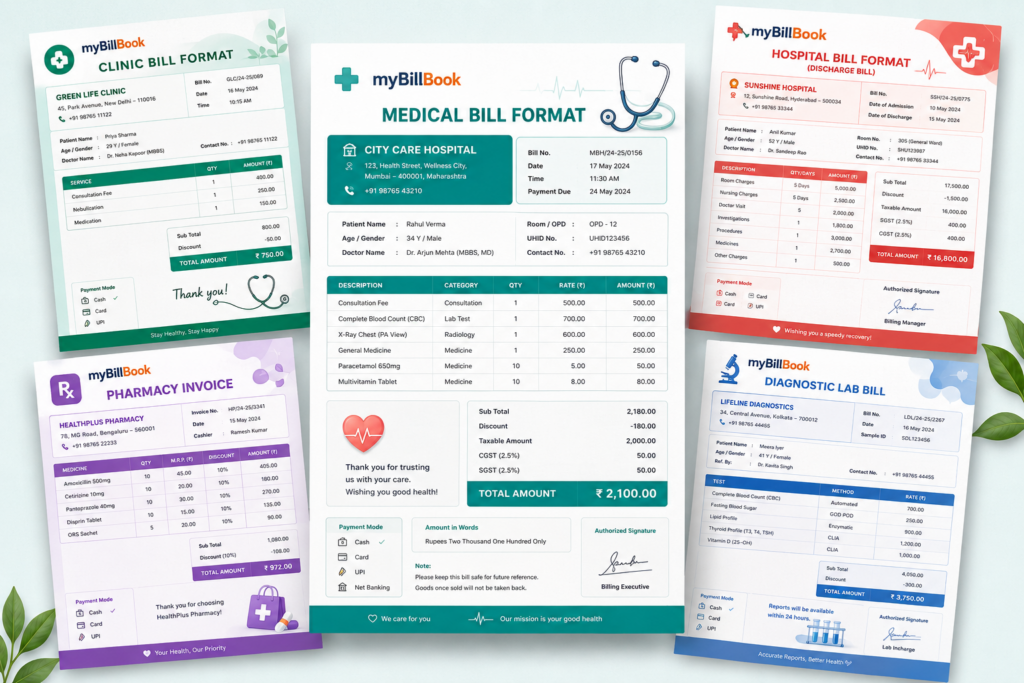
Get Your Free Medical Bill Templates
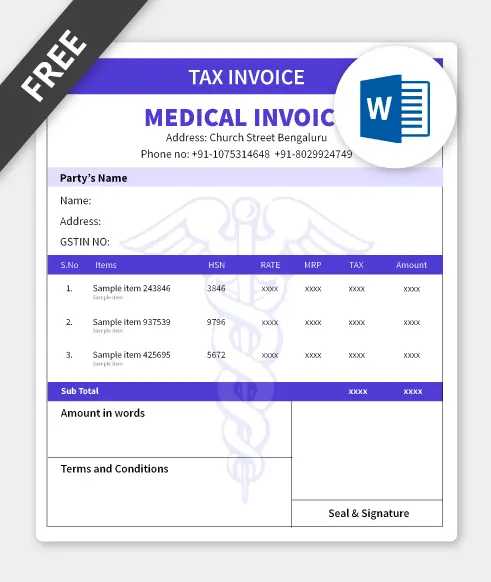
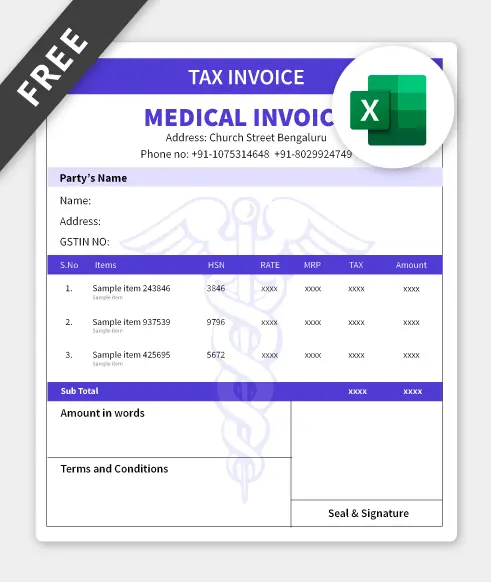
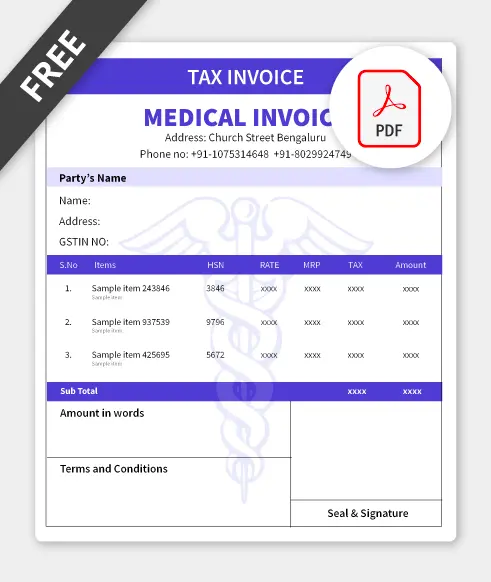
Unlock Premium Medical Bill Templates
Benefits of myBillBook Medical Bill Formats

Accurate Billing
Experience swift and precise medical bill generation with our medical billing software. It automates calculations, ensuring that each bill accurately
Read more
reflects the services provided, diagnosis, treatment details, and associated costs. This streamlined approach expedites the billing process, enabling healthcare providers to create invoices promptly, even during peak patient volumes, while minimising the risk of errors and discrepancies.

Customised Templates
The customised templates feature helps you tailor your medical bills according to your specific needs and branding preferences.
Read more
Create personalised templates with essential details such as patient information, diagnosis, treatment provided, and fees or add your clinic logo, adjust the layout, or incorporate additional fields for specific requirements. The Custom Invoice feature provides you with flexibility and control over the appearance and content of your medical bills.

Patient Database
Securely store and manage patient information that includes demographic details, medical history, treatment plans, and appointment schedules.
Read more
By maintaining a centralized database of patient records, healthcare providers can easily access and update patient information as needed, ensuring continuity of care and accurate documentation.

Medical Inventory Management
Medical inventory management is a comprehensive solution to track and manage medical supplies efficiently.
Read more
With features tailored specifically for healthcare settings, the software allows you to maintain accurate records of inventory levels, track usage, and streamline reordering processes. You can easily monitor stock levels, set reorder points, and receive alerts when supplies are running low.

ISO Certified Billing Platform
With robust encryption protocols and advanced security measures in place, myBillBook ensures that your sensitive information remains
Read more
protected from unauthorized access or data breaches. Whether you’re invoicing patients, managing expenses, or handling tax filings, you can trust myBillBook to safeguard your data and provide a secure environment for your financial transactions.

GST-Compliant Medical Billing
With built-in features designed to adhere to GST regulations, myBillBook enables you to generate medical bills that include
Read more
all necessary GST-related details. This includes GSTIN numbers, HSN/SAC codes for medical services, and accurate calculation of GST amounts. This helps you maintain compliance and avoid penalties.
Understanding Your Medical Bill: A Quick Guide
A medical invoice format typically includes the hospital or the pharmacy’s name, address, and contact details, empty fields to include the details of the patient, diagnosis, prescribed or administered medications, services provided, tests prescribed or done, etc.
A medical bill typically acts as a record for patient information which would be maintained for current and future use. Medical invoice templates are utilised by any doctor’s office, hospital, clinic, or healthcare organisation to show patients the cost they have incurred from the medical consultation.
Need for Medical Invoice Format
A medical bill format is essential to quickly create bills in a fast-paced business environment. Manually creating medical invoices may not be the right idea as it makes medical services look unprofessional and is also time-consuming. You must either have a medical bill format or have medical billing software that can accurately generate bills on time.
Sample Medical Bill Format
Every healthcare organisation has its own medical bill format. However, a sample format is provided here, which includes the basic and important details that must be included in every medical bill. It would help you understand the key fields that must be created in a hospital bill format.
For hospitals that handle regular patient billing, discharge summaries, consultation charges, lab tests, medicines, and GST-compliant invoices, using a dedicated hospital billing software can make the billing process faster, more accurate, and easier to manage.
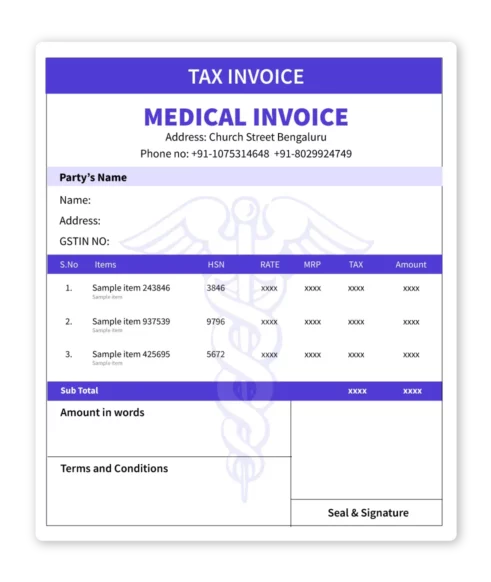
Medical Bill Format – Fields to Include
The following details must be included in a hospital bill format to ensure every detail is covered.
- Provider Details:
- Clinic/Hospital Name & Logo
- Full Address & Contact Information (Phone, Email)
- GST Identification Number (GSTIN) (if applicable)
- Patient Details:
- Full Name & Address
- Patient ID/Unique Identifier
- Contact Information
- Service Details:
- Date of Service/Consultation
- Detailed Description of Services: Consultation fees, procedures performed, lab tests, specific treatments.
- Medication & Product Details: Name, dosage, quantity, and unit price of any dispensed items.
- Service Codes (e.g., CPT, ICD-10): (If your practice uses standardized coding systems).
- Financial Details:
- Unit Price for each service/item
- Quantity of services/items
- Total Charge per item/service
- Subtotal Amount
- Applicable Taxes (e.g., GST) clearly itemized
- Discounts (if any)
- Final Amount Due
- Invoice Details:
- Unique Invoice Number
- Date of Invoice Issuance
- Payment due date (if applicable)
- Payment Information:
- Accepted Payment Methods (Cash, Card, UPI, etc.)
- Bank details for online transfers
Medical Bill Template in Different Formats – Word, Excel, PDF
Medical Bill Format in Word
Word is one of the easy-to-work tools available to everyone. Using Word, you can create a medical bill format that would be suitable for your organisation. Simply take a blank Word document, insert the required fields that are mentioned above, and once you’re sure, save the document. Whenever you wish to create a medical invoice format, make a copy of the main document, fill out the details in the fields, save the doc and take a printout.
You can also use the free template in Word available on the page. You can also customise the template to match your brand image and include other required fields as per your needs.
Medical Bill Format in Excel
After Word, Excel is another tool that helps you to create medical bill formats without much effort. With pre-defined rows and columns, Excel allows you to create medical invoices easily. Just highlight the rows and columns you need, enter the field names and save the sheet. Whenever you wish to create an Excel invoice template, make a copy of the main document, fill out the details in the fields and take a printout.
You can also use the free medical template in Excel, which is available on the page. Customise the format to match your brand image and include other required fields as per your needs.
Medical Bill Format in PDF
A PDF version of the medical bill template is available on the page and is free to download. However, the PDF version is not editable and requires you to download and use it manually that is to fill it using a pen. In case, you require an online PDF medical invoice template, you can use either the Word or Excel templates available on the page, fill in the details and download them as PDF files. The advantage of online PDF documents is that once saved, they cannot be edited. Hence, before saving make sure all the entered information is accurate.
Benefits of Using Downloadable Medical Bill Formats
- You can use them whenever you want. You just have to download the medical bill format to your computer and use it for all medical invoices.
- Medical invoice templates are free to use. You do not have to pay for it.
- An electronic medical invoice template always looks professional compared to a hand-written copy.
- Saves your time while billing the patients and also makes the invoices accurate and consistent.
- You can take a printout of the medical invoice and hand it over to the patients, or you can even mail the invoice.
However, choosing the right downloadable medical bill format from a trusted source like myBillBook is essential for accurate and hassle free medical billing.
Drawbacks of Downloadable Medical Invoice Formats
Despite the above discussed benefits there are few significant drawbacks of using free medical invoice formats that are available online. Some of them include –
-
- Limited customisation: Most templates are predefined and are difficult to customise as per your requirements. Even when they allow customisations, formats created in Word are little tricky to edit. For instance, if you insert or delete a particular field the rest of the fields might get disturbed forcing you to edit the entire document.
- Manual entry & errors: The free medical bill templates require you to enter the data manually. The patient information, billing codes, rates, taxes, discounts, etc., need to be added by you or your staff which might increase the risk of errors, leading to billing disputes and delays in payment.
- Inconsistent medical bills: The billing system in a health care organisation will be handled by different staff members who might use the templates inconsistently. This might lead to variability in billing documents and potential confusion for patients and insurance companies.
- Not Integrated with other systems: The medical bills that are created manually are not integrated with other electronic health records or enterprise management systems. This requires you to re-enter the entire billing information thus increases the workload.
- Data security issues: When you create medical bills using the free templates, you would save the created files on local devices or insecure cloud services. This poses significant security risks, including data breaches.
- Others issues: Besides these major drawbacks of using free formats for medical invoices, you will also face other issues like scalability, compliance, productivity, no business analytics, discrepancies and outdated billing practices.
While downloadable medical invoice formats are helpful for small practices or occasional use, the drawbacks of using them outweigh the merits. These drawbacks can be can mitigated by transitioning to a specialised medical billing software like myBillBook for all you medical billing needs. Listed here are the benefits of using myBillBook medical billing software instead of medical invoice formats.
Benefits of using myBillbook to Generate Medical Bills
A medical bill generator helps clinics, hospitals, pharmacies, and medical shops create bills faster by auto-calculating totals, taxes where applicable, discounts, paid amount, and balance amount.
myBillbook is a comprehensive billing and accounting software that helps medical organisations create medical invoices more efficiently. Listed below are the features offered by myBillBook invoicing software.
- myBillbook helps you calculate GSTs, due dates, discounts, total price, and other values in seconds.
- Users can search for medical products by barcodes and names.
- Both the cash received from the patient, and the outstanding payment will be displayed on the invoices.
- The billing staff can also add a signature to the invoice before sending the invoice to the patient.
- myBillbook is a cloud-based software that is compatible with the web app, windows, and android.
- It can support multiple languages like English, Hindi, Gujarati, and Tamil.
- Using myBillbook, you can create and share bills on mobile through Whatsapp anytime.
- You can also collect payment through UPI and can add and manage staff and their activities.
- It also offers 24/7 customer support in case you have any queries or requests to make.
Common Questions About myBillBook & Medical Billing
1.What is a medical bill format and why is it important for healthcare providers?
A medical bill format is a structured document used by healthcare professionals and facilities to detail services, procedures, medications, and products provided to a patient, along with their charges. It's crucial for accurate financial records, transparent patient communication, efficient insurance claims, and ensuring compliance with tax laws like GST.
2. Where can I download free medical bill formats in Word, Excel, and PDF?
You can download professional, ready-to-use medical bill templates in Word, Excel, and PDF formats directly from our website in the section above. These templates provide a convenient starting point for your billing needs.
3. How do I create a medical bill format for my clinic or hospital?
You can create a medical bill using downloadable templates (like those we provide in Word or Excel), by using an online bill generator, or by utilizing specialized medical billing software like MyBillBook, which automates the process and ensures accuracy.
4. Is it mandatory to include GST details in a medical bill in India?
Yes, if your medical practice is registered under GST (Goods and Services Tax) in India and provides services or sells products that are subject to GST, it is mandatory to issue GST-compliant medical bills with your GSTIN, HSN/SAC codes, and clearly itemized tax components.
5. What is the difference between a medical bill and a medical invoice?
The terms "medical bill" and "medical invoice" are often used interchangeably. Both refer to the document that outlines services provided and the amount owed by the patient or their insurance company.
6. Can I customize the free medical bill templates with my clinic's logo and details?
Yes, our free downloadable templates in Word and Excel are designed to be easily customizable. You can add your clinic's logo, contact information, and specific service details to personalize them.
7. What are the limitations of using free downloadable medical bill templates?
While convenient, free templates often lack automation, leading to manual entry errors, no real-time inventory tracking, limited data security, and difficulty in managing patient records or complex GST calculations automatically.
8. How can medical billing software like myBillBook improve my billing process compared to manual methods?
Medical billing software like myBillBook can improve billing by reducing manual entry, auto-calculating totals and taxes where applicable, storing patient and billing records, managing inventory, and helping clinics or medical shops create and share bills faster.
9. Does myBillBook help with managing patient records and history?
myBillBook includes a robust patient management system that allows you to securely store and access patient contact details, billing history, treatment records, and more, all in one centralized database.
Know More About Bill Formats