
Inventory Management for Manufacturing
Track raw materials, components, partly processed stock and finished goods with better visibility across purchases, godowns, stock movements, batches, serial numbers and reorder levels using myBillBook.
Inventory control built for day-to-day manufacturing stock

What Is Inventory Management for Manufacturing?
Inventory management for manufacturing is the process of tracking materials and goods as they move from purchase and storage through production-related handling to finished stock and sale.
Manufacturing inventory usually includes raw materials and components, work-in-process or partly processed items, and finished goods. The goal is to keep enough material available for operations without overstocking, losing traceability or tying up unnecessary working capital.
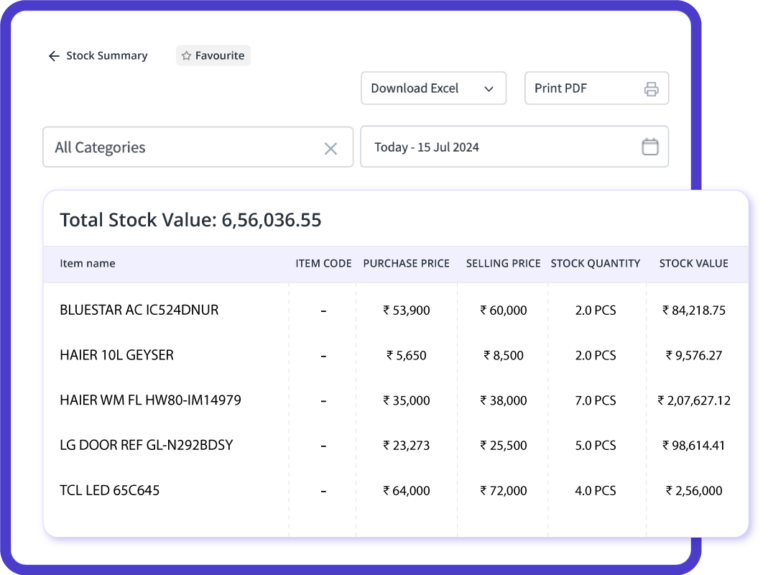
Why Manufacturing Inventory Needs Different Controls
Unlike a simple buy-and-sell business, manufacturers may need visibility across materials, intermediate stock and finished goods at the same time. A clear manufacturing stock management process reduces avoidable shortages, excess stock and manual reconciliation.
Manufacturing Inventory Features in myBillBook
Use practical inventory controls to keep material and finished-goods stock easier to track.
How to Set Up Manufacturing Inventory in myBillBook
A simple stock-first workflow for small and mid-sized manufacturers.
Step 1: Create Separate Item Records
Add raw materials, components, intermediate items and finished products as separate inventory items. Include opening quantity, unit, purchase/sale rate and relevant tax or item details where required.
Step 2: Import Existing Stock
Use supported bulk import workflows for large item lists instead of recreating every material manually.
Step 3: Record Purchases and Stock Inward
Enter supplier purchases so received material quantities are reflected in inventory records. Maintain batch or serial details where applicable.
Step 4: Set Reorder Levels
Define minimum stock levels for critical raw materials and fast-moving components so shortages are easier to identify before they interrupt regular work.
Step 5: Track Location-Wise Movement
Use supported godown transfers when stock moves between stores, warehouses or branches, keeping location-wise quantities clearer.
Step 6: Review Stock and Replenishment Reports
Use inventory, purchase and item-movement reports to identify shortages, slow-moving stock, excess inventory and the next purchase requirement.
Types of Manufacturing Inventory to Track
| Inventory type | What it includes | Why it matters |
|---|---|---|
| Raw materials & components | Inputs purchased for making a product. | Shortages can delay production; overstock can block working capital. |
| Work in process / intermediate stock | Items that are partly processed or awaiting the next stage. | Separate records help avoid confusing unfinished quantities with sale-ready stock. |
| Finished goods | Completed products ready for storage, dispatch or sale. | Clear finished-stock visibility supports dispatch and replenishment decisions. |
| Consumables, spares & packing material | Operational supplies used in manufacturing or packing. | These smaller items can still cause disruption if they unexpectedly run out. |
How myBillBook Helps Manufacturers Manage Inventory Better
myBillBook helps manufacturing businesses keep better control over raw materials, components, intermediate stock and finished goods. It brings day-to-day stock tracking, purchases, godown management and inventory reports into one system, making it easier to know what is available and what needs attention.
Track Raw Materials and Finished Goods Separately
Maintain separate inventory records for raw materials, components, partly processed items and finished products. This gives manufacturers clearer visibility into available stock and reduces confusion between material meant for production and goods ready for sale.
Prevent Stock Shortages with Reorder Visibility
Set minimum stock levels for important materials and identify low-stock items before they run out. This helps manufacturers plan purchases on time and reduces the risk of production delays caused by missing components or raw materials.
Manage Stock Across Godowns and Locations
Track inventory stored across different godowns or storage locations and record stock transfers when materials move between them. This gives teams a clearer picture of where stock is available and helps avoid unnecessary duplicate purchases.
Who Is This Manufacturing Inventory System For?
myBillBook can suit small and mid-sized manufacturers that need stronger stock control without immediately moving to a complex manufacturing ERP. Typical use cases include:
- Component and spare-parts manufacturers managing many SKUs
- Furniture, fabrication and hardware businesses tracking raw materials and finished items
- Packaged food or FMCG manufacturers that need batch-oriented stock visibility
- Electrical and electronics manufacturers using serialised or high-value inventory
- Textile and garment manufacturers managing material, accessory and finished-stock records
- Growing SMEs with more than one godown or storage location
Need invoicing, tax billing, job-work and broader manufacturer workflows too? See our dedicated Billing Software for Manufacturers page. This page is intentionally focused on inventory management.
Frequently Asked Questions
What is a manufacturing inventory management system?
A manufacturing inventory management system helps a business track raw materials, components, intermediate stock and finished goods. It supports stock visibility, replenishment, location tracking and inventory reporting so materials are available when needed without maintaining everything in separate spreadsheets.
Can myBillBook track raw materials and finished goods?
Yes. Manufacturers can maintain separate item-wise inventory records for raw materials, components and finished goods so quantities are easier to monitor across purchases, stock movements and sales-related transactions.
Can myBillBook manage work-in-process inventory?
myBillBook can be used to keep separate records for partly processed or intermediate items. If a business needs automated work-order-level WIP costing, routing, production scheduling or material consumption against production orders, a dedicated MRP or manufacturing ERP may be more suitable.
Does myBillBook support multiple warehouses or godowns?
Yes. Multi-godown inventory is available on applicable plans. Businesses can view location-wise stock and transfer inventory between supported godowns.
Can manufacturers track batches and serial numbers?
Yes. myBillBook supports batch-wise inventory for applicable stock and serial-number tracking for items that need unit-level identification.
Does myBillBook provide bill of materials management?
A bill of materials defines the components and quantities needed to make a finished product. This page focuses on inventory capabilities that are clearly supported in myBillBook. If the process requires automated multi-level BOM explosion, production orders or MRP planning, confirm current feature availability and assess whether a specialised manufacturing system is required.
What is the difference between manufacturing inventory software and billing software for manufacturers?
Manufacturing inventory software focuses on material quantities, locations, stock movement, purchases, batches, serial numbers and replenishment. Billing software for manufacturers covers invoicing and related commercial workflows.
Is myBillBook suitable for small manufacturing businesses?
It can suit small and growing manufacturers whose main requirement is practical inventory control, purchases, godowns, barcode handling, batch or serial tracking and reports without the complexity of a full manufacturing ERP.
How should I choose inventory management software for a manufacturing business?
Start with stock complexity: number of materials, locations, batch or serial requirements, purchase frequency, reorder needs and reporting expectations. Then decide whether you need inventory control only or advanced production functions such as BOM explosion, work orders, routing and MRP.