
GST Payment Challan - Form GST PMT-06
A GST payment challan (Form GST PMT-06) lets taxpayers deposit GST, interest, fees and other applicable dues through the government portal. Learn how to generate a GST challan, make GST challan payment online, download the receipt, track CPIN/CIN and use PMT-06 under QRMP.
If you manage invoices and taxes for a small business, GST billing software can help keep billing records organised before making payments on the GST portal.
What Is a GST Payment Challan (Form GST PMT-06)?
A GST payment challan, officially Form GST PMT-06, is generated on the GST common portal to deposit tax, interest, penalty, fees and other applicable amounts. Rule 87(2) of the CGST Rules covers generating the challan and specifying amounts by payment head. A generated challan is not proof of payment: the payment must be completed and confirmed. The deposit is credited to the electronic cash ledger; separately, the taxpayer must offset the relevant liability when required. For a broader foundation, read our Goods and Services Tax guide.
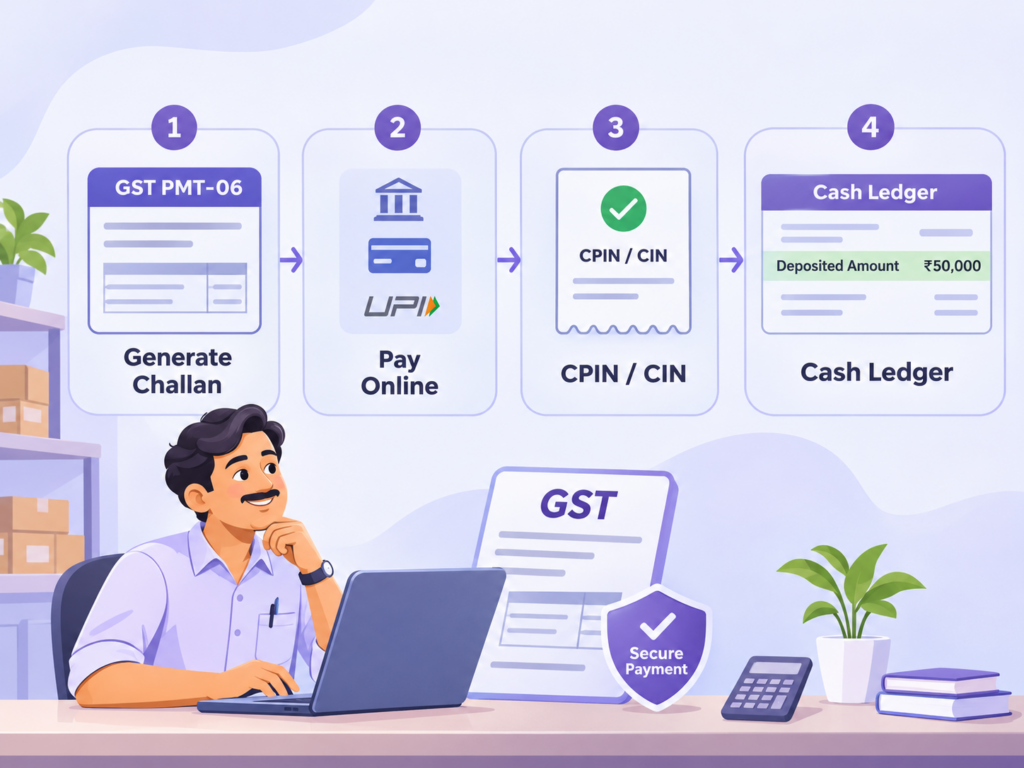
GST Payment Challan at a Glance
| Point | Details |
|---|---|
| Form | GST PMT-06 |
| Rule | CGST Rule 87(2) |
| Where generated | Official GST portal (gst.gov.in) |
| Purpose | Deposit applicable tax, interest, penalty, fee and other amounts |
| Challan validity | Generally 15 days |
| CPIN | Reference identifying the generated challan |
| CIN | Reference associated with payment confirmation |
| Deposit reflected in | Electronic cash ledger (PMT-05) |
| QRMP | PMT-06 also used for applicable deposits in the quarter’s first two months |
How to Generate a GST Payment Challan Online
- Visit gst.gov.in and log in to the taxpayer account.
- Go to Services → Payments → Create Challan.
- Select the relevant payment reason or option, if shown.
- Enter amounts carefully under the relevant GST heads.
- Select an available payment method and review the entries.
- Generate the challan and save its CPIN.
- Complete payment before the challan expires.
Some payment and challan-generation functions are also available before logging in, subject to taxpayer and transaction requirements. Do not confuse challan creation with successfully depositing money. For a wider explanation of GST payment online, see the existing guide.
How to Pay a GST Challan Online
- Open the generated challan and confirm the GSTIN, amount and tax head.
- Choose a payment option currently supported by the GST portal and the participating bank or payment provider.
- Complete the authorisation on the relevant payment interface.
- Return to the portal and verify the transaction status.
- Save the payment confirmation and any CIN or bank reference.
- Check that the deposit appears in the electronic cash ledger.
Available methods may include internet banking, UPI, cards, NEFT/RTGS and authorised-bank over-the-counter payment, depending on portal availability and applicable restrictions. Do not assume every method is offered for every transaction.
How to Download or Reprint a GST Payment Challan
- Log in to the GST portal.
- Open Services → Payments and locate the challan-history or payment-records option.
- Search for the relevant challan using its available identifiers and dates.
- Open the record and use the applicable view, download or print action.
Keep the generated challan separate from the successful payment receipt. The former is a payment instruction; the latter evidences completion of payment.
How to Check GST Challan Payment Status
Use the GST portal’s Track Payment Status facility under Services → Payments, where available. Enter the requested reference details (such as GSTIN or CPIN) and follow the portal verification process. Confirm successful payment against the electronic cash ledger.
| Reference | Meaning | What it shows |
|---|---|---|
| CPIN | Common Portal Identification Number | Identifies the generated challan; not itself proof of payment |
| CIN | Challan Identification Number | Used for confirmation of successful payment through banking channels |
| BRN | Bank Reference Number | Helps trace the bank-side transaction |
Form GST PMT-06 Format and Rule 87(2)
Form GST PMT-06 records the taxpayer’s relevant information and the deposit allocation across tax heads such as IGST, CGST, SGST/UTGST and cess, and payment categories such as tax, interest, penalty, fee and other permitted amounts.
Example: A business depositing ₹10,000 under CGST tax and ₹10,000 under SGST tax must enter each sum under the corresponding head. Allocating the whole amount to one head can complicate later utilisation or correction.
Rule 87(2) establishes the challan-generation mechanism for deposits through the GST common portal. Always check the payment amounts and intended allocation before generating or paying the challan.
GST Challan Validity: Is It the Same as the Payment Deadline?
A generated PMT-06 challan is normally valid for 15 days. If it expires without payment, a fresh challan generally needs to be created. This is not an extension of a GST payment or return deadline. A taxpayer must still comply with the applicable statutory date.
For related deadlines, see the GST filing calendar and the GSTR-3B filing guide.
Form GST PMT-06 for QRMP Taxpayers
Under the QRMP scheme under GST, eligible taxpayers generally deposit applicable GST for each of the quarter’s first two months using PMT-06 by the 25th of the following month, subject to the prescribed rules.
| October–December 2026 period | Standard action / date |
|---|---|
| October 2026 | PMT-06, where required, by 25 November 2026 |
| November 2026 | PMT-06, where required, by 25 December 2026 |
| December 2026 | Settle remaining quarterly liability through GSTR-3B due 22 or 24 January 2027 depending on state/UT |
Fixed-sum method: What is a 35% challan?
Where the previous quarter was filed quarterly, the fixed-sum challan is generally calculated using 35% of the prior quarter’s cash tax paid, with the prescribed tax-head rules. If that cash tax amounted to ₹40,000, the illustrative 35% amount is ₹14,000. When previous returns were monthly, the portal uses the cash tax paid in the preceding quarter’s last month instead.
Self-assessment method
Alternatively, taxpayers assess the actual liability for the month after considering eligible input tax credit, applicable adjustments and cash-ledger balances. The prescribed rules determine whether and how much additional payment is required.
Electronic Cash Ledger: Deposit vs Liability Offset
A successful PMT-06 payment normally credits money to the electronic cash ledger (Form GST PMT-05). The deposit is then available for permitted utilisation. This is different from actually offsetting tax liabilities and filing GSTR-3B. Do not treat an unutilised cash deposit as proof that a return has been filed.
If funds are deposited under the wrong head, investigate permitted transfers through Form GST PMT-09 and verify the actual ledger balances before making another deposit.
GST Challan Payment Issues and Common Mistakes
Payment debited but not reflected
Check the payment status and ledger before retrying. Keep the CPIN, bank reference and proof of debit. For unresolved discrepancies follow the GST portal’s grievance route, including PMT-07 where applicable.
Challan expired before payment
Generate a fresh challan and confirm that no earlier payment succeeded.
Wrong tax head selected
Check whether a permitted cash-ledger transfer via PMT-09 is appropriate. Do not assume the portal automatically corrects allocations.
Confusing CPIN with payment confirmation
CPIN identifies a generated challan; verify successful payment and ledger credit before considering the deposit complete.
Assuming challan payment files the return
Separate the challan deposit, liability-offset and return-filing steps in your compliance checklist.
How myBillBook Helps Organise Records for GST Payments
Accurate sales invoices, purchase entries and GST figures help businesses review tax liabilities before creating a payment challan. With GST billing software, retailers, distributors and other small businesses can keep transaction information organised and access available GST reports for return preparation.
For businesses maintaining regular purchase records, the purchase invoice feature can help keep entries together. myBillBook does not replace the authorised GST portal process for PMT-06 payment or statutory return filing.
Frequently Asked Questions
Is GST PMT-06 only for QRMP?
No. PMT-06 is the general challan for GST deposits and is also used for applicable monthly QRMP payments.
How can I generate a GST challan online?
On gst.gov.in, use Services > Payments > Create Challan, fill in the relevant heads, choose a payment mode and generate the challan.
How long is GST PMT-06 valid?
A generated challan is generally valid for 15 days. Its validity does not extend statutory tax-payment deadlines.
What is the difference between CPIN and CIN?
CPIN identifies the generated challan; CIN is associated with confirmation of payment through the banking system.
How do I download a GST payment challan?
Use the GST portal's payment or challan history to locate, view and download the relevant challan or receipt.
Can GST challan payment be made without login?
Certain pre-login challan workflows are available on the GST portal, subject to the transaction and taxpayer details required.
What is the QRMP PMT-06 payment due date?
The standard deadline is the 25th of the following month for the quarter's first two months, where a deposit is required.
Does generating PMT-06 mean GST has been paid?
No. A generated challan is not proof of successful payment. Verify bank confirmation and credit in the electronic cash ledger.
Does paying a GST challan file GSTR-3B?
No. Cash-ledger deposit and the required GSTR-3B liability-offset and filing processes are separate.