

GST e-Invoice Customer Care Number & Helpdesk
GST e-Invoice Helpdesk Number: 1800-103-4786
Taxpayers facing technical issues with the GST e-Invoice system can contact the GSTN toll-free helpdesk at 1800-103-4786 or raise and track a complaint through the GST Self-Service Portal. For problems specific to an Invoice Registration Portal (IRP), use the support channel for the IRP through which the e-Invoice was reported.
Last verified: 31 August 2026
Official e-Invoice Support Channels
GST Self-Service Portal
Use the GST Self-Service Portal to report technical issues, lodge complaints, upload supporting screenshots, and track existing support tickets.
Official Website: https://selfservice.gstsystem.in/
NIC e-Invoice 1 Portal
Use the NIC e-Invoice portal for e-Invoice registration, login, invoice reporting, IRN-related information, utilities, masters, downloads, and NIC-specific e-Invoice resources.
Official Website: http://einvoice1.gst.gov.in/
NIC e-Invoice API Developer Portal
Businesses, GSPs, ERPs and developers working with NIC e-Invoice APIs can use the official API Developer Portal for API specifications, validations, sample payloads, error lists, sandbox testing and release updates.
Official Website: http://einv-apisandbox.nic.in/
Which e-Invoice Support Channel Should You Use?
| Issue | Where to Get Help |
|---|---|
| e-Invoice portal login or registration issue | NIC e-Invoice Portal / GST Helpdesk |
| IRN generation error | IRP through which the invoice is being reported |
| e-Invoice enablement issue | GST Self-Service Portal |
| GSTIN validation issue | GST Self-Service Portal or relevant IRP |
| IRN cancellation issue | Relevant IRP |
| e-Invoice not reflecting in GSTR-1 | GST Self-Service Portal |
| QR code or signed invoice verification issue | Relevant IRP |
| NIC API error or integration issue | NIC e-Invoice API Developer Portal |
| General GST portal technical issue | GST Self-Service Portal / GST Helpdesk |
Different Invoice Registration Portals may provide their own support channels. If the error is specific to the IRP through which the invoice was reported, use that IRP’s support system first. For GST system-level technical issues, taxpayers can raise a ticket through the GST Self-Service Portal.
What Details Should You Keep Ready Before Contacting the e-Invoice Helpdesk?
Providing complete issue details can help the support team identify the problem more quickly. The information required will depend on the type of e-Invoice issue you are facing.
- GSTIN of the affected business
- Invoice Registration Portal (IRP) being used
- Issue category, such as login, registration, IRN generation, cancellation, API, GSTIN validation or GSTR-1
- Exact error code
- Complete error message
- Date and approximate time when the error occurred
- Invoice number, where relevant
- IRN, where already generated
- Screenshot of the error
- Browser/device details for portal-related problems
- API name and endpoint for API-related issues
- Relevant request and response details for API troubleshooting
Important: Never share your password, OTP, API secret, authentication token or other login credentials in a complaint, screenshot or support message. Redact sensitive credentials before attaching files.
Common e-Invoice Issues That May Require Helpdesk Support
- Unable to register or log in to the e-Invoice portal
- GSTIN eligible for e-Invoicing but not enabled
- IRN not generated despite submitting invoice details
- Error while cancelling an IRN
- Invalid GSTIN or HSN-related validation errors
- e-Invoice details not appearing as expected in GSTR-1
- Signed QR code or invoice verification issue
- Bulk invoice upload errors
- API authentication or validation errors
- Portal or system technical errors
How to Raise an e-Invoice Complaint Online
To avail of the self-help, do the following:
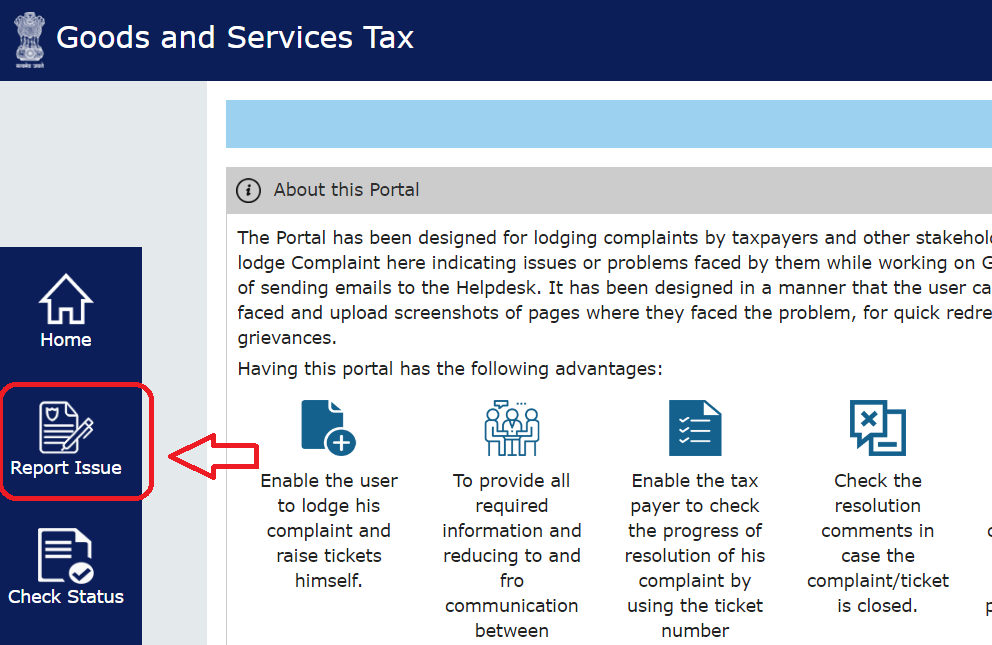
1. Navigate to https://selfservice.gstsystem.in and click on “Report Issue”
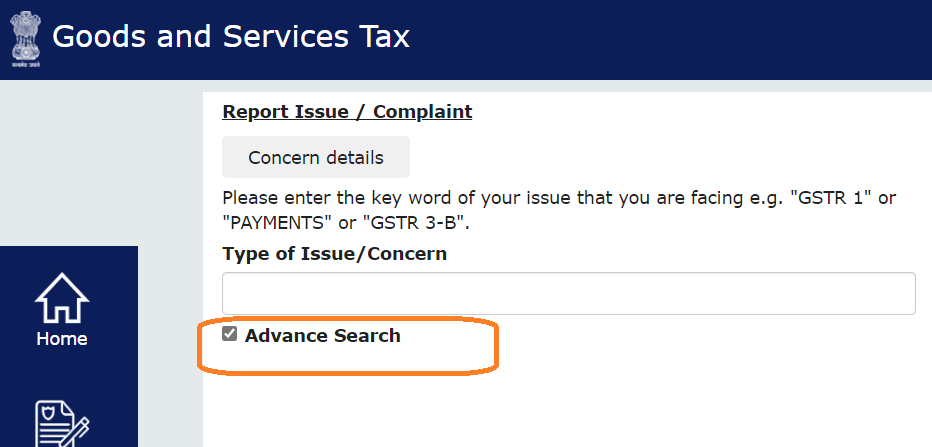
2. Select “Advance Search”.
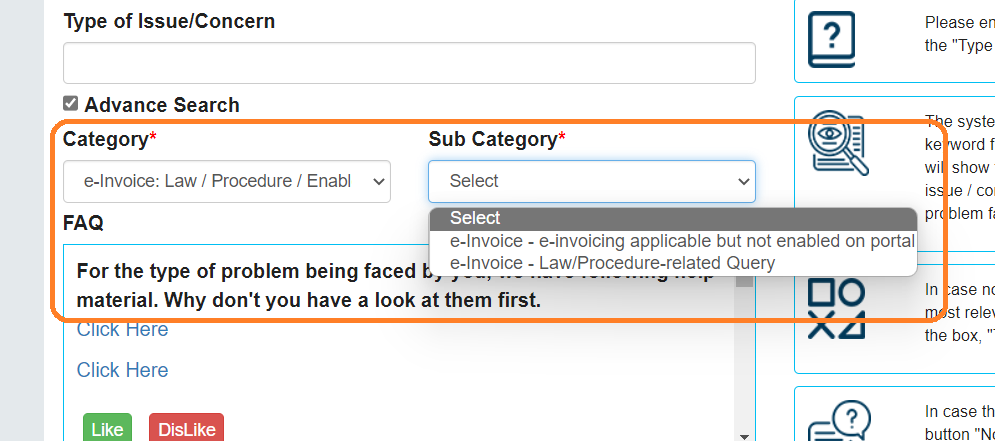
3. Under the “Category” dropdown list, select “E-Invoice” and the relevant subcategory under “Sub Category”.
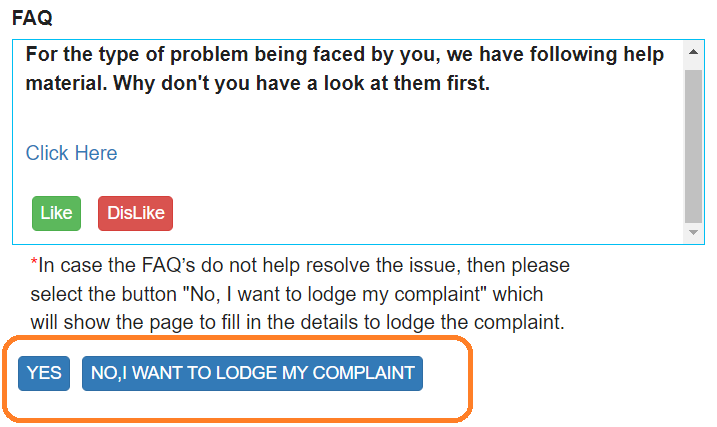
4. Use the links provided to select the issue type, fetch the information and resolve the issue. Otherwise, click “NO, I WANT TO LODGE MY COMPLAINT.”
5. Provide the required details by attaching the screenshots using the “Attachment” option.
In addition, you can use the “Self-help” e-invoice portal customer care to
- check the progress/status of the issue
- Fetch links to relevant information
Otherwise, you can always get help from the e-invoice helpdesk number.
Step 7: Save the Ticket Number
After submitting the complaint, the portal generates a ticket/reference number.
How to Check the Status of an e-Invoice Complaint
After raising a complaint, open the GST Self-Service Portal and select Check Status. You can search the status using the ticket reference number, GSTIN, or registered email ID.
Official complaint status page:
For e-Invoice API Integration Issues
Businesses or developers using NIC e-Invoice APIs should first check the official API Developer Portal for current API specifications, validations, sample payloads, error codes and release notes.
When reporting an API problem, keep the following technical information ready:
- Environment being used
- API name
- API endpoint
- Request headers, with confidential credentials removed
- Relevant request payload
- Error code and message
- Actual API response
- Date and time of the request
Do not include passwords, client secrets, authentication tokens or other credentials when sharing API troubleshooting information.
Official NIC API portal:
FAQs
What is the GST e-Invoice customer care number?
The GST Helpdesk toll-free number used for e-Invoice support is 1800-103-4786. Taxpayers can also report technical problems through the GST Self-Service Portal.
Where can I raise an e-Invoice complaint online?
e-Invoice technical issues can be reported through the GST Self-Service Portal. Users can search for the issue, review available help information and lodge a complaint if the problem remains unresolved.
How can I check the status of an e-Invoice complaint?
Use the Check Status option on the GST Self-Service Portal. Complaint status can be searched using the ticket reference number, GSTIN or registered email ID.
What should I do if an IRN is not being generated?
Note the exact error code and error message shown by the Invoice Registration Portal. Check whether the invoice details meet the required validations. If the issue appears technical and remains unresolved, contact the support channel of the relevant IRP or raise a ticket through the GST Self-Service Portal.
What should I do if an e-Invoice is not appearing in GSTR-1?
First confirm that the invoice was successfully reported and that a valid IRN was generated. If the expected e-Invoice information still does not appear in GSTR-1, raise a technical issue through the GST Self-Service Portal with the GSTIN, invoice or IRN details and screenshots.
Should I share my GST or e-Invoice portal password with customer care?
No. Passwords, OTPs, API secrets and authentication tokens should not be shared through support tickets, screenshots or emails. Provide only the information required to identify and troubleshoot the issue.
Where should e-Invoice API problems be reported?
For NIC e-Invoice API integration or testing issues, refer to the NIC e-Invoice API Developer Portal for current specifications, validations, error information and technical resources. If another IRP is being used, follow that IRP's API documentation and support process.
Looking for myBillBook Customer Support?
The 1800-103-4786 number above is the GST Helpdesk used for GST/e-Invoice technical support. It is not the myBillBook customer-care number.
For help with your myBillBook account, subscription, billing software or app, use the official myBillBook Contact Us page.
myBillBook support: