
Get Paid on Time
Payment Reminders
Send due payment reminders to customers and collect payments on time
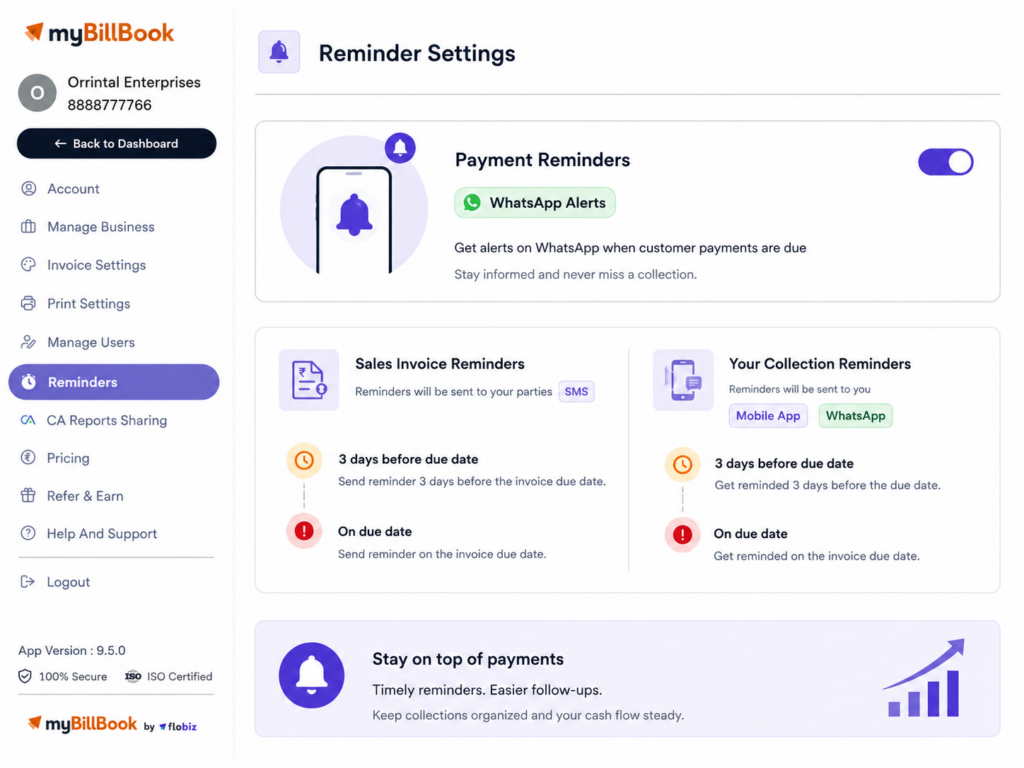
Payment Reminders Feature in myBillBook
Payment Reminders in myBillBook help businesses stay updated about pending customer payments and upcoming payment obligations.
You can set reminders around invoice due dates, receive collection alerts on the mobile app and WhatsApp, and send sales invoice reminders to customers through SMS.
myBillBook also provides a separate one-click WhatsApp reminder option on the web version, allowing you to initiate a payment reminder directly from Party List or Party Details.
How to Use Payment Reminders in myBillBook
Step 1: Open Settings
Go to Settings from your myBillBook dashboard.
Step 2: Select Reminders
Open the Reminders section from the settings menu.
Step 3: Enable Payment Reminders
Turn on the available payment reminder options based on how you want to track upcoming or pending payments.
Step 4: Choose Reminder Options
Select the reminders you want to receive or send based on invoice due dates.
Step 5: Save Changes
Click Save Changes to apply your reminder settings.
NEW
Send WhatsApp Reminders for Pending Payments
myBillBook now lets you send payment reminders to customers directly through WhatsApp from the Web app. From the Party List, click the WhatsApp icon beside the outstanding balance, or use Send Reminder from the Party Details page. myBillBook opens WhatsApp Web with a pre-filled reminder message that you can review and send to the customer.
How to Send WhatsApp Payment Reminders with myBillBook
myBillBook also lets you quickly send WhatsApp payment reminders to customers with outstanding balances from the web version.
From the Party List
- Open the Party List.
- Find the customer with an outstanding payment.
- Click the WhatsApp icon beside the outstanding balance.
- WhatsApp Web opens with a pre-filled payment reminder.
- Review the message and click Send.
From Party Details
- Open the required customer from the Party List.
- Click Send Reminder on the Party Details page.
- WhatsApp Web opens with the drafted reminder.
- Review and send the message to the customer.
The reminder is pre-filled for convenience, but the message is not sent automatically. You can review it before sending.
Benefits of Payment Reminders Feature on myBillBook
Everything You Can Manage with Payment Reminders
Sales Invoice Reminders
Send SMS reminders to customers three days before the invoice due date or on the due date.
Purchase Invoice Reminders
Get alerts three days before a purchase payment is due and again on the due date.
Payment Collection Alerts
Receive payment reminders on the myBillBook mobile app and WhatsApp so you know when customer payments need follow-up.
Low Stock Alerts
Get notified when inventory falls below the configured low-stock level.
Daily Summary
Receive updates about outstanding collections, payments and the previous day’s sales.
How Payment Reminders Are Sent
To Customers
Sales invoice payment reminders configured under Reminder Settings are sent through SMS.
To You
Payment and business reminders can be received through the myBillBook mobile app and WhatsApp.
Before the Due Date
Sales and purchase invoice reminders can be configured for three days before the due date.
On the Due Date
You can also receive or send applicable reminders on the invoice due date.
Important Things to Know About Payment Reminders
Invoice Due Date Matters
Payment follow-ups work best when the correct due date is added to the invoice.
WhatsApp Reminders Require Final Confirmation
myBillBook can prepare the WhatsApp reminder message, but you review and send it through WhatsApp Web.
Customer Contact Details
Keep customer mobile numbers updated so WhatsApp, SMS and party-sharing workflows can work correctly.
Platform Availability
The one-click WhatsApp reminder from Party List and Party Details is currently available on the web version of myBillBook.
Feature Availability
Some reminder options may vary depending on the platform or myBillBook plan being used.
Who Can Use Payment Reminders?
Retail Shops
Remind customers about unpaid bills without checking invoices manually.
Manufacturers
Track pending payments from buyers, dealers, and supply partners easily.
Service Businesses
Collect client dues after completing service work or projects. Advocates and law firms can combine reminders with legal billing software to track outstanding professional invoices.
Repair Businesses
Follow up on payments for repairs, AMC, or maintenance services.
Frequently Asked Questions
Will reminders change the payment status automatically?
No. Payment status changes only after you record the payment in myBillBook.
Will reminders be sent for already paid invoices?
No. Once the invoice is marked paid, it should not need payment follow-up reminders.
Can I use Payment Reminders without calling customers manually?
Yes. Reminders help reduce manual follow-ups, but you can still call customers when needed.
Will reminders affect the invoice amount or due date?
No. Reminders only notify you or the party. They do not change invoice details.
Can Payment Reminders help with credit sales?
Yes. They are useful when customers buy on credit and pay after the invoice date.