
Add Signature to Invoice with myBillBook
Create professional GST and non-GST invoices with a handwritten or uploaded signature, an authorised-signatory box, or a receiver-signature field.
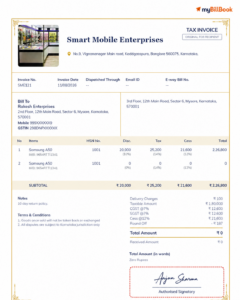
What Is an Invoice Signature Feature?
How to Add a Signature to an Invoice in myBillBook
- Create or open an invoice: Enter customer, item, tax and payment details.
- Open Signature settings: Select the signature option while customising the invoice.
- Add the signature: Draw it by hand, capture it with the camera or select an image from the gallery.
- Choose signature fields: Show an authorised-signatory box or enable a receiver’s signature field.
- Generate the invoice: Review, download, print or share the completed invoice.
Signature Options Available in myBillBook
Draw by Hand
Create a signature directly on a supported device.
Import from Camera
Capture an existing handwritten signature by camera.
Import from Gallery
Select a saved signature image from the device gallery.
Signature Fields
Show an empty box or add a receiver-signature field.
Why Add a Signature to an Invoice?
- Complete the authorised-signatory section before sharing an invoice.
- Avoid printing and scanning merely to place a visible signature.
- Use the approved signature image consistently where appropriate.
- Keep an empty signature box when physical signing is required later.
- Use a separate receiver-signature field when needed.
Who Can Use This Feature?
Retailers, wholesalers, distributors, manufacturers, service providers and other small businesses can use the feature when they want an authorised-signatory area on GST or non-GST invoices.
Businesses should decide who is authorised to use an uploaded signature and keep the signature image accessible only to the appropriate users.
Invoice Signature, Digital Signature and GST E-Invoice
| Term | What it means | myBillBook feature described here |
|---|---|---|
| Invoice signature | A handwritten, drawn or uploaded signature displayed on an invoice. | Draw or import a signature and show signature fields. |
| DSC-based digital signature | A cryptographic signature applied using a Digital Signature Certificate. | This page does not claim certificate-based DSC signing. |
| GST e-invoice | An applicable invoice reported to an Invoice Registration Portal for an IRN and signed QR code. | This is separate from adding a visible signature. |
Create and Manage Invoices with myBillBook
myBillBook helps businesses create GST and non-GST invoices and manage everyday billing records. Explore myBillBook invoicing software to learn more.
Frequently Asked Questions
Can I add my signature to an invoice in myBillBook?
Yes. myBillBook lets you draw a signature by hand or import a signature image from your camera or gallery and display it in the invoice’s signature area.
Can I leave an empty signature box on the invoice?
Yes. You can show an empty signature box when the invoice needs to be signed physically after it is printed or received.
Can I add a receiver’s signature field?
Yes. myBillBook provides an option to enable a receiver’s signature field on the invoice.
Does myBillBook apply a DSC-based digital signature to an invoice PDF?
The feature shown here adds a handwritten, drawn or uploaded signature to the invoice. It should not be described as certificate-based DSC signing unless a separate DSC integration is available and confirmed.
Is an invoice with an uploaded signature the same as a GST e-invoice?
No. Adding a visible signature to an invoice and generating a GST e-invoice are different processes. GST e-invoicing involves reporting applicable invoice data to an Invoice Registration Portal to obtain an IRN and signed QR code.
Can I change the signature used on invoices?
You can create a new signature by hand or import another signature image using the available signature settings before generating the invoice.