
Goods Movement Workflow
Delivery Challan
Create Delivery Challans in myBillBook for goods movement, add party and transport details, and generate e-Way Bills when required.
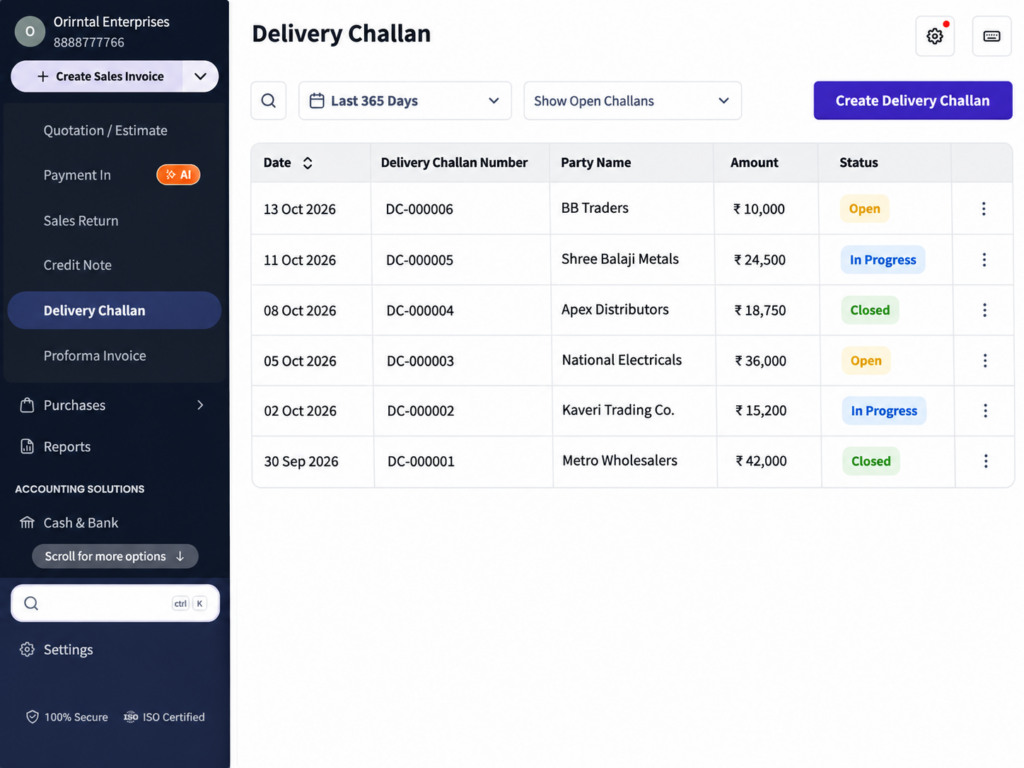
Delivery Challan Feature in myBillBook
The Delivery Challan feature in myBillBook helps you record goods movement when the dispatch itself is not being treated as the final sales invoice. Add the party, items, quantities and transport-related details, then save and share the challan for the movement.
Delivery Challans are created inside the same billing software for small businesses you use for invoices, inventory and e-Way Bill workflows, the document stays connected with the rest of your transaction records.
How to Create a Delivery Challan in myBillBook
Step 1: Open Delivery Challan
Go to Sales → Delivery Challan and start a new challan.
Step 2: Select the Party
Choose the customer or party for whom the goods movement is being recorded.
Step 3: Add Items and Quantity
Add the goods being moved and enter the relevant quantity and item details.
Step 4: Add Delivery and Transport Details
Enter the applicable delivery, shipping, transporter or vehicle details required for the movement.
Step 5: Review the Challan
Check the party, item, quantity and transport information before saving.
Step 6: Save, Print or Share
Save the Delivery Challan and use the available print, PDF or share workflow for dispatch and record keeping.
Generate an e-Way Bill from a Delivery Challan
Start from the Saved Delivery Challan
On Web, use the available e-Way Bill action from the Delivery Challan when the goods movement requires one.
Select Supply and Sub-Supply Type
Choose the appropriate Supply Type and Sub-Supply Type so the e-Way Bill reflects the reason and direction of goods movement.
Complete Transport Details
Add the applicable transporter, vehicle, distance and shipping information required for the e-Way Bill workflow.
Review and Generate
Check the information before generating the e-Way Bill. For the broader product workflow, see the e-Way Bill feature.
Manage Item Pricing and Discounts on Delivery Challans
Use Item-Level Default Discounts
When a default discount is configured for an item, the supported discount can appear when that item is added to the Delivery Challan and can be adjusted in the voucher.
Show Discount on MRP
When enabled for supported items, the challan can show the saving between MRP and selling price for clearer customer-facing pricing.
Keep Discount Types Separate
Item-level discount will affect the transaction value, while Discount on MRP is used to show the savings that is relative to the item’s MRP.
Review Pricing Before Dispatch
Check the item values and displayed discounts before sharing or printing the Delivery Challan.
Add Delivery and Acknowledgement Details
Add Receiver’s Signature
When enabled, a Receiver’s Signature field can appear on the printed or PDF Delivery Challan for customer acknowledgement.
Use Supported Invoice Fields
Where available in the current creation flow, complete the relevant bill-to, ship-to, invoice-detail and item-table fields needed for the movement.
Preview Before Sharing
Use the preview to check how the party, items, quantity, pricing and transport details will appear on the final challan.
Delivery Challan and Sales Invoice Are Different Workflows
A Delivery Challan records goods movement and should not be treated as the final tax invoice for the sale. When the transaction is ready for final billing, use the appropriate Sales Invoice workflow.
If your movement eventually becomes a billed sale, continue the transaction through your regular sales invoice workflow.
Important Things to Know About Delivery Challans
Use Delivery Challan for Goods Movement
The feature is intended for moving goods when the dispatch itself is not being recorded as the final sales invoice.
e-Way Bill Generation Is a Separate Compliance Step
A Delivery Challan can be the source document for supported e-Way Bill generation, but whether an e-Way Bill is required depends on the applicable GST and movement rules.
Review Goods and Transport Details Before Dispatch
Confirm the party, items, quantities and transport information before saving or sharing the challan.
This feature page explains how Delivery Challan works inside myBillBook. For downloadable Excel, Word and PDF layouts, use the dedicated Delivery Challan format page.
When to Use a Delivery Challan
Goods Sent Before Final Billing
Record the dispatch when goods need to move before the final sales invoice is issued.
Job Work or Other Goods Movement
Use the challan when goods move for an operational reason rather than as an immediate final sale.
Movement Requiring e-Way Bill
Create the challan first and use the supported e-Way Bill action when applicable to the goods movement.
Dispatch Requiring Acknowledgement
Use the Receiver’s Signature field where a signed delivery acknowledgement is useful for the movement record.
Frequently Asked Questions
How do I create a Delivery Challan in myBillBook?
Go to Sales, open Delivery Challan, select the party, add the goods and quantity, complete the relevant delivery or transport details, review the document and save it.
Can I generate an e-Way Bill from a Delivery Challan?
Yes. On Web, supported Delivery Challans can use the e-Way Bill workflow where you select the applicable supply and sub-supply type and complete the required transport details.
Does Delivery Challan support Discount on MRP?
Yes. When enabled for supported items, the Delivery Challan can show the saving compared with the item's MRP.
Can item-level default discounts appear on a Delivery Challan?
Yes. Supported default item discounts can appear when the item is added and can be adjusted in the voucher.
Can a Receiver's Signature be shown on a Delivery Challan?
Yes. When enabled, the Receiver's Signature field can appear on the printed or PDF Delivery Challan.
Is a Delivery Challan the same as a Sales Invoice?
No. A Delivery Challan records goods movement and is not the final sales invoice for the transaction.