
Manage Customer Returns
Sales Return
Record customer returns in myBillBook, review the returned items and use e-Invoice or e-Way Bill actions when applicable.
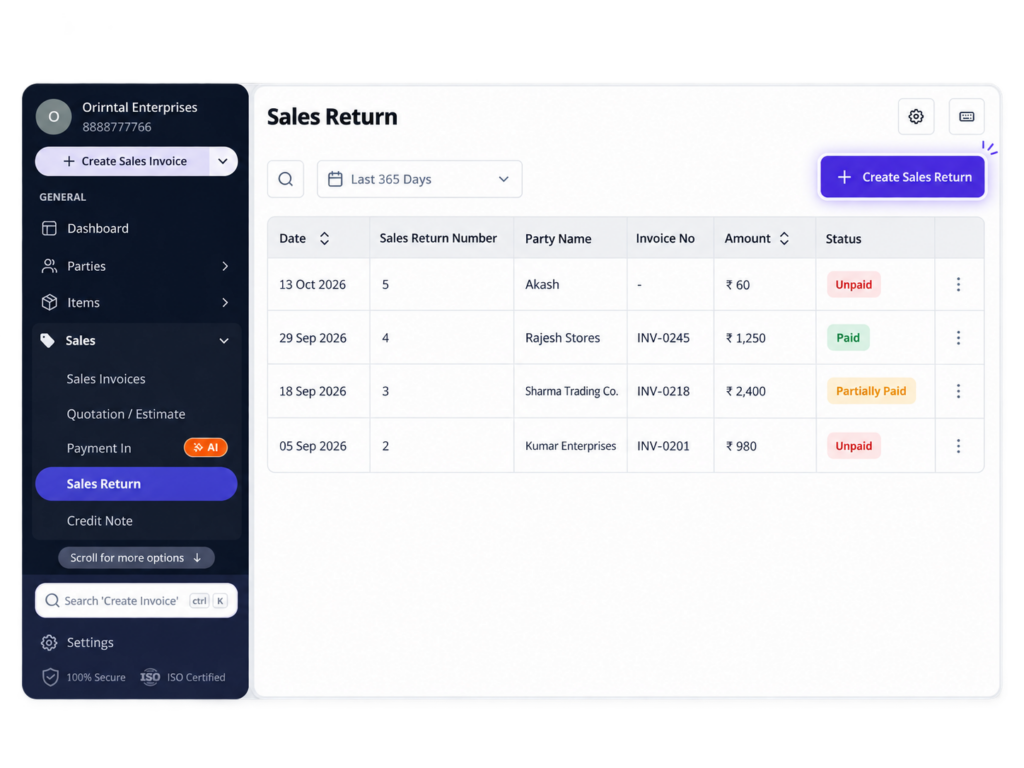
Sales Return Feature in myBillBook
The Sales Return feature in myBillBook helps you record goods returned by a customer after a sale. Instead of treating the return as an unrelated entry, you can create a dedicated Sales Return voucher with the customer and returned-item details.
After saving the Sales Return, you can review the voucher and use supported compliance actions such as e-Invoice or e-Way Bill generation when they are applicable to the return.
Managing customer returns alongside everyday sales is easier with a billing system that keeps sales invoices, return vouchers and transaction details organised within the same platform.
How to Create a Sales Return in myBillBook
Step 1: Open Sales → Sales Return
Go to the Sales Return section under Sales to view existing return vouchers or start a new one.
Step 2: Create a New Sales Return
Start a Sales Return voucher and select the customer or party returning the goods.
Step 3: Add the Returned Items
Add the items being returned and enter the applicable quantities and values for the return.
Step 4: Review the Return Details
Check the customer, item, quantity, tax and return value before saving the voucher.
Step 5: Save the Sales Return
Save the Sales Return so it is recorded separately from the original sale and can be reviewed from the Sales Return section.
Step 6: Use Additional Actions if Required
After saving the Sales Return, use the preview screen to access e-Invoice or e-Way Bill actions when those documents are applicable.
Manage e-Invoice, e-Way Bill and MRP Discounts in Sales Returns
Generate and Manage e-Invoices
Generate an e-Invoice directly from the saved Sales Return preview for eligible transactions. If required, you can also cancel the generated e-Invoice from the same Sales Return workflow.
Generate e-Way Bills for Sales Returns
Create an e-Way Bill for returned goods from Sales Return on Web when applicable. myBillBook automatically sets Supply Type as Inward and Sub-Supply Type as Sales Return, after which you can add the required transport details and generate the e-Way Bill.
Apply Discount on MRP
When Discount on MRP is enabled in Item Settings, the applicable MRP-based discount can be reflected while creating the Sales Return, helping keep the return value aligned with the item pricing setup.
What the Sales Return Feature Helps You Do
Record Customer Returns
Create a dedicated return voucher instead of editing the original sales record.
Capture Returned Quantities
Record the specific items and quantities that have come back from the customer.
Keep Return Documents Together
Use the Sales Return preview to review the voucher and access supported compliance actions.
Handle Return Compliance
Generate the applicable e-Invoice or e-Way Bill for the Sales Return without treating the return as a separate workflow.
When to Use the Sales Return Feature
A Customer Returns Goods
Create a Sales Return when items from an earlier sale physically come back to your business.
Only Part of the Sale Is Returned
Record the returned items and quantities instead of treating the complete sale as returned.
The Return Needs Its Own Voucher
Use a Sales Return voucher when you need a separate transaction record for the returned goods.
The Return Requires e-Invoice or e-Way Bill Handling
Use the supported preview actions when the return is subject to applicable e-Invoice or e-Way Bill requirements.
What to Check Before Saving a Sales Return
Correct Customer
Confirm that the selected party is the customer returning the goods.
Correct Returned Items
Check that only the items actually being returned are included in the voucher.
Correct Quantity and Value
Review the return quantity and amount carefully, especially when only part of the original sale is being returned.
Tax and Compliance Details
Where tax or compliance documents apply, review the transaction details before generating an e-Invoice or e-Way Bill.
Important Things to Know About Sales Returns
Sales Return Is Different from Purchase Return
Sales Return is used when a customer returns goods sold by your business. Purchase Return is used when your business returns goods to a supplier.
e-Invoice and e-Way Bill Are Separate Actions
For Sales Returns, myBillBook does not generate both documents together. If both are required, use the separate generation flows.
e-Way Bill Support for Sales Return Is a Web Workflow
The current product workflow specifically supports Sales Return e-Way Bill generation on Web.
Discount on MRP Depends on Item Settings
The MRP discount appears only when MRP and Discount on MRP are enabled and the calculated discount is positive.
Government Rules Still Apply
myBillBook simplifies the workflow, but e-Invoice, e-Way Bill and GST requirements continue to depend on the applicable transaction and current rules.
Who Can Use the Sales Return Feature?
Retailers
Record customer returns for goods sold through day-to-day retail transactions.
Wholesalers & Distributors
Manage partial or full product returns from business customers using a separate return voucher.
Manufacturers
Record returned finished goods and keep the return transaction separate from the original sale.
GST-Registered Businesses
Use the supported e-Invoice and e-Way Bill actions for Sales Returns when those compliance documents are applicable.
Frequently Asked Questions
Where can I create a Sales Return in myBillBook?
Open Sales → Sales Return to view existing return vouchers or create a new Sales Return.
Can I generate an e-Invoice for a Sales Return in myBillBook?
Yes. On Web, a Generate e-Invoice option is available from the Sales Return preview after the return has been created and saved.
Can I generate an e-Way Bill for a Sales Return?
Yes. myBillBook currently supports Sales Return e-Way Bill generation on Web when an e-Way Bill is applicable to the return.
Can I generate the e-Invoice and e-Way Bill together for a Sales Return?
No. For Sales Returns, the e-Invoice and e-Way Bill must be generated separately if both are required.
Does Sales Return support Discount on MRP?
Yes. Sales Return is one of the supported sales voucher types for Discount on MRP when the feature is enabled in Item Settings and a positive discount exists.
Is Sales Return the same as Purchase Return?
No. Sales Return is used when a customer returns goods sold by your business. Purchase Return is used when your business returns goods to a supplier.