
Quote Before You Bill
Quotation / Estimate
Create, share and convert customer quotations into invoices without entering the same details again
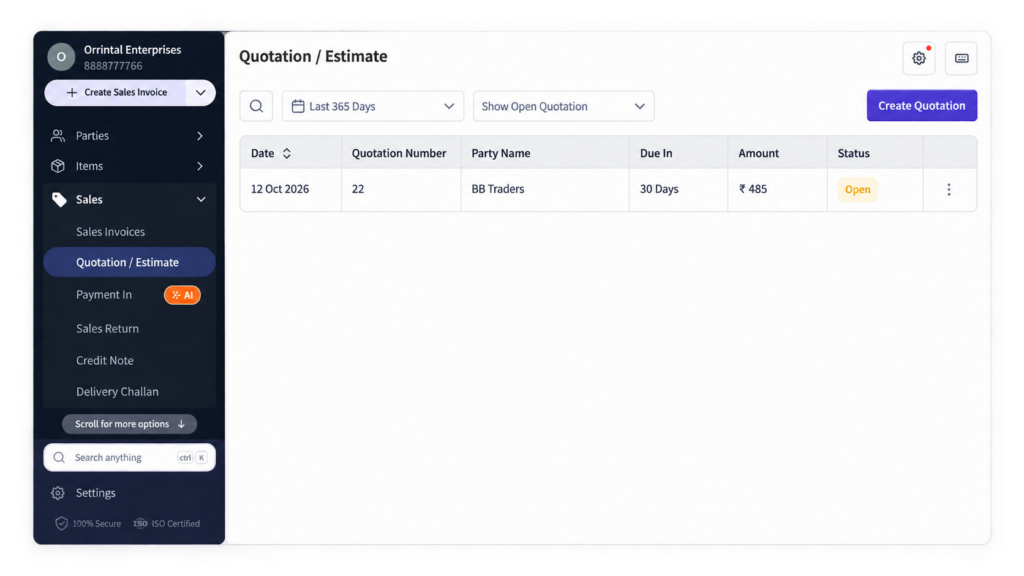
Quotation / Estimate Feature in myBillBook
Quotation / Estimate in myBillBook helps you prepare a price proposal for a customer before creating the final sales invoice. You can add the customer, products or services, quantities, rates, taxes, discounts and applicable terms in the quotation.
Once the customer accepts the quotation, you can convert it into an invoice instead of creating the sale again from scratch. This keeps the pre-sale quotation and final billing workflow connected inside myBillBook.
How Quotation / Estimate Works in myBillBook
Step 1: Create a New Quotation
Start a new quotation or estimate for the customer before the sale is finalised.
Step 2: Add Customer and Item Details
Select the customer and add the products or services, quantity, rate and other required transaction details.
Step 3: Add Tax, Discount and Terms
Include applicable taxes, discounts and business terms so the customer can review the complete proposed amount.
Step 4: Save and Share the Quotation
Save the quotation and share it with the customer for review before billing.
Step 5: Update the Quotation if Required
Edit the quotation when pricing, quantity or other deal details change before confirmation.
Step 6: Convert the Accepted Quotation into an Invoice
Once the customer confirms the deal, convert the quotation into a sales invoice without re-entering the same transaction details.
Why Use Quotations / Estimates in myBillBook?
What You Can Add to a Quotation / Estimate
Customer Details
Add the customer or business for whom the quotation is being prepared.
Products or Services
Add the items or services being quoted along with their quantities and rates.
Taxes
Include applicable tax details where required for the proposed transaction.
Discounts
Add discounts where they form part of the negotiated quotation.
Terms and Notes
Include applicable commercial terms or notes that the customer should review before confirming the sale.
Quotation / Estimate vs Sales Invoice
Quotation / Estimate: Used before the sale is confirmed to communicate proposed pricing, quantities, taxes, discounts and terms.
Sales Invoice: Created after the sale is confirmed to record the actual billing transaction.
In myBillBook, an accepted quotation can be converted into an invoice, helping you move from quotation to final billing without recreating the transaction.
Quotation Feature vs Quotation Format Templates
This feature page focuses on creating and managing quotations inside myBillBook.
If you are looking for downloadable Word, Excel or PDF quotation templates, visit the Quotation Format section instead.
The two pages serve different needs: the feature page covers the software workflow, while the format pages cover downloadable quotation templates and business-specific quotation formats.
Who Can Use Quotations / Estimates?
Retailers
Share prices for larger or special customer orders before creating the final bill.
Wholesalers & Distributors
Prepare quotations for bulk quantities, negotiated rates and repeat B2B orders.
Service Businesses
Quote service charges and project costs before starting work or issuing an invoice.
Contractors & Project Businesses
Share proposed material, labour or project charges and update them before confirmation.
Frequently Asked Questions
Can I convert a quotation into an invoice in myBillBook?
Yes. Once the customer accepts the quotation, you can convert it into a sales invoice instead of entering the same transaction details again.
Can I edit a quotation before the customer confirms it?
Yes. You can update quotation details such as quantity, rate, discount or other transaction details before the sale is finalised.
Is a quotation the same as a sales invoice?
No. A quotation is used before the sale is confirmed to communicate proposed pricing and terms. A sales invoice records the actual billing transaction after the sale is confirmed.
Is this page the same as myBillBook's quotation format pages?
No. This feature page explains how quotations are created and managed inside myBillBook. The quotation format pages focus on downloadable Word, Excel, PDF and business-specific quotation templates.
Who can use quotations or estimates in myBillBook?
Retailers, wholesalers, distributors, service businesses, contractors and other businesses that need to share pricing with customers before issuing a final invoice can use the feature.