
Payment Settlement Discount
Payment In Discount
Settle invoices with a payment-time discount without changing the original invoice
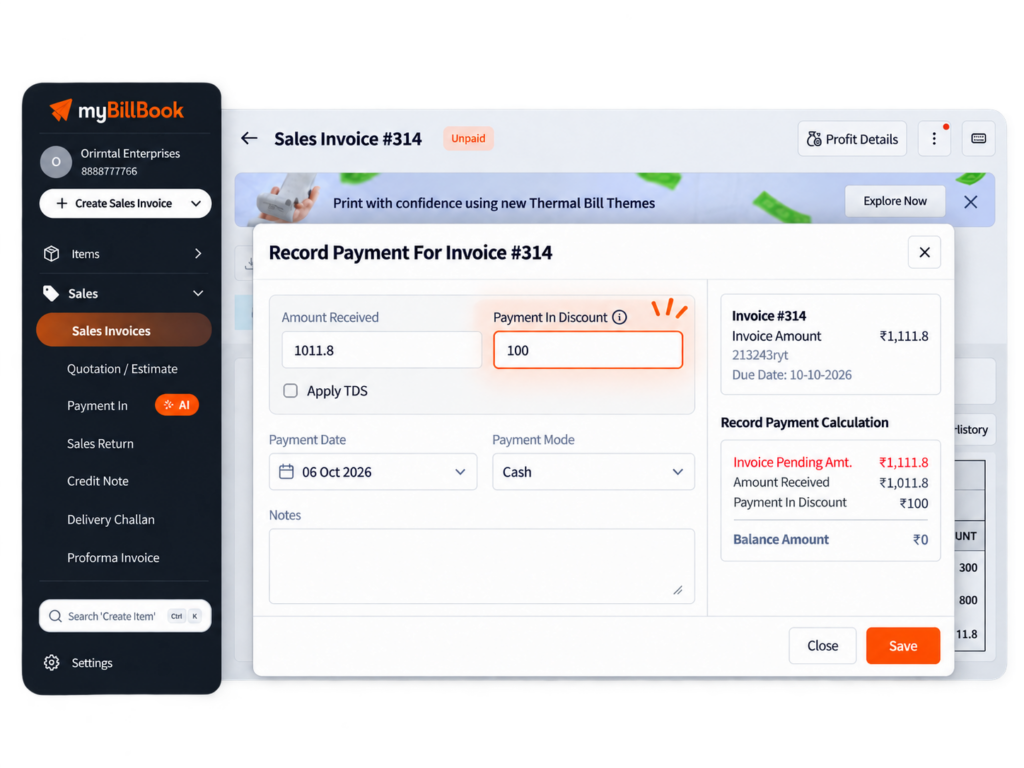
Payment In Discount Feature in myBillBook
Payment In Discount in myBillBook lets you give a discount while receiving payment for an invoice that has already been created.
The original invoice amount stays unchanged. The discount is recorded separately as Discount Allowed, while the customer’s outstanding amount is updated based on the payment and discount recorded.
This is useful for early-payment discounts, final settlement discounts, or small balance adjustments where the customer pays less than the pending invoice amount and the remaining amount is settled as a discount.
How to Record a Payment In Discount in myBillBook
Step 1: Select the Invoice
Go to Sales → Invoices and select the invoice or multiple invoices you want to settle.
Step 2: Click Record Payment
Open the payment flow by clicking Record Payment for the selected invoice or invoices.
Step 3: Enter Payment Details
Add the amount received, payment mode, and payment date. The amount received can be ₹0 when you are settling the balance only through a discount.
Step 4: Add Payment In Discount
Enter the discount amount under Payment-in Discount. If TDS applies, it is calculated after considering the payment discount.
Step 5: Review and Save
Review the invoice amount, Payment-In Discount, TDS if applicable, net amount received, and remaining balance. Save the Payment-In once the settlement is correct.
Benefits of Payment In Discount
What Happens After You Save a Payment In Discount?
Payment History
The discount is shown as Payment In Discount in the payment history for the transaction.
Cash and Bank Records
Cash or bank records reflect the net amount actually received from the customer.
Invoice Outstanding
The invoice outstanding updates using both the amount received and the discount applied during settlement.
Profit & Loss
The discount is recorded separately under Discount Allowed as an expense.
GST and Invoice Profit
The original invoice amount and GST filing values remain unchanged. The discount is treated as a payment-time expense rather than an invoice-level price change.
Ledgers and Reports
Payment-In Discount visibility is carried into the relevant ledger and standard reporting views.
Special Payment In Discount Scenarios
Discount Without Cash Received
You can enter ₹0 as the amount received and record only the discount. This is useful when a small pending balance is being settled completely through a discount.
Partial Payments
Payment-In Discount can be used across multiple part-payments for the same invoice.
Multiple Pending Invoices
One discount can be distributed across multiple selected invoices. You can review and adjust the allocation before saving.
TDS Applicable Payments
When TDS applies, myBillBook calculates TDS after considering the Payment-In Discount.
Special Payment In Discount Scenarios
Discount Without Cash Received
You can enter ₹0 as the amount received and record only the discount. This is useful when a small pending balance is being settled completely through a discount.
Partial Payments
Payment-In Discount can be used across multiple part-payments for the same invoice.
Multiple Pending Invoices
One discount can be distributed across multiple selected invoices. You can review and adjust the allocation before saving.
TDS Applicable Payments
When TDS applies, myBillBook calculates TDS after considering the Payment-In Discount.
Find and Settle Pending Invoices Faster
When recording a Payment-In on Web, you can organise pending invoices before settling them. Sort invoices by Invoice Date or Due Date, switch between ascending and descending order, and filter the list using a date range to find the relevant invoices faster.
Selected invoices stay pinned at the top while you review and adjust settlement details, making it easier to work with multiple pending invoices without losing track of your selection.
Payment In Discount vs Discount on MRP
Payment In Discount is applied when receiving payment after an invoice is created. It does not change the original invoice amount and is recorded separately as Discount Allowed.
Discount on MRP shows the customer’s saving compared with an item’s MRP during billing. It is a different feature used to display the difference between MRP and selling price on the invoice.
Learn more about Discount on MRP in myBillBook.
Things to Know About Payment In Discount
Older Payments Stay Unchanged
Existing payment entries created before using Payment-In Discount are not automatically changed.
App Version Matters
Users on older app versions may not see the Payment-In Discount option until they update to a supported version.
Permissions Still Apply
Access to payment actions continues to follow the role and permission settings configured for the account.
Invoice Amount Does Not Change
Payment-In Discount settles the outstanding at payment time. It does not rewrite the original invoice value.
Useful for Businesses That Settle Customer Dues
Wholesalers
Settle negotiated customer dues while keeping the original sales invoice unchanged.
Distributors
Handle payment-time discounts across recurring customer invoices and part-payments.
Service Businesses
Close small outstanding balances or offer an agreed settlement discount at payment time.
Frequently Asked Questions
What is Payment In Discount in myBillBook?
Payment In Discount lets you apply a discount while receiving payment for an invoice that has already been created. The invoice amount stays unchanged and the discount is recorded separately as Discount Allowed.
Can I record only a discount without receiving payment?
Yes. You can enter ₹0 as the amount received and add a Payment-In Discount to settle a small outstanding balance completely through the discount.
Does Payment In Discount change GST on the original invoice?
No. The original invoice and its GST values remain unchanged. The discount is treated separately as a payment-time expense.
Can Payment In Discount be used with partial payments?
Yes. Payment-In Discount can be used across part-payments for the same invoice.
Can I apply one Payment In Discount across multiple invoices?
Yes. A discount can be distributed across multiple selected pending invoices, and the allocation can be reviewed before saving.
Where is Payment In Discount recorded in myBillBook?
It appears in Payment History and is recorded under Discount Allowed in Profit & Loss, while cash or bank records show the net amount actually received.