
GST e-Invoice Workflow
e-Invoicing
Generate and manage e-Invoices from myBillBook using your existing sales transactions, with supported e-Way Bill and Sales Return workflows.
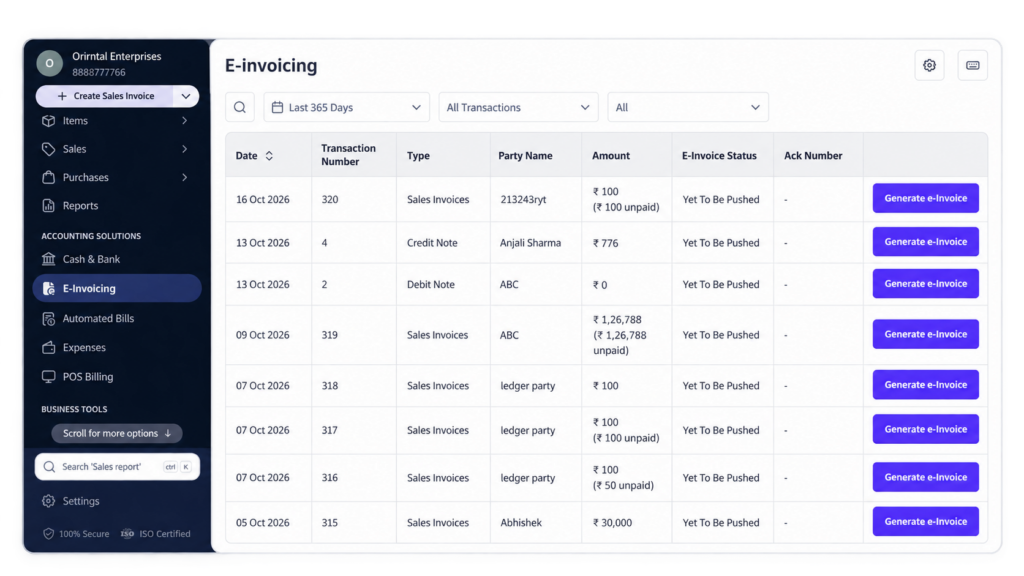
e-Invoicing Feature in myBillBook
The e-Invoicing feature in myBillBook lets eligible businesses generate e-Invoices from transactions already created in the software. Instead of entering invoice information again on a separate portal, you can start from the relevant Sales Invoice, review the details and generate the e-Invoice from the myBillBook workflow.
The feature also supports connected workflows such as e-Way Bill generation for supported Sales Invoices, e-Invoice generation from Sales Returns on Web and e-Invoice cancellation where applicable.
How to Generate an e-Invoice in myBillBook
Step 1: Enable e-Invoicing
Turn on e-Invoicing from the relevant Business Settings before using the feature for your transactions.
Step 2: Open the Sales Invoice
Go to the Sales Invoice for which you need to generate an e-Invoice.
Step 3: Select Generate e-Invoice
Use the Generate e-Invoice action available for the invoice.
Step 4: Complete GSP Setup if Required
Enter or select the required GSP credentials when prompted so myBillBook can complete the e-Invoice generation workflow.
Step 5: Review the Invoice Details
Check the customer, GSTIN, item, HSN/SAC, taxable value and tax information brought into the e-Invoice flow.
Step 6: Generate the e-Invoice
After reviewing the details, generate the e-Invoice for the transaction.
Manage e-Invoice Workflows in myBillBook
Generate e-Invoices from Sales Invoices
Start from an existing Sales Invoice and use the Generate e-Invoice action. myBillBook carries the relevant transaction details into the e-Invoice workflow so you can review them before generation.
Generate e-Invoice and e-Way Bill for Supported Sales Invoices
For supported Sales Invoice transactions, myBillBook can provide a combined e-Invoice and e-Way Bill workflow. Where shipping details are applicable, complete the required transport information before generation.
Generate e-Invoices for Sales Returns
On Web, you can generate an e-Invoice from a saved Sales Return preview when the transaction is eligible. Sales Return e-Invoice and e-Way Bill actions are handled separately when both documents are required.
Cancel an e-Invoice
Use the available cancellation action when an e-Invoice needs to be cancelled. Where an e-Way Bill is linked to the transaction, complete the required e-Way Bill cancellation confirmation before finishing the e-Invoice cancellation flow.
What the e-Invoicing Feature Helps You Do
Review Invoice Details Before Generation
Check the party, GST and item details carried into the e-Invoice flow before submitting the transaction.
Generate from Existing Transactions
Start the e-Invoice workflow from the Sales Invoice already created in myBillBook instead of re-entering the transaction from scratch.
Handle all the e-Way Bill Requirements Too
Use the supported combined Sales Invoice workflow where both e-Invoice and e-Way Bill generation are required.
Manage e-Invoice Actions from myBillBook
Generate and, where supported, cancel e-Invoices from the relevant transaction workflow without treating them as disconnected records.
What to Check Before Generating an e-Invoice
Customer GST Details
Confirm that the customer information and GSTIN are correct for the transaction.
Item and HSN/SAC Details
Review the item classification and HSN/SAC information used in the invoice.
Taxable Value and GST
Check the taxable value and applicable tax details before generating the e-Invoice.
Shipping and Transport Details
If an e-Way Bill is also required, review the applicable shipping, transporter, distance and vehicle information before generation.
Important Things to Know About e-Invoicing in myBillBook
Generate e-Invoices Individually
The current myBillBook e-Invoice workflow generates e-Invoices individually rather than through a bulk-generation action.
Sales Return Uses a Separate Return Workflow
e-Invoices for eligible Sales Returns are generated from the saved Sales Return preview on Web rather than from the regular Sales Invoice workflow.
Sales Return e-Invoice and e-Way Bill Are Separate
If both documents are required for a Sales Return, generate the e-Invoice and e-Way Bill separately.
Applicability Still Depends on GST Rules
myBillBook provides the product workflow, but whether a transaction requires e-Invoicing depends on the applicable GST e-Invoice rules for the business and transaction.
Who Can Use the e-Invoicing Feature?
Wholesalers & Distributors
Generate e-Invoices from B2B sales transactions created in myBillBook and handle applicable e-Way Bill workflows.
Manufacturers
Use the e-Invoice workflow for eligible business transactions while keeping invoice details connected to the original sale.
Retail Businesses
Use e-Invoicing for applicable business-to-business transactions managed through myBillBook.
GST-Registered Businesses
Generate e-Invoices from eligible myBillBook transactions when the applicable GST e-Invoice requirements apply.
Frequently Asked Questions
How do I generate an e-Invoice in myBillBook?
Enable e-Invoicing, open the relevant Sales Invoice, select Generate e-Invoice, complete the required GSP setup, review the transaction details and generate the e-Invoice.
Can myBillBook generate an e-Invoice and e-Way Bill together?
For supported Sales Invoice transactions, myBillBook can provide a combined e-Invoice and e-Way Bill workflow. Sales Return e-Invoice and e-Way Bill actions are handled separately.
Can I generate an e-Invoice for a Sales Return?
Yes. On Web, eligible Sales Returns can generate an e-Invoice from the saved Sales Return preview.
Can I cancel an e-Invoice in myBillBook?
Yes, where supported. If an e-Way Bill is associated with the transaction, complete the required e-Way Bill cancellation confirmation before finishing the e-Invoice cancellation flow.
Can I generate e-Invoices in bulk in myBillBook?
The current e-Invoice workflow generates e-Invoices individually rather than through a bulk-generation action.
Is this the same as the e-Invoicing Software page?
No. This page explains the e-Invoicing feature inside myBillBook. The e-Invoicing Software page covers broader software and commercial e-Invoicing intent.