
Tally Data Export
Data Export to Tally
Export myBillBook business data for use in Tally
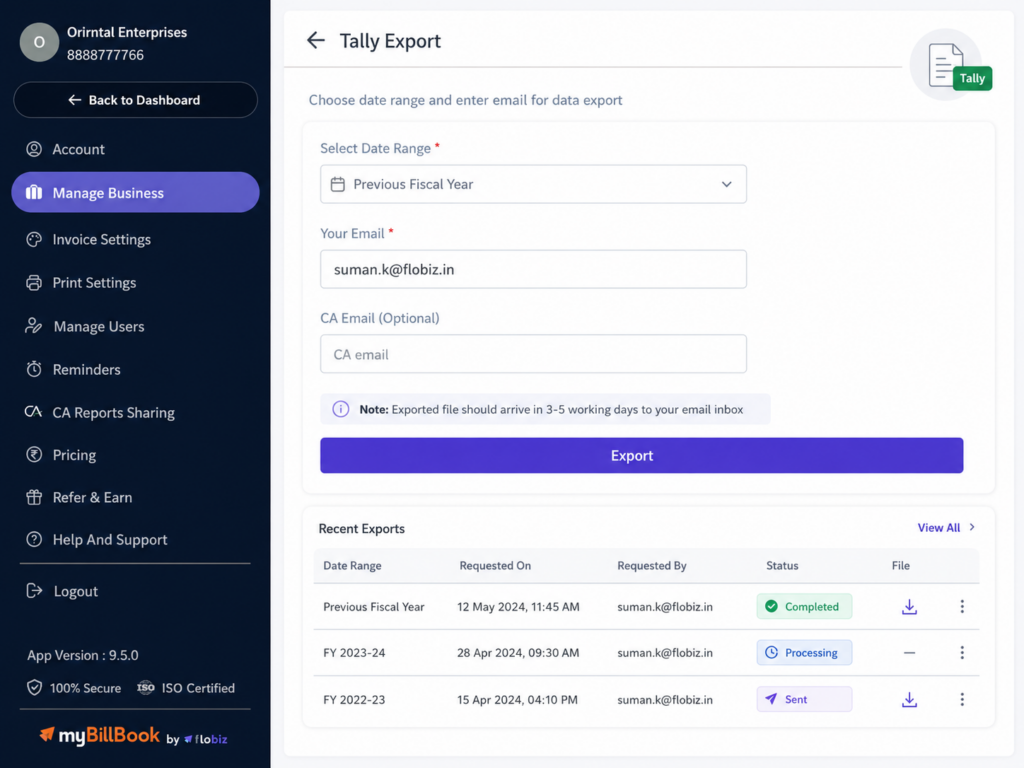
Data Export to Tally Feature in myBillBook
How to Data Export to Tally in myBillBook
Step 1: Open Settings
Go to Settings from your myBillBook dashboard.
Step 2: Go to Manage Business
Open the Manage Business from the settings menu.
Step 3: Select Data Export to Tally
Scroll down and click Data Export to Tally.
Step 4: Choose Date Range
Select the date range for which you want to export data.
Step 5: Add Email Details
Enter your email address and add your CA’s email address if needed.
Step 6: Submit Export Request
Click Export to raise the request and receive the Tally XML file by email.
Why Should You Use Data Export to Tally?
What Data You Can Export to Tally
Parties
Export party details used in your sales and purchase records.
Items
Export item details for products and services recorded in myBillBook.
Sales — Product Items
Export sales data for product-based invoices.
Sales — Service Items
Export sales data for service-based invoices.
Purchase — Product Items
Export purchase data for product-based purchases.
Purchase — Service Items
Export purchase data for service-based purchases.
Important Things to Know Before Exporting Data to Tally
Not Real-Time
The export file is generated after the request is processed.
Date Range Limit
Data can be exported only within the allowed date range limit.
Email Delivery
The exported XML file is shared through email after processing.
Plan Access
Data Export to Tally availability may depend on the user’s active plan.
Request Limit
Multiple export requests from the same company may have rate limits.
Review Before Importing
Exported data should be reviewed before importing into Tally.
Which Businesses Benefit Most from Data Export to Tally?
CA-Managed Businesses
Share export files with accountants who maintain books in Tally.
GST-Registered Businesses
Export your sales and purchase data for accounting review.
Service Businesses
Export service sales and purchase records when accounting is done in Tally.
Frequently Asked Questions
Does exporting data to Tally remove anything from myBillBook?
No. Exporting only creates a copy of selected data for Tally use. Your myBillBook data stays available.
Can I continue billing in myBillBook after exporting data?
Yes. You can continue creating invoices, purchases, parties, and items in myBillBook after export.
What happens if I edit invoices after exporting?
Changes made after export will not update the old export file. Create a fresh export if updated data is needed.
Should I export data separately for each business?
Yes. If you manage multiple businesses, export data from the specific business that needs Tally transfer.
Can exported data be used without checking in Tally?
No. The exported data should be reviewed after importing into Tally to confirm records are mapped correctly.