
Cloud Access
Cloud Accessibility
Access your myBillBook business from supported web and mobile platforms using the account linked to your business.
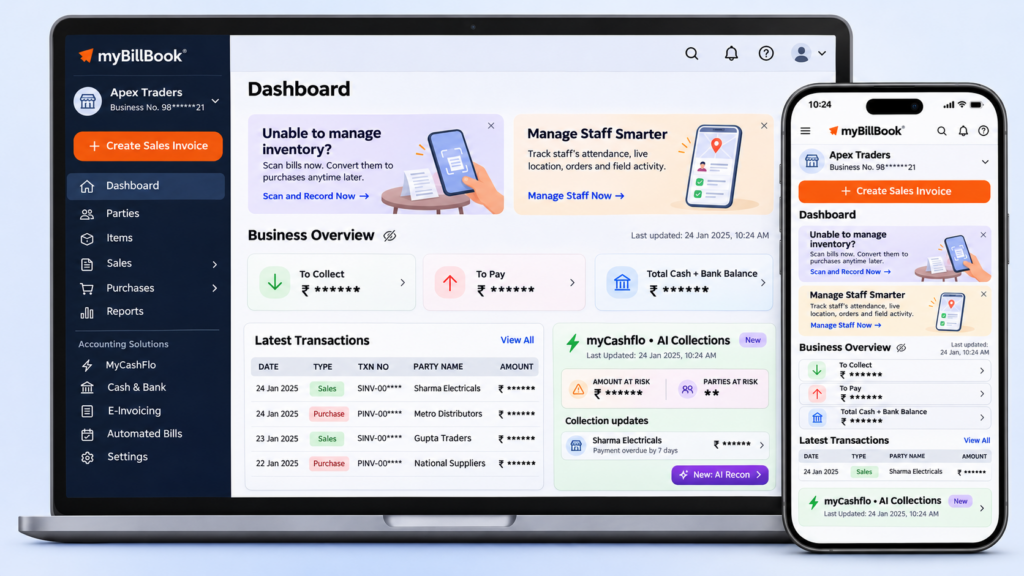
Cloud Accessibility in myBillBook
Cloud Accessibility in myBillBook billing and accounting software means you can sign in to your myBillBook account from a supported web or mobile platform and open the business linked with that account.
There is no separate Cloud Accessibility setting that needs to be enabled. Access works through your myBillBook login, while the platforms and access available to you depend on your plan and account permissions.
How Cloud Accessibility Works in myBillBook
Cloud access is connected to your myBillBook account rather than a separate feature switch.
Use Your myBillBook Account
Your business is linked to the myBillBook account you use to sign in.
Open a Supported Platform
Access myBillBook through a supported web or mobile platform available with your plan.
Log In with Your Registered Mobile Number
Use the registered mobile number linked to your myBillBook account and complete the normal login verification.
Select the Required Business
If more than one business is linked with the account, select the business you want to work on.
Continue Working from That Device
Once the business opens, you can continue using the business information and workflows available to your account on that platform.
Use myBillBook on Web and Mobile
myBillBook is available across supported web and mobile experiences, so you can use the platform that fits where you are working.
Web Access
Use the web version when you want to work from a supported browser on a computer and your plan includes web access.
Mobile Access
Use the myBillBook mobile app when you want to work from your phone while managing day-to-day business activity.
Platform Availability Depends on Your Plan
Web and mobile access can vary by myBillBook plan. Check the access included in your current plan before depending on a particular platform.
What to Know About Cloud Access in myBillBook
No Separate Cloud Setting
You do not need to switch on Cloud Accessibility from Settings. It works through your myBillBook account and supported platform access.
Access Is Account and Plan Based
The device or platform you can use depends on your account, plan and permissions.
Use Manage Users for Multiple People
If several people need to work in the same business, add them separately instead of sharing one admin login.
Features Can Differ by Platform
A workflow available on one myBillBook platform may not always be available in exactly the same way on another platform.
Frequently Asked Questions
Do I need to enable Cloud Accessibility in myBillBook?
No. There is no separate Cloud Accessibility setting to switch on. Access works through your myBillBook account and the platforms included with your plan.
Can I access the same myBillBook business from another device?
Yes. Open myBillBook on a supported device or platform, log in with the registered mobile number linked to your account, complete verification and select the required business.
Can I use myBillBook on both web and mobile?
Web and mobile availability depends on the myBillBook plan and account access you have. Check your current plan before relying on a specific platform.
Should my staff use my admin login on another device?
No. When another employee needs business access, use Manage Users to add them separately and assign the appropriate role instead of sharing the admin login.
Are all myBillBook features the same on every platform?
Not always. Some workflows and capabilities can differ between web and mobile, so feature availability should be checked for the platform you use.