
Employee Management Made Easy
Attendance Management System with Payroll
Manage staff attendance, salary dues, advances, loans, bonuses and payments in one place. Use the myHaazri Android app for location-enabled staff check-in, check-out and activity tracking.

What Is an Attendance Management System?
An attendance management system is software that helps businesses record employee attendance, maintain attendance history and manage present, absent, half-day, paid leave, weekly off, and overtime entries.
myBillBook combines attendance management software with salary-record management for small businesses. Owners can maintain daily or monthly salary setups, review salary dues and record payments, advances, loans and bonuses. Staff can also use the myHaazri Android app for location-enabled check-in and check-out.
Attendance Management Software Features in myBillBook
Daily Attendance Management
Record each staff member’s daily attendance and maintain an organised attendance history. Attendance can be corrected later if an entry was recorded incorrectly.
Monthly and Daily Salary Setup
Add staff members on either a monthly or daily salary basis, depending on how your business pays its employees.
Salary Dues and Payment Records
Review pending salary amounts and record payments made to individual staff members. This provides a clearer staff-wise history of salary dues and payments.
Geolocation Tracking with myHaazri
Enable Geolocation Tracking and allow staff to check in and check out using the myHaazri Android app. Admins can view check-in location, live location while sharing remains active, check-out location and location-based notes.
Advance Payment Management
Record salary advances separately so that advance payments do not get mixed with regular salary transactions.
Automatic Salary Calculation
myBillBook automatically calculates staff salary using recorded attendance, leave, overtime and salary advances. This reduces manual calculation and provides a clear payable salary amount for each employee.
Staff Payslip and Salary Breakdown
View a staff-wise salary breakdown covering salary, advances, leave deductions, payable amount and remaining balance.
Overtime Entries
Add overtime when an employee has been marked present. Set working hours in the attendance settings for overtime calculations.
Weekly-Off Settings
Set regular weekly-off days for employees and maintain weekly-off attendance records without repeatedly entering the same information.
NEW
myHaazri by myBillBook - An Online Attendance and Live Staff Tracking App
myHaazri is an Android app that works with myBillBook’s Staff Attendance and Payroll feature. It allows staff members to record location-enabled check-ins, check-outs and work-related notes from their phones.
Business admins can manage Staff Attendance and Payroll through the myBillBook web and Android applications. Staff members use the separate myHaazri Android app for check-in, check-out and location sharing.
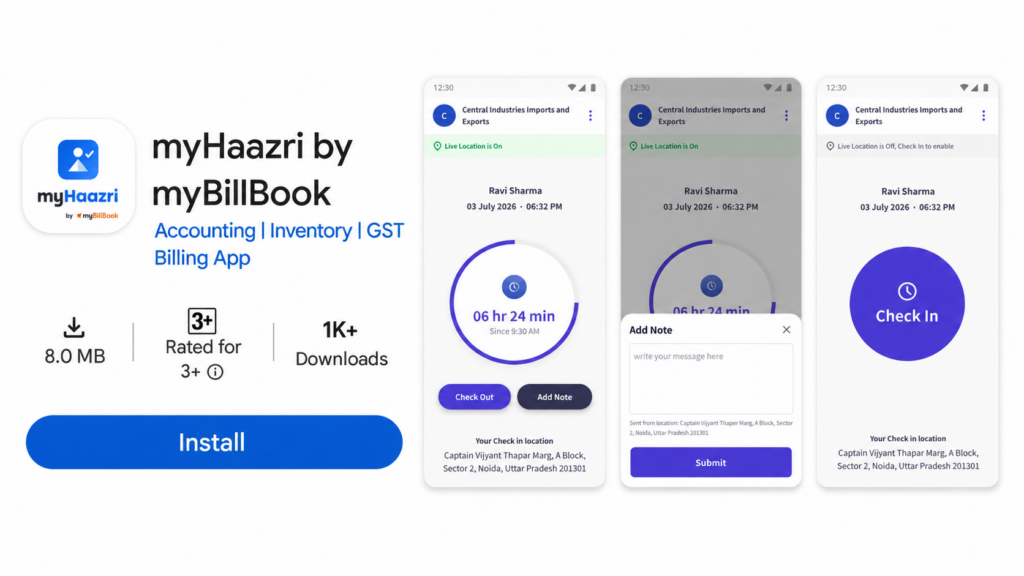
How myHaazri Check-In and Check-Out Works
1. Enable Geolocation Tracking
The admin opens Staff Attendance and Payroll → Attendance Settings in myBillBook and turns on Geolocation Tracking.
2. Share the myHaazri App
Staff can download myHaazri from the Google Play Store. The admin can also share the app link directly with employees.
3. Staff Check In
The staff member checks in using myHaazri. The admin can see the location from which the employee checked in.
4. View Live Location
After check-in, the admin can view the staff member’s live location while location sharing remains active.
5. Add Location-Based Notes
Staff can submit notes from particular locations. The admin can view these notes and their submitted locations from the Staff Attendance and Payroll dashboard.
6. Staff Check Out
The staff member checks out through myHaazri. The admin can view the checkout time and location.

The first check-in and last check-out of the day are treated as the employee’s check-in and check-out times. If an employee forgets to check out, myHaazri automatically checks them out eight hours after check-in, provided location was shared continuously.
Important: Location-enabled check-in and check-out through myHaazri provides staff time and location visibility. The location records themselves do not directly change payroll; salary calculation uses the attendance, leave, overtime and advance records maintained in myBillBook.
How to Use myBillBook Attendance Management Software
Step 1: Open the myBillBook Dashboard
Sign in to myBillBook using the Android application or web platform and open the main dashboard.
Step 2: Select Staff Attendance and Payroll
Choose Staff Attendance and Payroll from the dashboard to open the employee-management section.
Step 3: Add Staff Details
Enter the staff member’s name, phone number, salary type and other required information. Select either a daily or monthly salary setup.
Step 4: Configure Attendance Settings
Set working hours, weekly offs and other available attendance options according to your business requirements.
Step 5: Mark Daily Attendance
Open the Attendance section and mark employees as present, absent, half-day, paid leave or weekly off. Add overtime where applicable.
Step 6: Review Salary Dues
Use the Payroll section to review pending salary amounts and staff-level payment records.
Step 7: Record Staff Transactions
Record salary payments, advances, loan entries, loan repayments and bonuses against the relevant staff account.
Watch How to Use Staff Attendance and Payroll in myBillBook
Attendance Options Available in myBillBook
Present
Mark an employee as present when they have worked for the day.
Absent
Mark an employee as absent when they have not worked that day.
Half-Day
Use the half-day option when an employee has worked for only part of the day.
Paid Leave
Mark paid leave when an employee is away from work but remains eligible for salary for that day.
Weekly Off
Use weekly off for a regular non-working day based on the employee’s attendance settings.
Overtime
Add overtime when an employee marked present has worked beyond the configured working hours.
Benefits of an Online Attendance Management System
Replace Manual Attendance Registers
Maintain digital attendance records instead of relying on paper registers that are difficult to update and review.
Understand Pending Salary Dues
See staff-wise salary dues without repeatedly checking different spreadsheets or payment records.
Keep Advances and Loans Organised
Record advances, staff loans and repayments separately for clearer employee-wise balances.
Maintain a Staff Payment History
Review previous salary, bonus, advance and loan-related transactions for each employee.
Manage Daily-Wage and Monthly Staff
Use different salary setups for employees paid daily and those receiving a fixed monthly salary.
Track Field-Staff Activity
Use myHaazri to view check-in location, live location while sharing is active, check-out location and location-based notes.
Reduce Repetitive Record-Keeping
Bring attendance and salary-related records into one workflow instead of managing them across registers, spreadsheets and messages.
What Does myBillBook Attendance and Payroll Software Manage
myBillBook Helps You Manage
- Daily staff attendance
- Monthly and daily salary setup
- Present, absent, half-day, paid-leave and weekly-off records
- Overtime entries
- Salary dues and payments
- Salary advances
- Staff loans and repayments
- Bonus payments
- Staff-wise attendance and payment history
- Location-enabled check-in and check-out through myHaazri
- Live staff location while sharing remains active
- Location-based staff notes
myBillBook Is Not Designed For
- Complete HRMS administration
- PF or ESI calculation
- Professional-tax calculation
- Payroll TDS calculation or filing
- Recruitment and applicant management
- Employee performance appraisal
- Enterprise payroll-compliance processing
Businesses that require statutory payroll calculations should calculate and verify those deductions using an appropriate payroll-compliance system or qualified professional.
Who Should Use Attendance Management Software?
Retail Shops
Track sales staff attendance, daily wages, advances, and salary dues.
Service Centers
Record technician attendance, advances, bonuses, and service staff.
Contractors
Track daily workers, attendance status, overtime, and wage payments clearly.
Restaurants and Cafés
Maintain attendance and salary records for kitchen staff, servers, cleaners, cashiers and delivery teams.
Workshops and Small Factories
Record daily attendance, overtime, salary dues and payments for workers and support staff.
Clinics and Small Offices
Maintain staff attendance and salary-related records without implementing a complex enterprise HRMS.
Manage Staff Attendance and Salary Records
Move away from paper attendance registers and disconnected salary spreadsheets. Manage staff attendance, salary dues, payments, advances, loans, bonuses and employee records from one organised system.
Use myHaazri for Android-based staff check-in, check-out, live-location visibility and location-based notes while location sharing remains active
Frequently Asked Questions
What is staff attendance and payroll software?
Staff attendance and payroll software helps businesses record employee attendance, maintain salary dues and track salary-related payments. myBillBook also helps businesses record staff advances, loans, repayments, bonuses, overtime and attendance history.
Is myBillBook a complete HRMS?
No. myBillBook provides attendance and salary-record management for small businesses. It is not a complete HRMS for recruitment, performance management, employee benefits or enterprise HR administration.
Does myBillBook calculate PF, ESI, TDS or professional tax?
No. myBillBook’s Staff Attendance and Payroll feature is not a statutory payroll-compliance system. PF, ESI, TDS, professional tax and other statutory deductions should be calculated and verified separately.
Can I manage daily-wage and monthly employees?
Yes. Staff members can be added using either a daily or monthly salary setup, making the feature suitable for businesses with different employee-payment arrangements.
What attendance options are available?
Businesses can mark employees as present, absent, half-day, paid leave or weekly off. Overtime can also be added for employees marked present.
What is the myHaazri app?
myHaazri is an Android app connected to myBillBook’s Staff Attendance and Payroll feature. Staff use it for location-enabled check-in, check-out and notes, while admins view the activity from myBillBook.
Can the admin view an employee’s live location?
Yes. After the employee checks in through myHaazri, the admin can view their live location while location sharing remains active.
What happens if an employee closes the app or turns off location?
Location sharing stops, and the admin can no longer see the employee’s live location. Location visibility resumes after the employee checks in again and location sharing becomes active.
What happens if an employee forgets to check out?
The employee is automatically checked out eight hours after check-in, provided location was shared continuously during that period.
What happens if the staff member stops the app, switches off the phone, or turns off location?
Location sharing stops, and the admin cannot see the staff member's location. The admin will be able to view their location again when the staff member checks in again.
How do check-in and check-out work in myHaazri?
The first check-in and the last check-out of the day are used as the staff member's check-in and check-out times.
If a staff member forgets to check out, they are automatically checked out after 8 hours from check-in, provided location has been shared continuously.
Check-in and check-out through myHaazri do not impact payroll calculations.
Can staff add notes from the myHaazri app?
Yes. Staff can add notes through myHaazri, and the admin can view the note along with the location from which it was submitted in the Staff Attendance & Payroll dashboard.
Does myHaazri attendance automatically affect payroll?
No. Check-in and check-out activity recorded through myHaazri provides time and location visibility but does not automatically affect payroll calculations.