
AI-Powered Purchase Entry
Scan and Record Bills
Upload purchase bills and let Mira AI autofill purchase details faster.
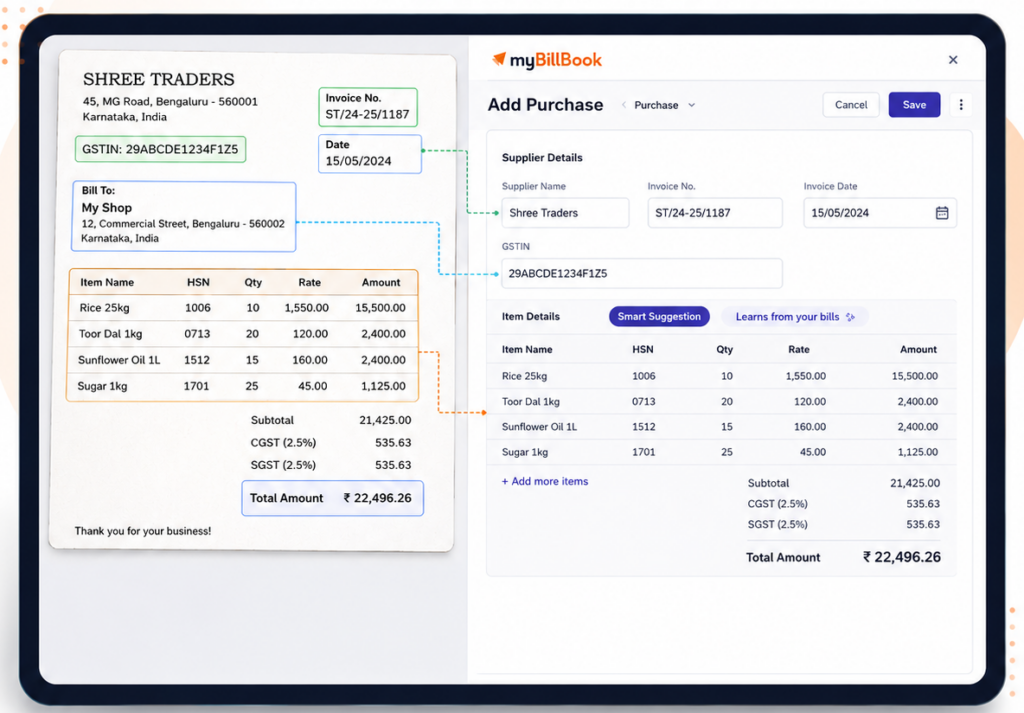
Scan and Record Bills Feature in myBillBook
The Scan and Record Bills feature in myBillBook helps businesses record purchase bills faster by reducing manual data entry. You can upload a supplier bill as a PDF or image, and Mira AI automatically reads the document and fills in key purchase details for you.
The feature can extract information such as the supplier or party name, item details, HSN codes, taxes, quantities and invoice totals. You can review the extracted information, make any required corrections and save the purchase entry once everything is accurate.
Scan and Record Bills is available on both mobile and Web, making it easier for businesses to record purchases from the device they normally use. On Web, uploaded bills can also remain under Incomplete Scans if you do not finish the entry immediately, allowing you to return and complete it later.
This helps businesses process supplier invoices more efficiently while keeping purchase records, tax details and inventory information organised in myBillBook.
How to Use Scan and Record Bills in myBillBook
Step 1: Open Scan and Record Bills
Open the myBillBook app, tap the + option on the dashboard and select Scan and Record Bills under Purchase Transactions.
Step 2: Upload or Capture the Bill
Upload a purchase bill PDF, select an image from your phone or take a photo of the supplier bill.
Step 3: Review the Extracted Details
Mira AI processes the bill and fills in available party and item details. Review the purchase voucher carefully.
Step 4: Correct Details if Required
Match scanned party or item names with your existing records, correct inaccurate matches or add any missing information.
Step 5: Save the Purchase Record
After reviewing the details, save the purchase voucher in myBillBook. Mira AI can also remember corrected party and item mappings and apply them to future scans when the same names appear again.
Why Use 'Scan and Record Bills' Feature on myBillBook
Reduce Manual Purchase Entry
Instead of typing supplier invoice details manually, you can upload or scan a purchase bill and let Mira AI extract the available information for you.
Save Time on Supplier Bill Processing
Purchase bills received as images or PDFs can be processed faster, helping businesses reduce repetitive data entry during regular purchase recording.
Review Details Before Saving
Extracted invoice, party, item, tax and amount details can be reviewed and corrected before the purchase entry is saved, giving you control over the final record.
Keep Purchase Records and Stock Updated
Once the purchase record is saved, the recorded item quantities can update stock in myBillBook, helping keep purchase and inventory information aligned.
Work Across Mobile and Web
Scan and Record Bills can be used on mobile as well as Web, giving businesses more flexibility to record supplier invoices from the device they use for daily work.
Who Can Benefit from Scan and Record Bills?
The Scan and Record Bills feature is useful for businesses that receive frequent supplier invoices and want to reduce manual purchase entry.
Businesses Receiving Supplier Bills by Email or PDF
If vendors send purchase bills through email, WhatsApp or online portals, you can upload the PDF or image directly into myBillBook instead of entering the details manually.
Businesses Managing Purchases on Desktop
Teams that handle purchase entries from a laptop or desktop can now use Scan and Record Bills on Web, making it easier to process supplier invoices without switching to mobile.
Businesses Handling a High Volume of Purchase Bills
Retailers, wholesalers and distributors that receive multiple supplier invoices can use AI-assisted bill scanning to capture purchase details faster and reduce repetitive data entry.
Teams Working Across Mobile and Web
Businesses can use the feature across devices depending on their workflow. Purchase bills can be scanned from mobile or uploaded on Web, giving teams more flexibility while recording purchases.
Trusted by Small Businesses Across India
Frequently Asked Questions
Is Scan and Record Bills the same as Purchase OCR?
Yes. Scan and Record Bills is the feature name shown in myBillBook, while OCR is the technology that helps read bill details.
Do I need to save the purchase record directly after scanning?
No. You can review the extracted bill details first and make changes before saving the purchase record.
Is Scan and Record Bills useful for repeat supplier bills?
Yes. It is useful when the same suppliers or items appear regularly in your purchase bills.
Does Scan and Record Bills remove the need to check bills?
No. You should still review invoice, party, item, tax, and amount details before saving.
Can I use Scan and Record Bills on a laptop or desktop?
Yes. myBillBook now supports Scan & Record Bills on the Web. You can upload a supplier bill as a PDF or image, review the details extracted by Mira AI, and save the purchase record.