
An MIS report is a business management report that brings together important data such as sales, expenses, inventory, payments and cash flow to help managers evaluate performance and make decisions.
MIS stands for Management Information System. Businesses use MIS reports to track daily operations, compare monthly results, identify problems and plan improvements.
This guide explains the meaning and full form of MIS reports, their different types, practical examples, and how to prepare an MIS report in Excel.
MIS Report Full Form
The full form of MIS is Management Information System. An MIS report is a structured summary of information generated from a business’s management information system to support planning, monitoring and decision-making.
For example, a retail business may prepare an MIS report showing monthly sales, expenses, closing stock and pending customer payments.
While MIS refers to the overall system used to manage information, an MIS report is one of the outputs produced from that information.
What Is an MIS Report?
An MIS report is a periodic report that organises business data into useful information for owners, managers and department heads. It highlights key performance indicators (KPIs), compares results across periods and helps identify areas that require attention.
For example, an MIS report can reveal that a business’s monthly sales increased while its outstanding customer payments also rose. This allows the owner to assess sales performance alongside collections instead of looking only at revenue.
MIS reports can be prepared daily, weekly, monthly or whenever management requires a specific analysis. They may be created in Excel, generated using business software or presented through reporting dashboards.
Types of MIS Reports
MIS reports can be classified according to the purpose of the information they provide. The four common types are:
1. Summary Reports
Summary reports combine large amounts of business data into a concise overview. They help management understand overall performance without reviewing every transaction.
Example: A monthly summary showing total sales, expenses, gross profit and outstanding receivables.
2. Trend Reports
Trend reports compare business performance across different periods to identify patterns, growth or decline.
Example: A retailer comparing monthly sales for the last six months to identify seasonal demand changes.
3. Exception Reports
Exception reports highlight unusual results or values that fall outside expected limits. They help managers identify issues that need immediate attention.
Example: A report showing products with stock below their minimum reorder levels or customers with payments overdue by more than 60 days.
4. On-Demand Reports
On-demand reports are prepared to answer a specific business question rather than following a fixed reporting schedule.
Example: A business owner requesting a comparison of sales from two branches before deciding whether to expand one location.
These classifications describe how a report is used. MIS reports can also be grouped by business function, such as sales, finance, inventory, HR and production.
Examples of MIS Reports Used in Businesses
Different departments prepare MIS reports to monitor their operations. Here are some common examples:
| MIS Report | Key Information Tracked | Business Purpose |
|---|---|---|
| Sales MIS Report | Daily sales, monthly revenue, product-wise sales and sales targets | Identify best-selling products and track sales performance |
| Finance or Accounting MIS Report | Income, expenses, profit margins, cash flow and outstanding payments | Monitor financial performance and liquidity |
| Inventory MIS Report | Opening stock, closing stock, stock movement and reorder levels | Prevent stock shortages and excess inventory |
| HR MIS Report | Employee attendance, headcount, leave and employee turnover | Monitor workforce availability and staffing needs |
| Production MIS Report | Units produced, production targets, wastage and downtime | Evaluate production efficiency |
For small retailers and wholesalers, sales, inventory and financial MIS reports are particularly useful because they connect daily transactions with decisions about purchasing, pricing, stock management and collections.
A company may prepare these reports individually or combine selected information into one monthly management report.
Monthly MIS Report Example for a Small Business
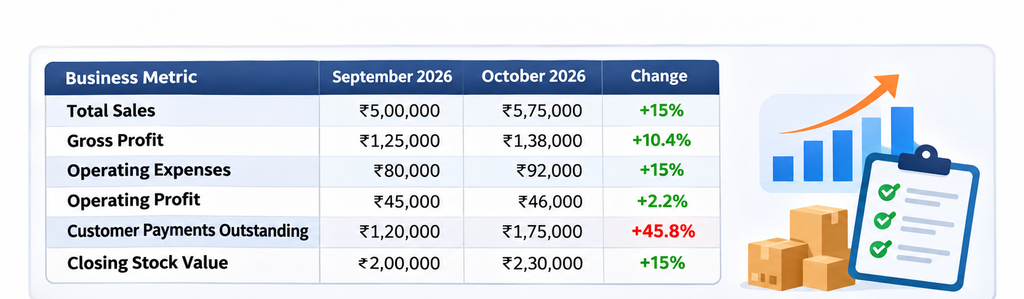
Consider a wholesale business preparing its monthly MIS report for October 2026. The owner wants to understand sales growth, expenses, pending customer payments and stock levels.
A simple monthly MIS report could look like this:
| Business Metric | September 2026 | October 2026 | Change |
|---|---|---|---|
| Total Sales | ₹5,00,000 | ₹5,75,000 | +15% |
| Gross Profit | ₹1,25,000 | ₹1,38,000 | +10.4% |
| Operating Expenses | ₹80,000 | ₹92,000 | +15% |
| Operating Profit* | ₹45,000 | ₹46,000 | +2.2% |
| Customer Payments Outstanding | ₹1,20,000 | ₹1,75,000 | +45.8% |
| Closing Stock Value | ₹2,00,000 | ₹2,30,000 | +15% |
What Does This MIS Report Tell the Business Owner?
The report highlights three useful findings:
- Sales increased by 15%. The business generated more revenue in October compared with September.
- Operating profit increased by only 2.2%. Operating expenses grew at the same rate as sales, limiting the improvement in profit.
- Outstanding customer payments increased by 45.8%. The owner should review overdue invoices and customer payment terms before extending more credit.
The closing stock value also increased by 15%, so the owner may want to review stock movement and identify whether any products are becoming slow-moving.
This is how MIS reporting turns business figures into decisions. Instead of viewing sales, expenses and stock separately, the business owner can assess their combined impact on performance.
MIS Report Format: What Should It Include?
There is no single compulsory MIS report format for every business. The structure depends on the company’s industry, reporting objectives and the decisions management needs to make.
However, a practical MIS report usually contains the following information:
| Section | Information Included |
|---|---|
| Report Header | Business name, department and reporting period |
| Key Performance Indicators | Sales, expenses, margins, inventory or other relevant KPIs |
| Previous Period Comparison | Current performance compared with a previous month or target |
| Variance | Difference between actual results and targets or earlier periods |
| Key Observations | Important trends, concerns and unusual changes |
| Action Points | Decisions required, responsible person and follow-up date |
For example, a monthly accounting MIS report may include sales, gross profit, expenses, cash balance and outstanding receivables, while an inventory MIS report may focus on stock movement, reorder levels and slow-moving items.
The format should remain consistent from one reporting period to another so changes can be tracked easily.
Benefits of MIS Reports
MIS reports help businesses understand performance, identify problems and make more informed decisions. Their main benefits include:
- Better Decision-Making: Managers can compare sales, expenses, profit and other KPIs before making operational or financial decisions.
- Early Problem Detection: Exception reports can highlight overdue payments, unexpected expenses, declining sales or low inventory levels.
- Improved Financial Planning: Regular reporting helps businesses monitor budgets, understand cash requirements and control costs.
- Performance Monitoring: Businesses can compare actual results with targets to identify departments, products or activities that need improvement.
- Faster Management Reviews: A structured report brings important information together, reducing the time spent reviewing multiple spreadsheets and transaction records.
The accuracy and usefulness of an MIS report depend on the quality of its underlying data and how regularly it is updated.
How to Prepare an MIS Report in Excel
Microsoft Excel is commonly used to prepare MIS reports because it allows businesses to organise data, calculate KPIs, compare reporting periods and create summaries using PivotTables and charts.
Follow these steps to prepare a basic MIS report in Excel.
Step 1: Define the Reporting Objective
Decide what the report needs to explain. For example, a monthly sales MIS report might track total sales, sales returns, product-wise revenue and performance against targets.
Step 2: Collect the Required Business Data
Gather the information from sales records, billing systems, accounting records or inventory reports. Confirm that the data covers the correct reporting period.
Step 3: Organise the Data into Columns
Create a worksheet with consistent column headings. For a basic sales MIS report, the columns may include:
- Invoice Date
- Invoice Number
- Customer Name
- Product Category
- Sales Amount
- Payment Status
Keep individual transactions in separate rows and avoid mixing subtotals with raw transaction data.
Step 4: Calculate Important Metrics
Use Excel formulas to calculate and compare business performance.
Total Sales
=SUM(E2:E100)
This adds the sales amounts in column E, assuming the sheet follows the column structure listed above.
Monthly Sales Growth
=(C2-B2)/B2
This calculates the percentage change between the previous month’s sales in B2 and the current month’s sales in C2. Format the result as a percentage. If the previous month’s value is zero, handle that case separately to avoid a division error.
Step 5: Summarise Data Using PivotTables
Select the transaction data, insert a PivotTable, and group the values by product category, month or customer.
For example, a PivotTable can show total sales by product category without requiring a separate manual calculation for every product.
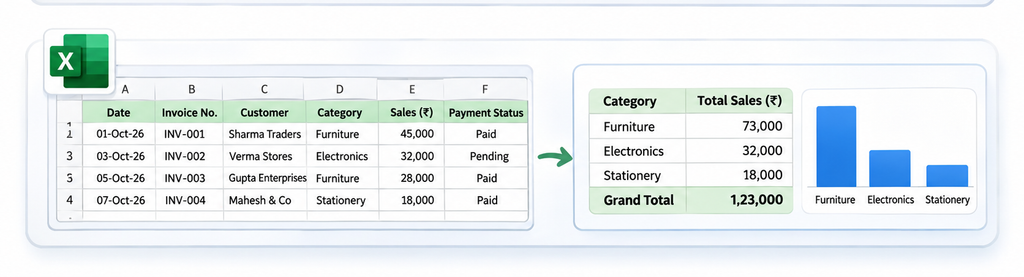
Step 6: Create a Summary and Highlight Key Changes
Present the main KPIs in a separate summary worksheet. Use tables or charts to compare current performance with previous periods.
Highlight unusual changes, such as an increase in overdue payments or a drop in monthly sales.
Step 7: Verify and Share the Report
Check the source data, formulas, reporting dates and totals before sharing the report with management.
Once the figures are verified, add a short summary explaining the major observations and any action required.
For recurring MIS reports, use a consistent workbook structure so the report can be updated each month without rebuilding it from the beginning.
Daily, Weekly and Monthly MIS Reports
Businesses prepare MIS reports at different intervals depending on how frequently the information changes and how quickly decisions are required.
| Frequency | Typical Metrics | Common Use |
|---|---|---|
| Daily MIS Report | Daily sales, cash collections, orders and stock alerts | Monitor everyday business activities |
| Weekly MIS Report | Weekly sales trends, outstanding tasks, purchases and inventory movement | Review short-term performance and operational issues |
| Monthly MIS Report | Revenue, expenses, profit, cash flow, receivables and stock value | Evaluate overall business performance and plan for the next month |
For example, a retailer may review daily sales and stock alerts at the end of each working day, while the business owner examines a monthly MIS report to assess profitability and customer payment collections.
The reporting frequency should match the business’s requirements. A small business does not necessarily need a detailed MIS report every day.
How MIS Reports Help in Different Industries
MIS reports can be adapted to the information each industry needs to monitor.
Retail and Wholesale Businesses
Retailers and wholesalers use MIS reports to analyse product-wise sales, stock levels, margins and outstanding customer payments. These reports help identify fast-selling products, slow-moving stock and customers with delayed payments.
Manufacturing Businesses
Manufacturers can track production output, material consumption, wastage, machine downtime and order fulfilment. This helps managers understand production efficiency and identify operational bottlenecks.
Service Businesses
Service providers may track monthly revenue, service-wise earnings, expenses, customer bookings and payment collections to monitor business performance.
E-commerce Businesses
E-commerce businesses can use MIS reports to review sales by channel, order returns, fulfilment performance and inventory availability.
Although the metrics differ across industries, the purpose remains the same: converting operational data into information that supports management decisions.
MIS Report vs Financial Statements
MIS reports and financial statements may use information from the same accounting records, but they serve different purposes.
| Basis | MIS Report | Financial Statements |
|---|---|---|
| Purpose | Supports internal management decisions | Reports financial position and performance |
| Format | Customised based on business needs | Prepared under applicable accounting and reporting requirements |
| Frequency | Daily, weekly, monthly or as required | Prepared for specified reporting periods |
| Contents | Financial and non-financial KPIs | Financial information such as income, assets, liabilities and cash flows |
| Users | Owners, managers and department heads | Management, investors, lenders, regulators and other stakeholders |
A profit and loss statement can be one component of an MIS report. However, MIS reports may also include operational details such as slow-moving inventory, overdue customer payments and sales targets.
Common Mistakes to Avoid in MIS Reporting
An MIS report is useful only when its data is accurate, relevant and easy to interpret. Businesses should avoid these common mistakes:
1. Using Incorrect or Outdated Data
Reports prepared with incomplete sales records, outdated stock figures or incorrect expenses can lead to poor decisions.
How to avoid it: Verify the source data and reconcile important totals before preparing the report.
2. Including Too Many Unnecessary Metrics
A report with dozens of unrelated figures can make it difficult to identify important trends.
How to avoid it: Select KPIs that directly relate to the business’s objectives and the decisions management needs to make.
3. Ignoring Comparisons and Trends
Showing only the current month’s figures makes it difficult to understand whether performance has improved or declined.
How to avoid it: Compare the current period with the previous period, the corresponding period last year or an established target.
4. Presenting Numbers Without Insights
A report that only lists figures may not help managers understand what action is required.
How to avoid it: Add a short observation explaining major changes, possible causes and recommended follow-up actions.
5. Failing to Review Reports Regularly
Even a well-designed MIS report becomes less useful if it is not updated consistently.
How to avoid it: Establish a reporting schedule, assign responsibility for preparing the report and review the findings with the relevant decision-makers.
Frequently Asked Questions
Who prepares MIS reports in a company?
MIS reports may be prepared by accountants, MIS executives, finance teams, analysts or department managers, depending on the organisation. In smaller businesses, the owner or accountant may prepare reports using Excel or business software.
What is MIS reporting in accounting?
MIS reporting in accounting involves preparing management summaries using financial information such as sales, expenses, profit, cash balances and outstanding payments. These reports help business owners monitor financial performance and make decisions.
Is an MIS report mandatory for every business?
There is no universal requirement for every business to prepare a document specifically called an MIS report. It is primarily an internal management tool, although particular industries, contracts or organisations may have specific reporting obligations.
Can small businesses prepare MIS reports without specialised software?
Yes. Small businesses can prepare basic MIS reports using Excel or spreadsheets. As transaction volumes increase, suitable billing, accounting or reporting software may help reduce manual data collection and reporting effort.
Who uses an MIS report?
MIS reports are typically used by business owners, department heads, finance managers and senior management. The intended audience determines which metrics, comparisons and observations the report should include.
