
Billing Software with Barcode Generation & Printing
The Best Billing Software with Built-In Barcode Management

Features of myBillBook Barcode Billing Software
myBillBook combines barcode scanning, barcode generation, label customisation and inventory tracking to help businesses bill faster and manage products more accurately. From generating item codes to printing customised barcode labels in bulk, the barcode workflow is designed to support day-to-day retail and inventory operations.
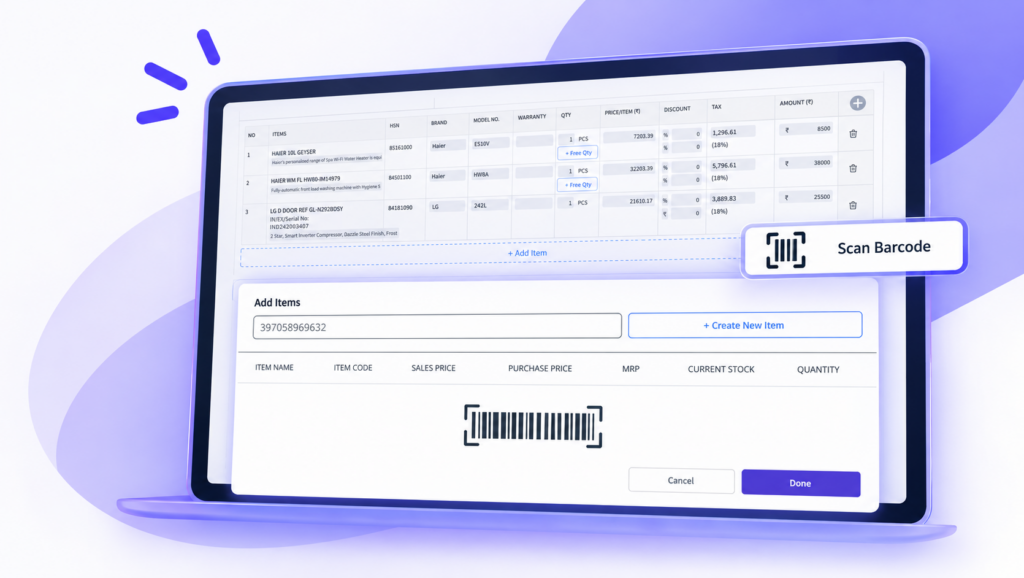
Fast Barcode Billing
Scan product barcodes while creating an invoice to add items quickly without searching for them manually. Once an item is scanned, myBillBook can pull the available product details into the bill, helping speed up counter billing and reduce item-selection errors.
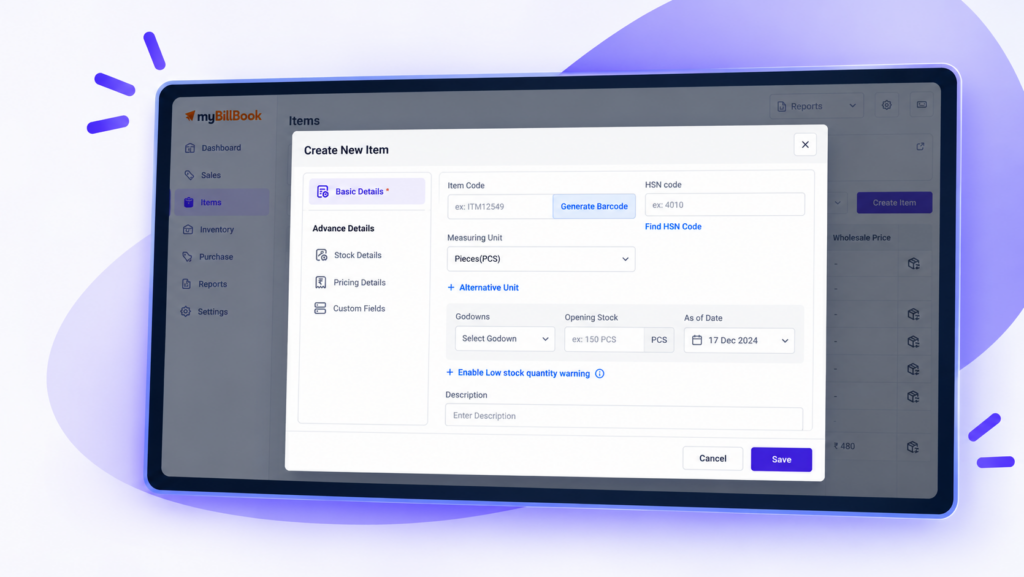
Generate Barcodes for Products
Create unique barcodes for new or existing products directly in myBillBook. You can generate an item code automatically or use your own SKU or internal product code.
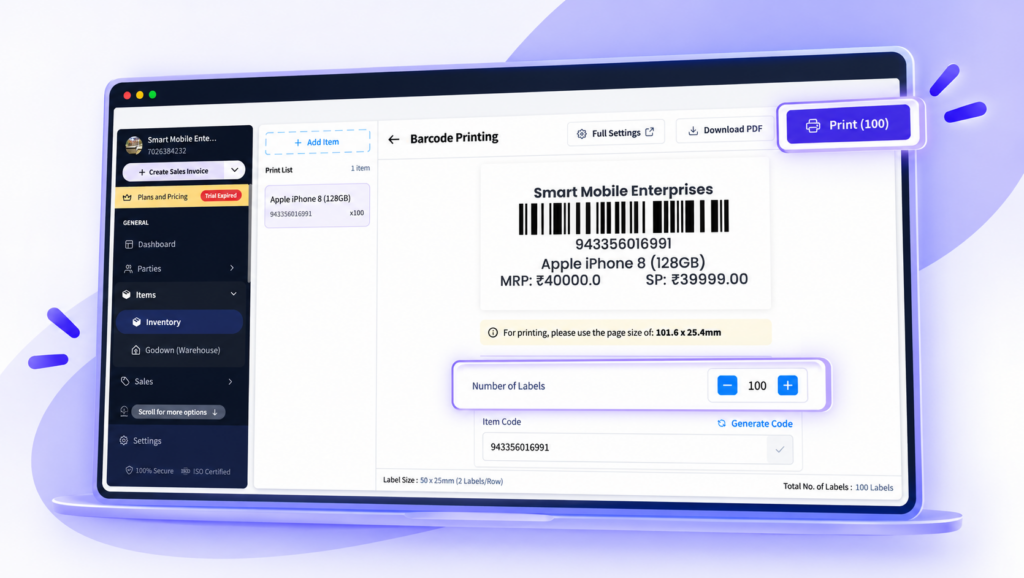
If an item is missing a code while preparing labels for printing, you can generate it directly from the Barcode Print screen before continuing.
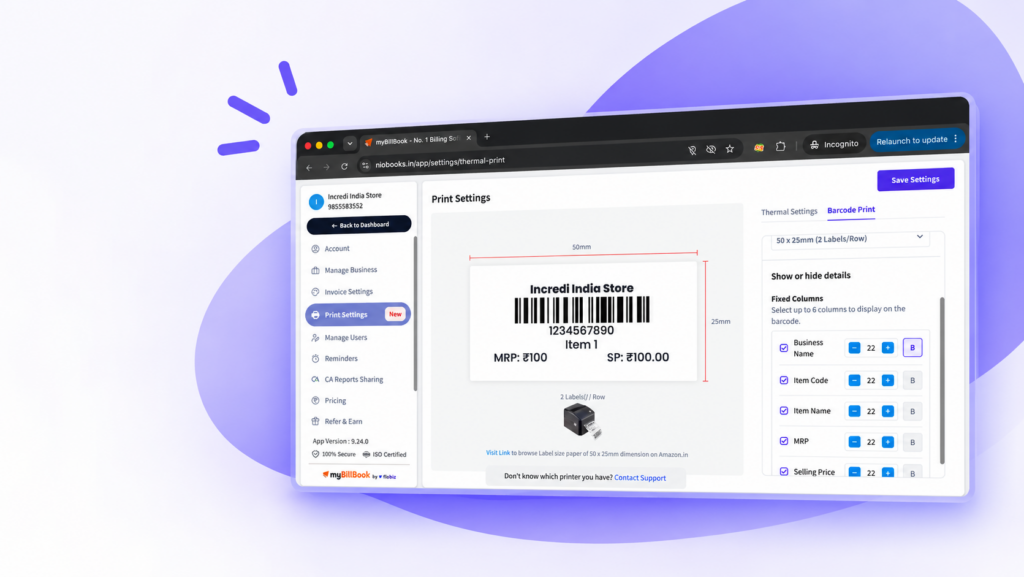
Customise Barcode Labels
On Web, myBillBook lets you control what information appears on your barcode labels. You can show or hide details such as business name, item name, MRP, selling price, batch number, manufacturing date and expiry date.
You can also include up to six item custom fields such as brand, colour, material, category, rack number or internal code. Fields without a value are automatically hidden from that item’s label.
You can adjust the font size of individual fields, use bold text where needed and preview the label before printing.
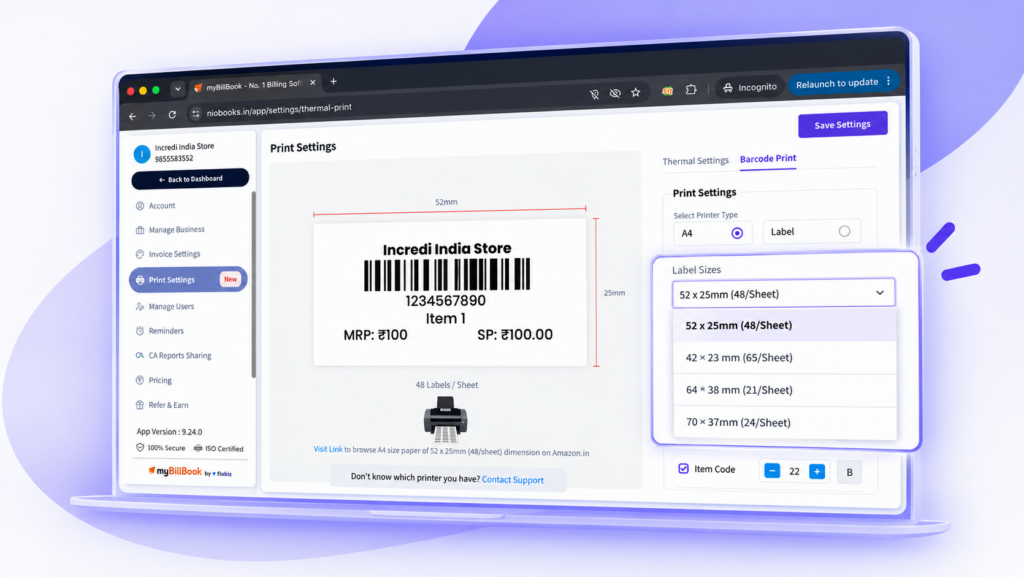
Multiple Barcode Label Sizes
Choose a barcode label size based on your printer, sticker roll and product labelling needs.
For A4 or regular printers, myBillBook supports:
- 64 × 38 mm
- 42 × 23 mm
- 52.5 × 25 mm
- 70 × 37 mm
For label printers, supported options include:
- 38 × 25 mm
- 50 × 25 mm
- 100 × 50 mm
myBillBook also remembers your saved barcode settings, so you do not need to configure the same preferences every time you print.
Bulk Barcode Printing
Select multiple products and manage their barcode labels from one Barcode Print screen. You can search for items, add or remove products and set a different label quantity for each item.
myBillBook supports printing up to 100 barcode labels per item in one workflow. Once the labels are ready, you can download them as a PDF or print them directly using your browser.
Barcode-Based Inventory Management
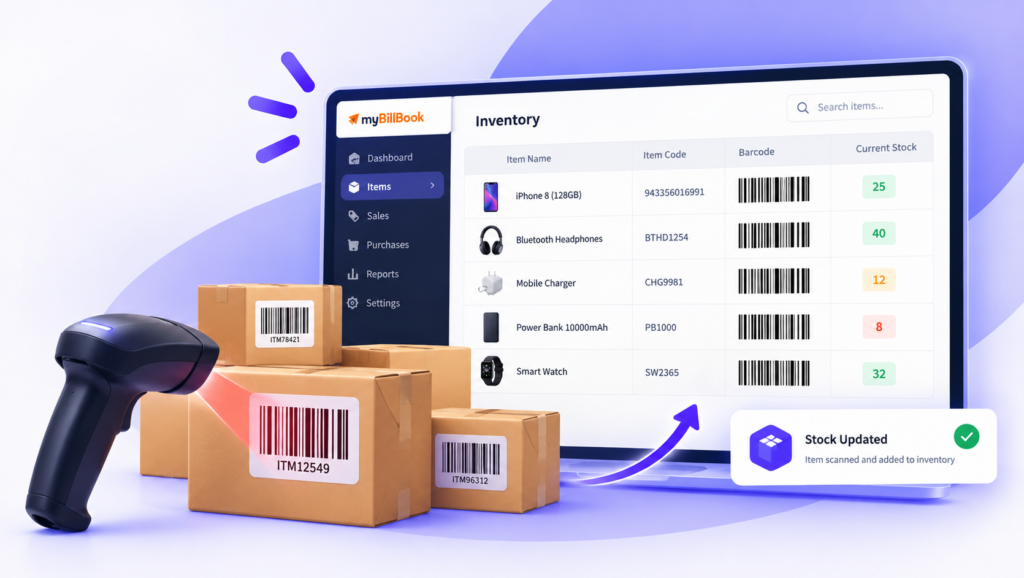
Use barcode-based workflows alongside myBillBook’s inventory system to manage large product catalogues more efficiently. Item codes and barcodes help businesses identify products faster during billing and keep product records organised.
This is especially useful for retail shops, wholesalers and other businesses managing many SKUs, variants or frequently moving stock.
Print Directly from Your Browser
Barcode labels are now generated through a PDF-based printing flow on Web. You can download labels as a PDF or print them directly using your browser’s print dialogue without relying on separate third-party barcode label software.
If you close or cancel the print window, your selected items, quantities and label settings remain available so you can make changes and print again.
Try our New Barcode Generator Tool – 100% Free!
Customer Reviews About Our Barcode Billing Feature
“Tracking inventory used to be a nightmare for our store. myBillBook’s barcode-based inventory management has transformed this process. We now generate and assign barcodes to items, and manage inward and outward inventory seamlessly with a barcode scanner. This ensures accurate, real-time updates and simplifies stock management.”

Ravish Rathod,
Grocery Store owner – Chennai
“Stockouts were a frequent issue in our retail store. With myBillBook’s real-time low stock alerts, we never run out of popular items. The automated alerts ensure timely restocking, keeping our shelves consistently stocked and maintaining customer satisfaction. Proactive inventory control has become easy, ensuring our best-selling items are available.”

Ravi Rao,
Stationery Owner – Banglore
“Managing inward and outward inventory used to be a hassle for our store. With myBillBook’s system, we now easily generate and assign barcodes to items. Using the scanner, we can efficiently manage inventory movements, ensuring real-time updates and significantly reducing errors. This has streamlined our processes”

Arun Rane,
Clothing Retailer – Delhi

Pricing plans
- Create unlimited invoices
- Access to 1 business, 1 user & 1 CA
- Inventory management
- Android, iOS & Web
- Custom Invoice Themes
- Create your Online Store
- Generate, Print & Scan Barcodes
- Desktop app
- SMS + WhatsApp marketing*
- Unlimited Godown management
- Print Barcode (Label printer)
- Bulk Download & Bulk Print Invoices
- Access to 2 businesses, 3 users & 1 CA
- e-Way Bills (Unlimited)
- Generate e-Invoicing
- Loyalty & Rewards
- Automate Recurring Billing
- POS Billing (Desktop App, Web app)
- Data Export to Tally (on request)
- User Activity Tracker
What is a Barcode Billing Software
Billing software that can generate, print, edit, and scan barcodes is typically called barcode billing software. Compared to billing software without the scanning feature, software with a barcode generation feature benefits a business in better ways, like faster billing, accurate accounting, reduced errors, etc.
Businesses like retail stores, supermarkets, grocery stores, apparel shops, and similar establishments should have billing software with a barcode scanning feature for faster checkouts and also for easy product tracking and inventory management.
For high-volume stores, barcode billing for supermarkets helps speed up checkout, reduce manual entry errors, track large product inventories, and update stock automatically after every bill.
Barcode Generation Using myBillBook
myBillBook is a GST billing and accounting software that offers both barcode generation and scanning features through its cloud-based mobile and desktop apps. Specifically designed for small and medium businesses in India, the feature is being used by more than 1 Crore businesses across the country.
Ease of use, affordability, multi-device compatibility, data safety and security are some of the key features that made the feature one of the most used by businesses in India.
“Try our new barcode generator tool – It’s 100% free”
Benefits of myBillBook Barcode Billing Software
Faster & Accurate billing
Barcodes enable faster billing compared to the manual entry of product details. Generate barcodes, stick them to the products, and scan them while billing. The product details will be fetched as soon as the code is scanned. This saves a substantial amount of time and also provides accurate billing without errors.
Reduced Errors
Use of barcode scanners for product entries at checkouts significantly reduces manual errors. During the generation, if the product details are entered accurately, then the scanner picks up accurate data without any errors. Barcode scanners are typically accurate regardless of the material they scan.
Better Inventory Management
The scanners make inventory management easy and precise. Once the items are scanned during billing, the information is instantly recorded, and the inventory is updated automatically. This way, businesses can get up-to-date information about stock anytime and from anywhere.
Mobile retailers can simplify accessory scanning and stock updates with barcode billing for mobile stores.
Easy Integration
You can connect any barcode scanner to the PC on which the billing app is installed or being used. For barcode printing, you can connect a supported printer based on your setup. At the checkout counter, businesses that also need fast customer receipts can use thermal receipt printing with myBillBook for compact and quick bill generation.
No training required
Both barcode generation and scanning features are easy to use and require no formal training.
Better Customer Experience
Reduced checkout times and accurate billing enhance the overall customer experience.
Further, with barcodes printed on products, any returns and exchanges are easy, as items can be quickly scanned and the requests can be immediately processed.
FAQs on Billing Software with Barcode
What is barcode generation feature in myBillBook?
The feature keeps track of invoices, inventory, and business management and also generates barcode stickers that can be applied to each product. Just by scanning the product’s barcode, you can get an overview of the product’s data and stock.
How to generate a bill from a barcode?
Scan the barcode using the scanner connected to the billing software. Once the barcode is scanned, the product details will be automatically fetched and added to the bill. Enter the quantity, finalise the bill, process the payment and print the receipt.
Can any business adopt billing software with barcodes?
Yes. Whether you’re a retail business, a manufacturing business, a wholesale business or just a grocery store with multiple products, you can easily adapt the myBillBook software for your business.
Are barcode billing software and hardware expensive?
Any barcode scanner or gun is sufficient for scanning. A scanner gun is available at an affordable price. myBillBook barcode billing software is one of the most affordable billing softwares available in the market. The subscription price for the software begins as low as INR 199 per month.
How many barcodes can I print on A4 size paper?
Using a Label printer connected to the billing software, you can print 48 barcodes per A4 size paper.